

Viddo AI Models 2026: 76 Models, One Workspace
November 27, 2026 | Ryan Carter
Choosing an AI video model used to mean opening three tabs and keeping a spreadsheet of limits. On Viddo AI you get 76 models in one workspace, 48 of them video.
The real parameter ranges are already exposed, so you can pick by spec instead of by reputation. This guide covers what each model is actually good at, what it costs you in credits and time, and which one to reach for on a given brief.
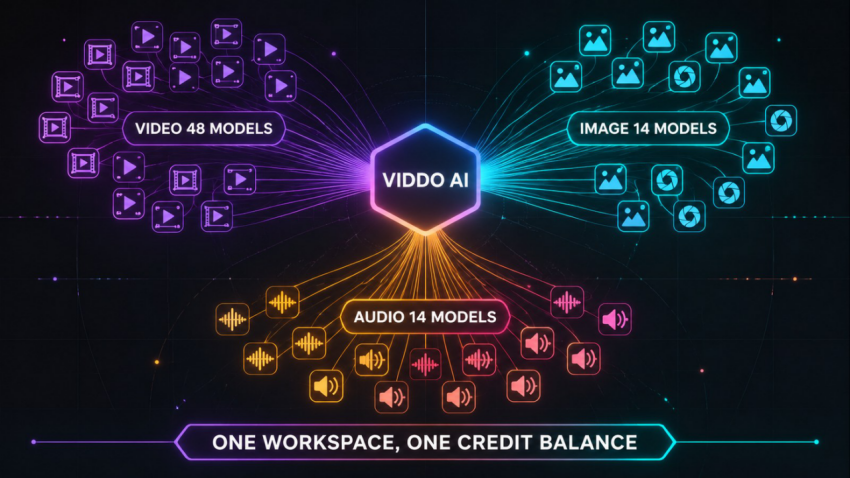
Image: the Viddo AI model catalogue, with video, image, and audio families branching from one hub. Source: Viddo AI, 2026.
What Is the Viddo AI Model Catalogue
The Viddo AI model catalogue is the full set of generation models available inside one Viddo AI account: 48 video models, 14 image models, and 14 audio models, all reachable from the same prompt panel.
Every model on Viddo AI is executed by Viddo itself, including GPT Image, Nano Banana, Seedance, and Suno entries. There is no separate account, no external billing relationship, and no second export step.
· 76 models in total across three media types.
· 48 video models, 14 image models, 14 audio models.
· Each model exposes its own limits, so controls change when you switch.
· All output arrives in one project history and one credit balance.
That last point matters more than the count. Switching models is how you find out whether a shot needs Veo's realism or Kling's motion handling, and doing that switch should cost a prompt, not a subscription.
Why Model Count Is Not the Same as Model Choice
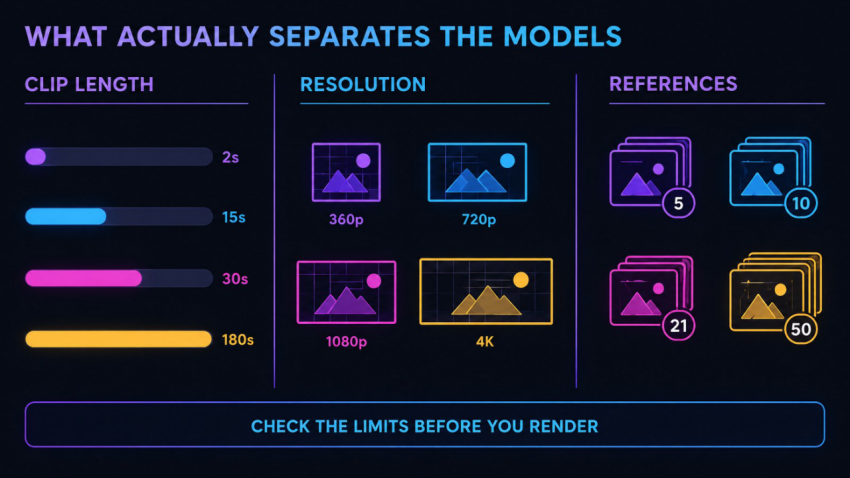
A catalogue of 76 models is only useful if you can narrow it down. The four questions that actually separate them are input type, maximum duration, output resolution, and how many references the model will accept.
· Input — text, image, video, first/last frame, or a music track.
· Duration — the shortest allowed clip often matters more than the maximum.
· Resolution — 360p, 720p, 1080p, 2K, and 4K are not interchangeable.
· References — how many images, clips, and audio files attach at once.
All four are visible in the interface before you spend anything, and the credit estimate updates as you change settings.
Image: duration, resolution, and reference capacity read as three separate dimensions per model. Source: Viddo AI, 2026.
The Video Models on Viddo AI
These 48 video models cover everything from 2-second motion tests to 180-second films, and the specs below come from the live model contract rather than from marketing copy.
Seedance 2.5 for Multi-Reference Work
Seedance 2.5 is the widest input surface in the catalogue: up to 30 reference images, 10 video clips, and 10 audio files in a single request.
· Up to 50 reference assets accepted in one request.
· Runs 4 to 30 seconds per clip.
· Renders at 480p, 720p, or 1080p.
· Six aspect ratios, plus an adaptive option.
· Reference and edit modes on the same model.
If your brief involves holding one character across several shots, this is the model to test first.
Kling 4.0 for Long Clips and Motion
Kling 4.0 accepts 10 reference images, 5 video clips of up to 30 seconds, and 3 audio files.
· Runs 3 to 30 seconds per clip.
· 720p and 1080p output tiers.
· Optional original-sound retention on reference renders.
· Adaptive, 16:9, 9:16, and 1:1 ratios.
Kling's advantage is headroom on duration and the option to keep the audio from your reference footage.
Google Veo 3.1 for Photorealistic Look
Veo 3.1 is the pick when realism is the brief. It renders at 720p, 1080p, or 4K, and the legacy integration pins the clip to 8 seconds.
· 16:9 and 9:16 ratios.
· One reference image for image-to-video, two for first and last frame.
· Random seed support for repeatable runs.
Veo 3.1 Lite adds a first-and-last-frame mode to the same family.
Wan 3.0 for Fast, Wide-Format Drafts
Wan 3.0 is the quickest way to test an idea. It starts at 2 seconds and accepts up to 21 reference assets.
· Starts at 2 seconds, reaches 30.
· 480p, 720p, and 1080p tiers.
· Six ratios: adaptive, 16:9, 9:16, 1:1, 4:3, 3:4.
· Sound on by default.
· Up to 10 reference images, 5 video clips, and 5 audio files.
A 2-second render is a cheap way to find out whether the concept works before you spend on the full shot.
Other Video Models Worth Knowing
The rest of the catalogue fills in specific gaps rather than competing head-on.
· Runway Gen-4 — filmmaking workflows, 720p and 1080p, 5 or 10 second clips.
· MiniMax H3 — reference and first-last-frame modes, 4 to 15 seconds, 768p or 2K.
· Vidu Q4 Preview — the widest resolution ladder in the catalogue, 540p through 4K.
· Sora 2 and Sora 2 Pro — 16:9 and 9:16, up to 25 seconds.
· Pixverse V6 — the lowest entry resolution at 360p, 1 to 15 second clips.
· One-click Film — up to 180 seconds per render for long-form work.
· Gemini Omni — 4K output on a short 4 to 10 second clip.
Motion control, talking-head, video extension, style transfer, and long-video-to-shorts tools sit alongside the generative models in the same dropdown.
The Image Models on Viddo AI
Fourteen image models cover text-to-image and image-to-image work, with resolution ladders that run from 1K to 4K.
GPT Image 2.6 for Instruction Following
GPT Image 2.6 is the strongest text-to-image model on the Artificial Analysis board at 1264 Elo in its top mode, and it is the only one here that can output animated GIFs.
· Resolution from 1K to 4K.
· Up to 16 reference images in one request.
· PNG, JPEG, WebP, GIF, and SVG output.
· GIF runs of 2 to 16 frames, 20 to 2000 ms per frame.
· Transparent background option on PNG and WebP.
· Three modes that trade cost against output quality.
Two related entries share that 16-reference ceiling: GPT 2.5 Image at the same 1K-to-4K range, and GPT Image 2 with a 10-reference ceiling.
Nano Banana 2.1 for Fast Iterations
Nano Banana 2.1 sits at 1175 Elo, eighth on the same board, and it is the default image model on Viddo AI.
· Up to 10 reference images.
· Ten aspect ratios, including 1:4 and 4:1.
· Fast enough to loop on a concept.
Nano Banana 2 matches that reference ceiling and adds nothing else; Nano Banana Pro drops to 5 references but keeps the same 1K-to-4K range.
Seedream and Midjourney for Style Control
Seedream 5 Pro reaches 2K with a 1.5K step in between, and Seedream 4.5 starts at 2K and goes to 4K. Midjourney is the odd one out: it is the only image model here with tunable style parameters instead of a fixed pipeline.
· Seedream 5 Pro — 1K, 1.5K, and 2K, with up to 10 references.
· Seedream 4.5 — starts at 2K, tops out at 4K, up to 5 references.
· Midjourney — stylization 0 to 1000, weirdness 0 to 3000, variety 0 to 100.
Grok Imagine, GPT 4o, GPT Image 1.5, MOSS Image, and Nano Banana 2 round out the remaining image slots.
The Audio Models on Viddo AI
Fourteen audio models cover music, voice, and sound design, including eight Suno tools for editing finished tracks rather than only generating new ones.
· Suno — custom mode with a style description, instrumental flag, and vocal gender.
· Suno custom length — from 10 to 360 seconds.
· MiniMax Voice Clone — voice cloning from a reference sample.
· MiniMax Speech 2.8 — HD and Turbo speech tiers.
· Seed Audio 1.0 — multilingual generation in a music and dialogue variant.
· Suno editing tools — add instrumental, add vocals, lyrics, mashup, separate, cover, extend, sounds.
This is what turns three separate tools into one production line: picture, voice, and score inside the same project.
How to Choose the Right Model on Viddo AI
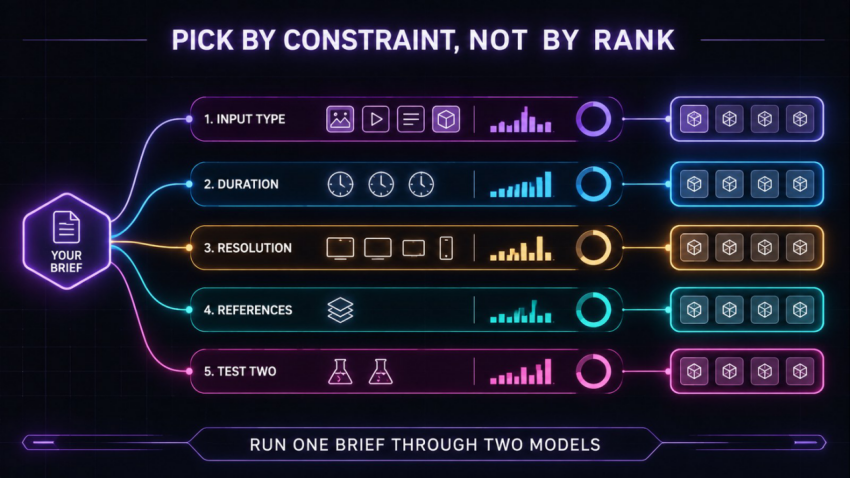
The reliable method is to decide the constraint first, then narrow the list. Ranking charts settle general quality, but your shot decides the winner.
Step 1: Fix the Input You Have
Start from what you actually own. A single still image, a text brief, an existing clip, or an audio track each rules out half the catalogue.
· Text only points to Seedance 2.5, Wan 3.0, Runway, Flux 3.0, Veo 3.1.
· One image to animate opens Runway, Veo 3.1, Hailuo, Kling, Grok Imagine.
· Existing video to restyle points to Runway Aleph, Style Transform, Enhance.
· A music track to build on points to Music To Video and V2.
Step 2: Fix the Hard Limit
Decide the delivery constraint before you look at quality. Maximum duration and maximum resolution are where models genuinely differ.
· Under 5 seconds for a loop points to Wan 3.0, Wan 2.7, or Pixverse V6.
· Over 15 seconds points to Seedance 2.5, Kling 4.0, Wan 3.0, or One-click Film.
· 4K delivery points to Veo 3.1, Vidu Q4 Preview, or Gemini Omni.
Step 3: Test Two Candidates With the Same Prompt
Run one prompt through two models and compare the result. Artificial Analysis ranks by pairwise human preference, which is a good general signal and a poor answer for one specific brief.
· Text to video: Wan 3.0 leads at 1175 Elo, MiniMax H3 third at 1164.
· Image to video: MAGI-2 first at 1163, Seedance 2.5 second at 1158.
· Text to image: GPT Image 2.6 first at 1264, Nano Banana 2.1 eighth at 1175.
Worth checking: Veo 3.1 sits at 964 on text-to-video, below both Wan 3.0 and MiniMax H3, which surprises people who assume realism wins every board.
The models are all in the same dropdown, so switching between two candidates is a click rather than a new subscription. Open Viddo AI and run one brief twice before you spend the budget.
Step 4: Check the Reference Budget
If the shot depends on holding a face, a product, or a piece of music steady, the reference cap decides the model before quality does.
· Seedance 2.5 accepts up to 50 assets and is the widest on offer.
· Wan 3.0 accepts up to 21, and Kling 4.0 takes 10 images plus 5 clips.
· Most image models cap out between 5 and 16 references.
Image: a brief routed by constraint to a model. Source: Viddo AI, 2026.
What the Standings Actually Say
Here is where the 2026 leaderboards place the models you can run on Viddo AI. Elo comes from Artificial Analysis, where blind evaluators compare two outputs from the same prompt and the votes are fitted with a Bradley-Terry model.
· Text to video — AA-Video-T2V v2.1 board, video with audio from text.
· Image to video — AA-Video-I2V v2.1 board, a reference image as first frame.
· Text to image — AA-Image-T2I v2.1 board, same pairwise method.
Text to video
· Wan 3.0 leads at 1175 Elo, released August 2026.
· MiniMax H3 (768p) follows at 1164.
· Seedance 2.5 sits fifth at 1154, and MAGI-2 seventh at 1150.
· Kling 4.0 is eleventh at 1144, and Flux 3.0 twelfth at 1138.
· Grok Imagine Video 1.5 is twentieth at 1051, and HappyHorse-1.1 twenty-first at 1047.
· Veo 3.1 places thirtieth at 964, and Pixverse V6 twenty-ninth at 977.
Image to video
· MAGI-2 leads at 1163 Elo, with Seedance 2.5 close behind at 1158.
· Seedance 2.0 is fifth at 1140, and Kling 4.0 sixth at 1139.
· MiniMax H3 (768p) is seventh at 1135, and Wan 3.0 fifteenth at 1110.
· Flux 3.0 is nineteenth at 1070, and Pixverse V6 Max twenty-first at 1052.
Text to image
· GPT Image 2.6 Sunburst (max) leads at 1264 Elo, released November 2026.
· GPT Image 2.5 Sunburst is second at 1230, GPT Image 2.6 Flare third at 1226.
· GPT Image 2 (high) sits sixth at 1196, and Nano Banana 2.1 eighth at 1175.
· Nano Banana 2 is thirteenth at 1145, and Seedream 5.5 fourteenth at 1134.
· GPT Image 1.5 (high) sits sixteenth at 1126, and Nano Banana Pro eighteenth at 1117.
One caveat worth stating plainly: these boards rank models that share a name with a Viddo entry, and the vendor builds behind a given name can differ in detail. Treat the ordering as a shortlist, not a verdict.
What Viddo AI Costs and How Credits Work
Generation runs on credits, and the estimate is visible before you commit. A single Nano Banana 2.1 image at 16:9 and 2K comes back at 5 credits.
· One image render costs 5 credits on Nano Banana 2.1.
· Longer clips and higher resolutions cost more than a 2-second draft.
· Failed creations refund the credits that were used.
· Unlimited simultaneous generation tasks on every plan.
· Basic plan: $16 per month billed annually, 19,000 credits a year.
· Basic plan covers up to 260 videos or 520 images a month.
Full tier details live on the Viddo AI pricing page, and the credit cost updates live in the panel as you change settings.
Tips for Getting Better Results Across Models
· Write the shot, the camera move, and the sound in one prompt block.
· Draft at the shortest length that answers your question.
· Keep one reference image per character so identity holds across shots.
· Lock the aspect ratio to the delivery destination before you render.
· Use the seed field when you need to repeat a look with small changes.
· Run the same brief through two models before you commit a render budget.
Viddo AI Models FAQ
How many AI models are on Viddo AI?
There are 76 models available: 48 video, 14 image, and 14 audio. All of them run inside the same Viddo AI workspace and share one credit balance.
How do I choose between AI video models?
Start from your constraint, not from a ranking. Fix the input type, then the maximum duration, then the resolution, then the reference count. That usually leaves two or three candidates to test with the same prompt.
Which model is best for long AI videos?
For clips over 30 seconds, One-click Film renders up to 180 seconds per job. For clips up to 30 seconds, Seedance 2.5, Kling 4.0, and Wan 3.0 all reach that length.
What is the best AI video model right now?
It depends on the shot. Wan 3.0 leads the text-to-video board, MAGI-2 leads image-to-video, and GPT Image 2.6 leads text-to-image. Test two candidates on your own prompt before committing.
Does Viddo AI let me use images from one model as references for another?
Yes. Reference images are uploaded once and passed to whichever model you select, so you can take a still from Nano Banana 2.1 and animate it in Seedance 2.5 inside the same project.
Can I use Viddo AI output commercially?
Every Viddo AI plan includes commercial usage rights and delivers output without watermarks. Review the license of any reference material you upload before publishing.
Can I use Viddo AI models through an API or MCP?
Yes. Viddo AI exposes its models through the Model Context Protocol, so an AI assistant can list the catalogue and run image, video, and audio generation from chat. Setup details are on the Viddo AI MCP page.
Are credits the only cost?
Credits are the per-generation cost. Your plan sets how many credits you get each month, and unused generation work is refunded if a job fails.
Try the Whole Catalogue on Viddo AI
Seventy-six models, one prompt box, one credit balance, and the real limits of each model visible before you spend.
Start from the model that matches your input, then change one thing at a time. Viddo AI keeps every test in the same project, so a comparison never turns into a second subscription.
· Pick the model, set the ratio, resolution, and length.
· Add references only if the shot needs them.
· Compare two models on the same brief.
· Keep the stronger cut and move to the next scene.
The full lineup is listed on the AI video model page, and single-model walkthroughs sit in the MAGI-2 guide and the GPT Image 2.6 guide.