

Bing Bing Bing Kicking AI: Make Your Own Meme Video
October 27, 2026 | AVON
Bing Bing Bing Kicking AI: How to Make Your Own Kicking Meme Video
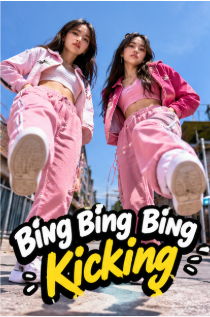
If you have been scrolling through TikTok lately, you may have come across the Bing Bing Bing Kicking trend. The idea is simple: two characters stand side by side, take turns throwing exaggerated kicks toward the camera, and move along with a catchy beat. It is a little ridiculous, which is exactly why it works.
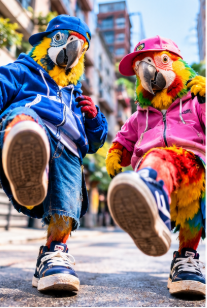
What makes the trend especially fun is how easily the original idea can be remixed. Instead of two people, you might see parrots, cartoon characters, monsters, or other unexpected pairs performing the same moves. The familiar action stays the same, but changing the characters gives each video its own punchline.
Want to make a version of your own? With an AI video generator like Viddo.ai, you can experiment with different characters, scenes, and visual styles without having to film the whole thing yourself.
What Is the Bing Bing Bing Kicking Trend?
The Bing Bing Bing Kicking meme is built around a short, rhythmic sequence of exaggerated kicks aimed toward the camera. The movement is easy to recognize, and the repetitive beat makes the clip feel satisfying when the timing is right.
The format also leaves plenty of room for jokes. Two ordinary characters can make a funny video, but swapping them for a pair of ducks, dinosaurs, or fictional creatures can make the result even more unexpected.
That flexibility is a big part of the appeal. You do not need an elaborate story or complicated editing. The main ingredients are recognizable characters, exaggerated movement, and timing that matches the rhythm.
For creators, it is also an easy format to personalize. You can turn the idea into a video featuring your favorite characters, invent a strange animal duo, or create a playful clip to share with friends.
Why Does This Meme Work So Well in Short Videos?
Some trends depend on a particular joke that gets old after a few days. The kicking meme works a little differently because its basic format is easy to reuse.
The action is instantly recognizable. Viewers can understand what is happening almost immediately. There is no long introduction or explanation to sit through.
The contrast creates the joke. A pair of serious-looking animals performing exaggerated kicks is funny precisely because it is unexpected. The more unusual the combination, the more memorable the result can be.
It is easy to make your own. Changing the characters, outfits, background, or animation style gives you a new variation without changing the basic idea.
It fits vertical video. The action happens close to the camera, making the format suitable for TikTok, Instagram Reels, and YouTube Shorts.
Of course, a trend's popularity can change quickly. Rather than copying every detail of an existing clip, think about what makes the format recognizable and add a twist that feels like your own.
How to Make a Bing Bing Bing Kicking AI Video
You do not necessarily need a dance studio, a camera crew, or advanced editing skills to experiment with this idea. AI video generation lets you create a scene from a visual reference or start with a written prompt, depending on the model and workflow you choose.
Here is a practical way to approach it with Viddo.ai.
Step 1: Choose Your Characters
Start with two characters that would be funny or interesting together. You could try:
-
Two parrots dressed like street dancers
-
A pair of cartoon monsters with oversized sneakers
-
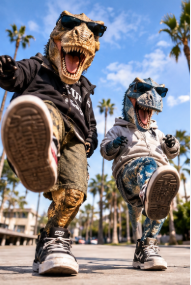
Two dinosaurs trying to copy a dance challenge
-
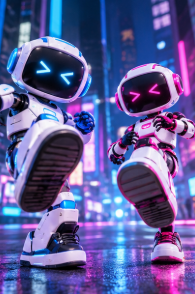
Two robots performing synchronized kicks
-
Your own original characters in matching outfits
Think about the contrast between them. A serious-looking character paired with a goofy one can be more entertaining than two nearly identical characters.
If you want to use people or pets from your own photos, choose clear images and make sure you have permission to use them.
Step 2: Decide How You Want to Create the Movement
There are two useful approaches.
If you have a suitable reference clip and your chosen video model supports motion reference or video-to-video generation, use the reference to guide the timing and movement. This can be helpful when you want the kicks to follow a recognizable sequence.
If you are starting from scratch, describe the scene and movements in a text prompt. Be specific about where the characters stand, how they move, and what the camera should capture.
Keep in mind that a text prompt alone may not reproduce an existing meme's choreography exactly. You may need a few attempts to get the timing and poses you want.
Step 3: Write a Clear Prompt
For a generated version of the trend, try a prompt like this:
Two playful cartoon parrots stand side by side on a quiet urban street, facing the camera. They take turns performing exaggerated sideways kicks toward the lens, bouncing lightly to a catchy rhythmic beat. Their movements are energetic and comedic, with clear full-body poses and expressive reactions. Low-angle camera, natural daylight, consistent character designs, smooth animation, vertical 9:16 video, short looping social media style.
This prompt captures the general idea without requiring you to recreate every detail of a particular video.
You can also change the visual style. For a more realistic result, replace “cartoon parrots” with “two realistic parrots with detailed feathers.” For a retro look, try “colorful 1990s arcade animation with exaggerated poses.”
One important tip: do not overload the prompt with too many actions. A short video has limited time, so two or three clearly described movements are often easier for a model to interpret than a long sequence of unrelated instructions.
Step 4: Generate and Review the Video
Open Viddo.ai and choose an available video generation workflow that fits your input, such as text-to-video, image-to-video, or video-to-video.
Enter your prompt or upload your reference material, then generate the clip. The exact options and output will depend on the model you select.
When reviewing the result, pay attention to three things:
-
Movement: Do the kicks look deliberate, or do the legs bend in unnatural ways?
-
Consistency: Do the characters keep their appearance throughout the clip?
-
Timing: Does the action feel rhythmic, or do the movements happen too quickly or too slowly?
If the result is close but not quite right, adjust one thing at a time. For example, ask for slower kicks, clearer full-body framing, or more space between the two characters. Changing too many details at once can make it harder to tell which adjustment helped.
Step 5: Finish It for TikTok, Reels, or Shorts
A vertical 9:16 format is a sensible starting point for short-form social content. Keep the characters large enough to see, especially their legs and feet, since the kicking movement is the whole point of the video.
Sound matters, too. If you want to use a particular trending audio track, check whether it is available in the platform where you plan to publish. You can add suitable audio during editing or when posting, subject to the platform's music and usage rules.
Finally, keep the clip focused. A short setup followed by the main action is usually more effective than a long introduction. If the final pose loops naturally back into the opening, that can make the video more satisfying to watch again.
5 Bing Bing Bing Kicking AI Video Ideas to Try
Once you have the basic movement, there is no need to stop at the original format. Here are five variations worth experimenting with.
1. Two Pets Take Over the Trend
Imagine a cat and a dog standing side by side, looking completely serious before attempting exaggerated kicks. The humor comes from the contrast between their familiar appearances and the ridiculous choreography.
For this version, focus on keeping their natural features recognizable while making the action playful rather than aggressive.
2. A Pair of Cartoon Villains
Give two cartoon villains matching outfits and let them perform the same moves as if they are preparing for a dramatic showdown. The scene can look cinematic, but the choreography should remain deliberately silly.
A dramatic camera angle combined with goofy movement can create a fun contrast.
3. Tiny Characters, Big Moves
Try two tiny robots, toy soldiers, or miniature dinosaurs performing oversized kicks in a setting that makes them look even smaller. A low camera angle can help emphasize their movements.
This concept works particularly well when the characters have distinct silhouettes and the background is not too busy.
4. Realistic Animals in an Everyday Setting
Put two realistic animals in an ordinary street, park, or empty basketball court. Their environment looks familiar, while their synchronized actions are completely unexpected.
For this style, ask for consistent anatomy, visible full-body movement, and a stable camera. These details can help reduce distracting visual errors.
5. A Before-and-After Character Transformation
Start with two ordinary-looking characters and transition into a bold, stylized version of the same pair. They might transform into neon street dancers, fantasy creatures, or futuristic robots before performing the kicks.
This approach adds a visual reveal to the meme, giving viewers a reason to keep watching beyond the first few seconds.
Tips for Getting Better AI Kicking Videos
AI-generated movement can be unpredictable, especially when characters move quickly or approach the camera. A few practical choices can improve your chances of getting a usable result.
Keep the scene simple. A plain street or uncluttered background gives the model fewer distractions to interpret.
Make the movement easy to follow. Describe who kicks first, how the second character responds, and whether they finish together. Clear sequencing is more useful than vague instructions such as “dance wildly.”
Use clear reference images. If your workflow accepts image references, choose images where the subjects are visible and their appearances are easy to distinguish.
Check the feet and legs carefully. Fast kicks can produce warped limbs, awkward balance, or sudden changes in body proportions. Review the full clip before publishing.
Do not expect every generation to be perfect. If the choreography is wrong, simplify the action or try a suitable reference-based workflow. If the characters look inconsistent, improve the input images or describe their appearance more clearly.
Give the result a personal twist. A recognizable trend can help people understand your video, but a surprising character choice or a distinctive visual style makes it more memorable than a direct copy.
Create Your Own Meme Video with Viddo.ai
The best thing about the Bing Bing Bing Kicking format is that the idea is simple enough to experiment with. You can start with a pair of funny characters, try a different visual style, and see how AI interprets the movement.
With Viddo.ai, you can explore available AI video models and experiment with prompts, images, or video references to develop your own short-form video ideas. Different models may handle motion, character consistency, and realism differently, so it is worth testing the workflow that best fits your project.
Ready to try a variation of the trend? Visit Viddo.ai and start creating your own AI video. Make it weird, keep the movement clear, and give viewers a reason to watch until the final kick.
Frequently Asked Questions
What is the Bing Bing Bing Kicking meme?
It is a short-video format featuring two characters taking turns performing exaggerated kicks toward the camera to a rhythmic beat. Creators have adapted the format using different people, animals, and fictional characters.
Can I make a Bing Bing Bing Kicking AI video from a photo?
You can experiment with image-to-video generation if the selected model supports your intended input and motion. Results vary depending on the photo, model, and complexity of the movement.
What should I include in an AI kicking video prompt?
Describe the characters, their positions, the order of the kicks, the camera angle, and the visual style. Keep the action short and clear so the model has a manageable sequence to generate.
Can I use the video on TikTok or Instagram Reels?
AI-generated clips can be formatted for vertical social platforms, but you should check each platform's current rules for AI-generated content, music rights, and disclosure. Make sure you have the necessary rights and permissions for any photos, audio, or reference footage you use.
How can I make the kicks look more natural?
Use a simple scene, describe the movements in a clear sequence, and keep the characters fully visible. If your chosen model supports motion references, a suitable reference clip may help guide the choreography. You may still need several generations to get the result you want.
Is an AI video generator enough to recreate the exact original meme?
Not always. Text-to-video can create a similar concept, but reproducing precise choreography and timing may require a model with motion-reference or video-to-video capabilities, followed by editing.