

Closed on Sunday AI Trend: How to Make the Viral Choir Video
October 18, 2026 | AVON
Closed on Sunday AI Trend: How to Make the Viral AI Choir Video
Have you seen the viral Closed on Sunday AI trend taking over social media? From funny cat choirs to creative character transformations, this AI video trend is giving creators a new way to turn a simple photo into an entertaining, shareable video.
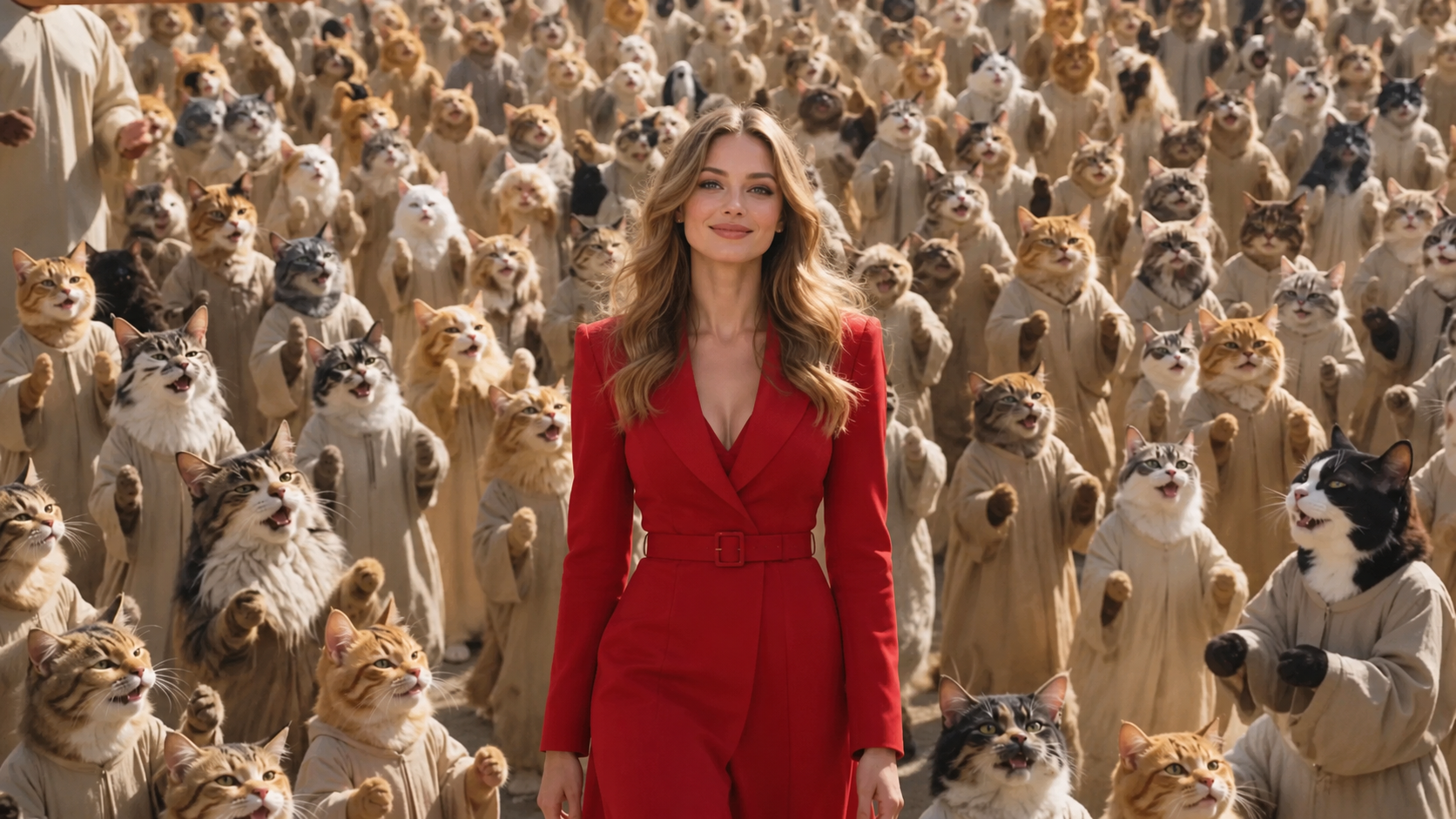
Inspired by the memorable choir scene associated with Kanye West's Closed on Sunday music video, this trend combines a recognizable visual setup with AI-powered video generation. The result is a fun format that creators can adapt with their own photos, pets, characters, and imaginative ideas.
Want to create your own version? In this guide, we'll explain what the Closed on Sunday AI trend is, share creative ideas, and show you how to make an AI choir video with Viddo.ai.
What Is the Closed on Sunday AI Trend?
The Closed on Sunday AI trend is a viral-style video format inspired by the choir scene in Kanye West's 2019 music video for Closed on Sunday.
The visual concept is simple: one main character stands relatively still in the foreground while a group of people behind them sing, clap, sway, or move together. AI creators have adapted this setup into humorous variations featuring pets, fictional characters, and personalized subjects.
What makes the trend appealing is its combination of a recognizable composition, synchronized group movement, and unexpected subjects. A regular portrait can become the centerpiece of a playful choir scene, making the finished video feel much more dynamic than the original image.
Creators can experiment with different characters, outfits, environments, and group arrangements to develop their own interpretations of the format.
Why Is the Closed on Sunday AI Trend So Popular?
Several elements make this type of AI video well suited to short-form social media.
1. A Simple Concept With a Memorable Visual
The basic composition is easy to understand. A central character remains in focus while a larger group creates movement in the background. This contrast gives the video a recognizable visual identity.
2. Endless Creative Possibilities
You don't have to recreate the original scene exactly. You could feature a cat surrounded by a choir of cats, a dog standing in front of a crowd, or a portrait transformed into a cinematic group scene.
The more unexpected the main character, the more entertaining the result can be.
3. Ideal for Short-Form Video
The format can work well on TikTok, Instagram Reels, YouTube Shorts, and other platforms that favor visually engaging clips. A short, recognizable scene can communicate its joke or creative idea without requiring a lengthy explanation.
4. AI Makes Experimentation Easier
Traditional video production may require actors, locations, costumes, and careful coordination. AI video generation can help creators experiment with similar visual concepts using images and text prompts.
Results vary depending on the model, reference image, and prompt, but AI offers a convenient starting point for creative variations.
How to Make a Closed on Sunday AI Video With Viddo.ai
You can use Viddo.ai to experiment with an AI-generated choir scene featuring yourself, your pet, or another character.
Step 1: Choose Your Main Character
Start with a clear image of the character you want to feature in the video.
For the best chance of getting a consistent result, consider using an image with:
-
A clearly visible face and body.
-
Good lighting and sufficient image resolution.
-
A pose that fits the scene you want to create.
-
Minimal obstruction around the subject.
A portrait of yourself can create a personalized version, while a pet photo can give the trend a humorous twist.
Step 2: Open an AI Video Generation Tool
Visit Viddo.ai and open a suitable image-to-video or video generation tool.
Choose a model that supports your intended workflow. If you want to animate a reference image, use an image-to-video option where available. Upload your selected image and configure the generation settings.
Step 3: Describe the Choir Scene
Write a prompt that clearly explains the composition, the main subject, and the movement you want to see.
For example, you can start with this prompt:
Example AI video prompt:
“Create a cinematic choir scene inspired by a dramatic outdoor group performance. Keep the main character centered in the foreground, standing relatively still with a calm expression. Behind the main character, a large choir moves together naturally, gently swaying and clapping in rhythm. Use consistent lighting, realistic body movement, a wide composition, and smooth motion. Keep the main character visually recognizable throughout the video.”
You can adapt the prompt to fit your own idea. For a pet version, replace “main character” with your cat or dog and describe the desired appearance and behavior.
This prompt is a creative starting point rather than a guarantee of an exact recreation. You may need to adjust the wording or generate several versions to get the composition and movement you want.
Step 4: Generate and Review Your Video
Start the generation process and review the result.
Pay attention to the following details:
-
Subject consistency: Does the main character remain recognizable?
-
Group movement: Does the choir move naturally rather than appearing frozen?
-
Composition: Is the main subject clearly visible in the foreground?
-
Motion quality: Are there distracting distortions or unnatural movements?
-
Overall style: Does the result match the mood and visual concept you intended?
If the result doesn't look right, simplify your prompt, clarify the movements, or try another suitable model.
Step 5: Download and Share Your Creation
Once you're happy with the result, download the video and prepare it for your preferred social media platform.
Consider adding a short caption that explains your creative twist. A funny character, an unexpected pet, or an exaggerated choir scene can make your version more distinctive.
Before publishing, check the platform's requirements for music, third-party content, and AI-generated media disclosures.
Ready to experiment? Visit Viddo.ai and start creating your own AI video.
Creative Ideas for Your Closed on Sunday AI Video
Looking for inspiration? Here are several variations worth trying.
Cat Choir AI
Imagine your cat standing proudly in front of a choir of cats, with the group gently swaying together. This variation combines the recognizable choir composition with the internet's enduring love of cat videos.
Dog Choir AI
Put your dog at the center of a dramatic group scene. You could experiment with a majestic outdoor setting, coordinated movement, or a deliberately over-the-top cinematic atmosphere.
Friends and Family Choir
Use a group of familiar characters or consenting participants to create a personalized video. Keep the composition simple and focus on coordinated movement.
Fantasy Character Choir
Try a choir of fantasy creatures, animated characters, or original fictional designs. This approach gives you more freedom to explore unusual costumes, colors, and environments.
Cinematic Choir Scene
For a more dramatic interpretation, experiment with golden-hour lighting, a wide landscape, coordinated clothing, and slow, deliberate movement. This version may be better suited to artistic edits than comedy.
Tips for Getting Better AI Choir Videos
AI video generation can produce unexpected results, especially when many characters appear in one scene. These tips can help you improve your attempts.
Use a clear reference image. A well-lit, recognizable subject gives the model a stronger starting point.
Describe foreground and background separately. Explain what the main character should do and how the choir should move. This helps clarify the intended composition.
Keep the prompt focused. Too many simultaneous actions or scene changes can make the result less consistent. Start with one clear composition and a few coordinated movements.
Specify the camera behavior. If you want a stable shot, say so. If you want a slow cinematic movement, describe it explicitly.
Generate multiple variations when needed. AI results can differ from one generation to another. Small prompt adjustments may improve the composition, motion, or character consistency.
Review music and audio separately. A visual scene does not automatically include the soundtrack you want. If you plan to use the original song or another commercial recording, check the relevant music licensing and platform rules.
Frequently Asked Questions
What is the Closed on Sunday AI trend?
It is an AI video trend inspired by the choir scene associated with Kanye West's Closed on Sunday music video. Creators adapt the composition using different subjects, including people, pets, and fictional characters.
Can I make a Closed on Sunday AI video with a photo of my cat?
Yes, you can try using a cat photo as the main reference image in a suitable image-to-video workflow. The final result depends on the model and prompt, and you may need several attempts to achieve the desired group composition.
Do I need video editing experience?
Not necessarily. AI video generation can help you create an initial clip from a prompt and, where supported, a reference image. You may still want to trim the result, add captions, or adjust the audio before publishing.
Can I use the video on TikTok, Instagram Reels, or YouTube Shorts?
You can prepare an appropriately formatted video for these platforms, but make sure it meets each platform's technical requirements and content policies. If your video includes copyrighted music or third-party material, check whether you have the necessary rights.
Can I use AI-generated choir videos commercially?
Commercial-use rights depend on the platform's terms, the content you provide, the model involved, and any third-party rights that may apply. Before using a video in advertising or other commercial projects, review the applicable terms and make sure you have permission to use any protected music, images, or other source material.
Create Your Own AI Video With Viddo.ai
The Closed on Sunday AI trend shows how a familiar visual concept can inspire countless creative variations. Whether you want to feature your pet, create a funny character transformation, or experiment with a cinematic choir scene, AI video generation gives you a way to explore the idea without organizing a full production.
Start with a clear image, describe the scene and movement you want, and experiment until you find a result that matches your vision.
Visit Viddo.ai and bring your next AI video idea to life.