

Choosin’ Texas Emo AI: Create Viral AI Videos
October 27, 2026 | AVON
What Is the Choosin’ Texas Emo AI Trend?
The Choosin’ Texas Emo AI trend combines the recognizable sound and country-music vibe of “Choosin’ Texas” with the dramatic aesthetic of emo and alternative rock. The result is an unexpected contrast between country-inspired music and a darker, more emotional visual style.
Click Here to Create Video, upload your photo and the video to get your own Choosin’ Texas Emo
This contrast is what makes the trend so entertaining. Imagine a singer dressed in black, dramatic eyeliner, dark hair covering one eye, and a moody performance under neon lights—all paired with a country-inspired musical moment.
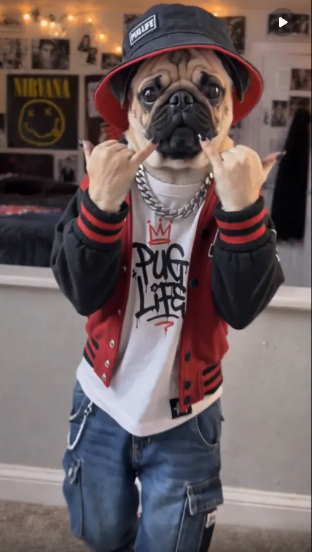
Creators can take this idea in many directions, from emo singer transformations to funny pet videos and cinematic character makeovers.
AI video tools make it easier to experiment with these looks without complicated editing software or an elaborate filming setup.
Why Is Choosin’ Texas Emo AI Getting Attention?
Several elements make this trend a natural fit for short-form video platforms.
1. The Unexpected Country-Meets-Emo Combination
Country music and emo aesthetics have very different visual identities. Combining them creates an immediate contrast that can catch viewers’ attention.
A country-inspired character suddenly transformed into an emo rocker is simple to understand, visually memorable, and easy to share.
2. Dramatic AI Transformations
AI-generated videos can turn an ordinary portrait into a completely different character. A casual selfie, for example, can become a dark alternative-rock performance with dramatic lighting, expressive poses, and a concert-like atmosphere.
These transformations are especially useful for creators who want to participate in a trend without recording an entire music video themselves.
3. Easy-to-Adapt Video Ideas
The trend is not limited to one character or visual style. Creators can try different hairstyles, outfits, settings, and personalities to make their own versions.
Ideas include:
-
An emo singer performing under purple stage lights
-
A country-inspired character transforming into a gothic rocker
-
A cute pet reimagined as an emo music star
-
A group of friends appearing in a dramatic alternative-rock music video
-
A cinematic before-and-after transformation from country style to emo fashion
The key is to create a clear visual transformation that viewers can recognize within the first few seconds.
How to Create a Choosin’ Texas Emo AI Video
Want to make your own version of the trend? You can use an AI video generator to turn an image or character concept into a short, stylized video.
Step 1: Choose Your Character
Start with a portrait, selfie, pet photo, or AI-generated character image.
For an emo-inspired look, consider black clothing, layered dark hair, silver accessories, smoky makeup, and a dramatic expression. You can also keep the original character's appearance and change only the styling.
If you are using a real person's photo, make sure you have permission to use it.
Step 2: Choose a Visual Style
Decide what kind of video you want to create. A few styles work particularly well for this trend:
-
Dark concert aesthetic: Purple and blue stage lights, a smoky background, and expressive performance movements.
-
Gothic fashion transformation: Black outfits, dramatic makeup, and a slow cinematic camera movement.
-
Funny emo makeover: An ordinary character transforms into an exaggerated alternative-rock personality.
-
Music video aesthetic: Neon lights, dynamic camera angles, and energetic movements.
Choose one main concept rather than combining too many unrelated effects.
Step 3: Generate Your AI Video
Open Viddo.ai and choose a suitable image-to-video or video-generation tool.
Upload your image, describe the desired appearance and movement, and generate your clip. The available models and settings may vary, so select the option that best fits your intended result.
Step 4: Use a Detailed Prompt
A good prompt describes the character, movement, lighting, camera motion, and overall atmosphere.
For example:
Prompt: Emo Concert Transformation
“Transform the character into an emo-inspired rock star performing on a dark concert stage. Black layered hair, dark fashion, subtle silver accessories, expressive facial movements, dramatic purple and blue stage lighting, atmospheric haze, cinematic close-up, smooth camera push-in, realistic fabric and hair movement, high-detail music video aesthetic, vertical composition.”
For a funnier interpretation, try this alternative:
Prompt: Funny Country-to-Emo Makeover
“Create a playful transformation from a cheerful country-inspired character into an exaggerated emo rock star. The character changes into a black outfit with layered dark hair and dramatic eyeliner, then strikes a confident rock-star pose. Colorful stage lights, expressive movement, humorous contrast, smooth transition, polished short-form social media video.”
These prompts are original creative concepts inspired by the visual contrast behind the trend. They do not require copying an existing creator's video.
Step 5: Edit and Share Your Video
After generating your clip, review the character consistency, facial details, movement, and camera transitions.
For a stronger short-form video:
-
Show the original character or setup immediately.
-
Introduce the transformation early.
-
Keep the main visual change easy to understand.
-
Use vertical framing for TikTok, Instagram Reels, and YouTube Shorts.
-
Add captions or a short title when they help explain the joke.
If you want to use the original song or a particular viral sound, check the platform's music library and applicable usage rights before publishing.
5 Choosin’ Texas Emo AI Video Ideas to Try
Here are five concepts you can adapt for your next AI-generated video.
1. Country Singer to Emo Rockstar
Begin with a country-inspired character in a casual outfit. Transform the character into an emo performer with black clothing, dramatic lighting, and a confident stage pose.
Best for: Before-and-after transformation videos.
2. The Emo Cat Music Star
Turn a cat portrait into a humorous emo character with a tiny black outfit, dramatic hair styling, and a miniature concert-stage background.
Best for: Funny pet content and shareable AI experiments.
3. Gothic Fashion Reveal
Start with a simple portrait and gradually reveal a gothic fashion look. Use a slow camera movement, dark backgrounds, and contrasting highlights to create a cinematic effect.
Best for: Fashion, beauty, and character transformation content.
4. Emo Band Introduction
Create a short sequence introducing three or four AI-generated band members, each with a different alternative-rock style. Use coordinated lighting and matching visual tones to make the characters feel like a real group.
Best for: Music-themed edits and fictional band concepts.
5. Cute Character, Dark Rockstar
Take an adorable character and transform it into an unexpectedly serious emo performer. The stronger the contrast between the original look and the final result, the more entertaining the reveal can be.
Best for: Comedy-focused social media clips.
Tips for Better Choosin’ Texas Emo AI Results
AI video generation works best when the prompt is specific but not overloaded.
Keep the character recognizable. If you are animating an existing image, describe which features should remain consistent, such as facial structure, hairstyle, clothing details, or the character's overall appearance.
Focus on one main action. A slow head turn, a confident pose, or a dramatic transformation is often easier to generate cleanly than several complicated actions in one short clip.
Describe the lighting. Phrases such as “purple concert lighting,” “neon blue rim light,” and “dark cinematic atmosphere” help establish a coherent visual direction.
Experiment with camera movement. A slow push-in, a gentle camera orbit, or a reveal from a low angle can make a simple portrait feel more cinematic.
Make the opening visually interesting. Short-form viewers decide quickly whether to continue watching. Introduce the character or the transformation as early as possible.
Create Your Own AI Video with Viddo.ai
You don't need a professional camera setup to experiment with the Choosin’ Texas Emo AI trend. With an image and a well-written prompt, you can explore different characters, styles, and visual transformations using AI video tools.
Whether you want to create an emo-rock makeover, a funny pet video, or a cinematic alternative-fashion clip, the most important ingredients are a clear concept and a memorable visual contrast.
Ready to experiment? Visit Viddo.ai and start creating your own AI-generated videos.
Try different prompts, compare the results, and develop a style that feels original to you.