

Ramalama Bang Bang: Create Ramalama AI Video
October 27, 2026 | Flips
Ramalama Bang Bang Trend: How to Create Viral AI Costume Reveal Videos
Have you seen videos where someone walks toward the camera, showing only their shoes and legs, before a dramatic camera movement reveals their full Halloween costume? That's the Ramalama Bang Bang trend, one of the recognizable costume reveal formats making a comeback on TikTok in October 2026.
Click here to create video,upload your photo and prompt,generate a an attractive video
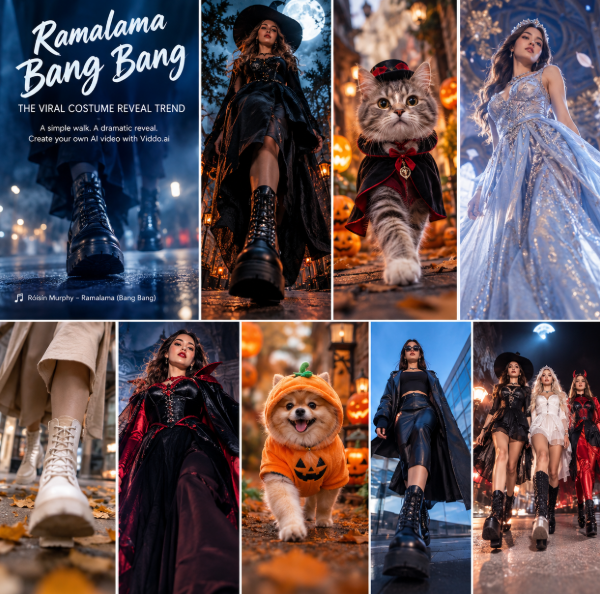
Set to “Ramalama (Bang Bang)” by Róisín Murphy, this trend turns a simple walk into a suspenseful, stylish reveal. From witches and vampires to glamorous princesses and adorable cats, creators are finding new ways to make the format their own.
The best part? You don't necessarily need an elaborate costume, a professional camera, or a complicated editing setup. With an AI video generator like Viddo.ai, you can explore similar visual effects using your own photos and creative ideas.
In this guide, we'll explain the Ramalama trend, break down what makes it engaging, and show you how to create your own AI costume reveal videos.
What Is the Ramalama Bang Bang Trend?
The Ramalama Bang Bang trend is a short-form video format inspired by the song “Ramalama (Bang Bang)” by Irish singer Róisín Murphy, originally released on her 2005 album Ruby Blue.
The format is simple: the camera starts low, focusing on a person's shoes and legs as they walk toward the lens. As the music builds, the camera suddenly tilts upward to reveal the person's complete outfit, makeup, or character.
The contrast between the mysterious opening and the final reveal is what makes the format so effective.
In 2025, the trend gained widespread attention around Halloween. In October 2026, it returned with new costume ideas, group performances, and AI-generated variations.
Today, creators are experimenting with:
-
Halloween costume reveal videos
-
Witch, vampire, and princess transformations
-
Group costume walks with friends
-
AI-generated character reveals
-
Cute cat and pet costume videos
-
Fashion, cosplay, and beauty transformations
Whether you want a spooky Halloween look or a playful character reveal, the basic format offers plenty of creative possibilities.
Why Is the Ramalama Trend So Popular?
1. The Suspense Makes People Want to Keep Watching
At the beginning, viewers can see only a pair of shoes or part of an outfit. They know something is coming, but they don't know exactly what the final look will be.
That unanswered question creates anticipation. The camera movement then delivers the reveal at the most recognizable moment in the soundtrack.
For creators, this is a simple way to build a short video around a clear beginning, middle, and payoff.
2. Almost Any Costume Can Work
You don't need a complicated dance routine to participate.
A witch, vampire, skeleton, princess, futuristic character, or original fantasy design can all work with the same basic camera movement.
The format also works for fashion creators who want to showcase an outfit, makeup artists revealing a finished look, and brands presenting a new collection.
3. AI Makes Creative Variations Easier to Explore
Traditional filming requires a suitable location, a costume, camera positioning, and careful editing.
AI video generation offers another approach. You can start with a reference image and experiment with character movement, cinematic camera angles, lighting, and visual atmosphere.
For example, a single portrait can inspire a fantasy costume walk, while a cat photo can become the starting point for a playful Halloween character video.
The result depends on the source image, model capabilities, and prompt. For the most consistent results, use clear reference images and keep the character's appearance and intended movement simple.
Video Inspiration #1: The Classic Halloween Costume Reveal
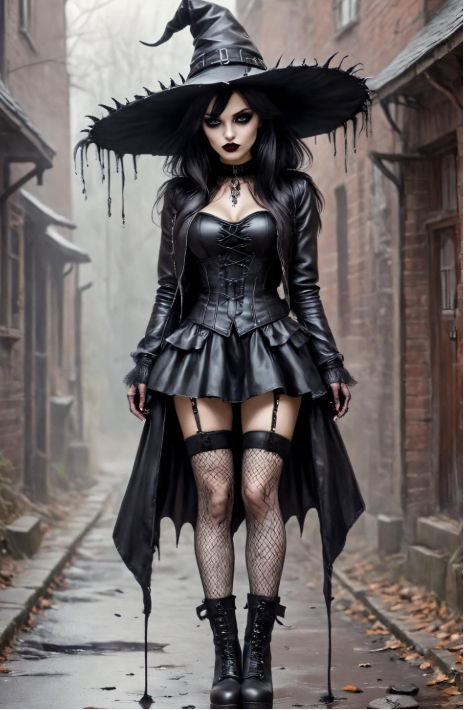
Video concept: A mysterious witch walks toward the camera before revealing a dramatic Halloween outfit.
[Insert Video 1: Ramalama-Inspired Halloween Witch Reveal]
Suggested video style: vertical 9:16, cinematic lighting, mysterious atmosphere, dramatic camera tilt, and a clear full-costume reveal.
How to Create This Look With AI
Start with a clear reference image of your chosen character. Use a video generation model that supports image-to-video generation, then describe the walking motion and camera movement.
AI video prompt:
“Create a cinematic vertical 9:16 Halloween costume reveal video using the uploaded reference image as the character reference. Begin with an extremely low-angle shot focused on the character's black boots and the hem of a flowing witch costume as she walks slowly toward the camera along a dimly lit, foggy street. Gradually build suspense with subtle moonlight, drifting mist, and realistic fabric movement. After several steps, perform a smooth, fast upward camera tilt to reveal the complete witch costume, detailed makeup, and confident expression. End with the character striking a dramatic pose and looking directly into the camera. Keep the same character, face, outfit, and body proportions throughout. High-quality cinematic lighting, realistic motion, smooth camera movement, no character morphing, no extra limbs, no sudden outfit changes.”
Pro tip: The final reveal should be the visual highlight. Avoid introducing too many actions before the camera tilt, or the audience may lose the suspense.
Video Inspiration #2: The Ramalama Cat Trend
Video concept: An adorable cat approaches the camera in a tiny Halloween costume, followed by a close-up revealing its complete look.
[Insert Video 2: AI Cat Costume Walk and Reveal]
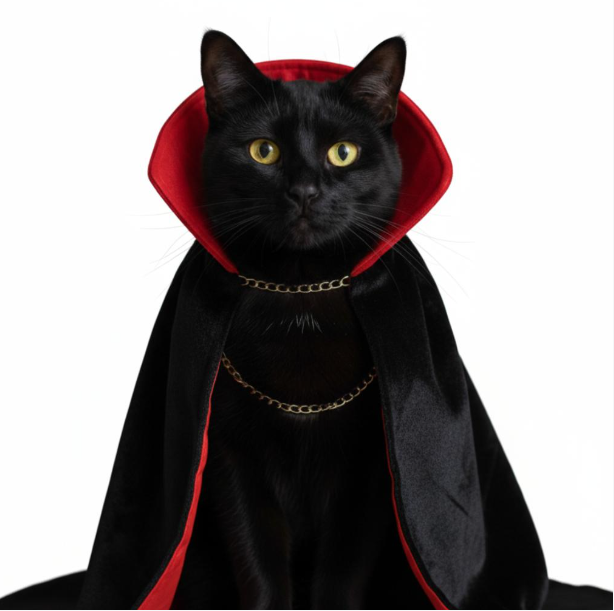
Pet videos offer a playful alternative to traditional costume walks. A black cat dressed as a tiny vampire, a fluffy kitten wearing a pumpkin outfit, or two cats in matching costumes can all provide an entertaining twist.
How to Create an AI Cat Costume Video
Choose a clear image of your cat or a fictional cat character. Describe a simple walking sequence and a final close-up.
AI video prompt:
“Create a cute, high-quality vertical 9:16 AI video based on the uploaded cat reference image. Start with a floor-level camera shot showing the cat's paws and tiny costume boots as it confidently walks toward the camera through a softly lit Halloween setting. Include warm lantern light, subtle autumn decorations, and a few floating leaves. As the cat approaches, smoothly tilt the camera upward to reveal its face and complete costume. End with the cat pausing in a charming, confident pose. Preserve the cat's original fur color, markings, facial features, and costume throughout the entire video. Natural feline movement, consistent anatomy, smooth tracking, detailed fur, cinematic composition, no sudden transformations.”
Pro tip: Keep the cat's movement natural and the camera action simple. Overly complicated movements can make AI-generated animal videos less consistent.
Video Inspiration #3: From an Ordinary Portrait to a Fantasy Runway
Video concept: A person in an everyday outfit transforms into a glamorous fantasy character through a dramatic costume reveal.
[Insert Video 3: AI Fantasy Fashion Transformation]
This variation works well for cosplay, fashion inspiration, beauty content, and original character design.
Instead of filming a complete costume from scratch, you can use AI to explore different visual concepts and build a short reveal around a reference image.
AI Video Prompt
“Create a stylish vertical 9:16 fantasy fashion reveal video using the uploaded reference image. Begin with a low-angle tracking shot showing the character's shoes and the lower part of the outfit as they walk toward the camera along an elegant nighttime runway. Use cinematic lighting, subtle reflections on the floor, and a sophisticated fashion-film atmosphere. As the character reaches the camera, execute a smooth upward whip tilt that reveals the full outfit: an elaborate fantasy gown with shimmering details, flowing fabric, and elegant accessories. End with a graceful turn and a confident pose. Maintain the character's identity, face, hairstyle, and body proportions consistently. Realistic fabric physics, detailed textures, natural walking motion, polished cinematic quality, no unwanted changes to the character.”
Pro tip: If you want a specific outfit, provide a reference image showing that outfit whenever your chosen model supports it. Text prompts alone may not reproduce every clothing detail accurately.
How to Make a Ramalama-Inspired AI Video With Viddo.ai
You can use Viddo.ai to experiment with the visual elements of this trend, including character movement, costume concepts, and camera reveals.
Follow these steps to get started.
Step 1: Choose Your Concept
Decide what you want to reveal: a Halloween costume, a fantasy character, a fashion look, or a cute pet outfit.
A clear visual concept makes it easier to write a focused prompt.
Step 2: Upload a Reference Image
Choose a high-quality image with a clearly visible subject.
For character consistency, use a reference image with good lighting and unobstructed facial features. If the outfit is important, make sure its defining details are visible.
Step 3: Select an Image-to-Video Model
Open Viddo.ai and choose a video generation model that supports your intended workflow.
Check the model's available duration, reference-image support, and camera-motion capabilities before generating. Different models may interpret the same prompt differently.
Step 4: Describe the Camera Movement
The camera movement is central to the Ramalama-inspired format.
Include three key instructions in your prompt:
-
Opening shot: Start low, focusing on the shoes and legs.
-
Movement: Track the subject walking toward the camera.
-
Reveal: Tilt the camera upward to show the complete outfit and finish with a pose.
Keep these instructions clear and avoid combining too many unrelated actions in one generation.
Step 5: Generate, Review, and Refine
Preview the result and check whether the character remains consistent, the walking motion looks natural, and the final reveal happens at the right moment.
If the camera angle or character appearance is incorrect, adjust the prompt or reference image and try again. Remember that each generation may consume credits, depending on the model and settings.
Step 6: Add the Music and Publish
For TikTok, Reels, or YouTube Shorts, use the official “Ramalama (Bang Bang)” sound when available and permitted for your account and intended use.
Edit the video so the upward camera movement and final reveal align with the soundtrack's recognizable cue. If you publish commercially, verify that the music is licensed for that use.
Tips for Better AI Costume Reveal Videos
To make your video look more polished, keep these principles in mind.
Keep the character consistent. Describe the same hairstyle, outfit, colors, and facial features throughout the prompt.
Use one main camera movement. A low-angle tracking shot followed by a single upward tilt is easier to execute than several rapid camera changes.
Keep the action simple. Walking, revealing an outfit, and striking a pose are usually enough for a short video.
Choose the right aspect ratio. Vertical 9:16 video is a practical choice for TikTok, Instagram Reels, and YouTube Shorts.
Pay attention to timing. The reveal should occur at the intended musical cue. You may need to trim or rearrange the generated clip during editing.
Review the output before publishing. Check for facial changes, distorted hands or feet, inconsistent clothing, and unnatural movement.
Experiment with different styles. Try gothic horror, glamorous fashion, fantasy princesses, cute pets, or coordinated group costumes to develop your own version of the trend.
Frequently Asked Questions
What is the Ramalama Bang Bang trend?
It is a costume reveal video format associated with Róisín Murphy's song “Ramalama (Bang Bang).” Videos typically begin with a low-angle shot of someone's feet and legs before the camera tilts up to reveal a complete outfit.
What song is used in the Ramalama trend?
The song is “Ramalama (Bang Bang)” by Irish singer Róisín Murphy, from her 2005 album Ruby Blue.
Can I create a Ramalama-style video with AI?
Yes. You can use an image-to-video generator to create a similar walking and costume reveal effect. Results depend on the reference image, model capabilities, prompt, and editing.
Can I make an AI cat Ramalama video?
Yes. Start with a clear cat image and describe the walking movement, costume, camera angle, and final reveal. Keep the movement simple for better visual consistency.
How long should a Ramalama-inspired video be?
A short clip is generally suitable for social media. The ideal length depends on the soundtrack, the walking sequence, and how much time you need for the final reveal.
Can I use the original song in commercial videos?
Not automatically. Availability on a social platform does not guarantee commercial usage rights. Check the applicable music license and platform rules before using the song in promotional content.
Create Your Own AI Costume Reveal With Viddo.ai
The Ramalama Bang Bang trend shows how a simple camera movement can turn an ordinary walk into a memorable reveal.
Whether you want to create a spooky Halloween character, a cute cat transformation, or a glamorous fantasy runway, AI video generation gives you a way to explore creative ideas without filming every scene yourself.
Start with a strong reference image, describe the movement clearly, and experiment with different visual styles.
Ready to create your next AI video?
Explore Viddo.ai and start turning your creative ideas into videos.
Note: Viddo.ai is an independent AI video creation platform and is not affiliated with, endorsed by, or sponsored by Róisín Murphy or TikTok. The examples above are original creative concepts inspired by the general costume reveal format.