

Thank You Baby AI Trend: Create AI Baby Dance Videos
October 23, 2026 | AVON
Thank You Baby AI Trend: Turn Your Photo Into a Viral Dance Video
What Is the Thank You Baby AI Trend?
The Thank You Baby AI trend is a playful short-video concept inspired by the internet's love of funny baby expressions, exaggerated dance movements, and catchy music. It combines cute visuals with unexpected movement to create videos that are entertaining, easy to share, and perfect for platforms such as TikTok, Instagram Reels, and YouTube Shorts.
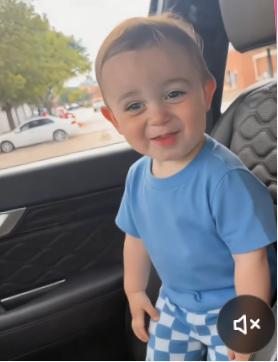
The idea is simple: take a photo of a baby, a fictional character, or an adult, then use an AI video generator to transform the still image into a short, animated dance clip.
Depending on the version of the trend, the subject may smile at the camera, tilt their head to the beat, bounce rhythmically, or make exaggerated facial expressions. Some creators also experiment with funny outfits, different backgrounds, and unexpected characters.
The result is a lighthearted video that turns an ordinary picture into something much more expressive.
Why Is the Thank You Baby AI Trend So Appealing?
Short-form videos often perform well when viewers can understand the joke immediately. The Thank You Baby AI trend combines several elements that make it easy to watch and share.
1. Cute and Funny Expressions
A serious-looking baby performing exaggerated dance moves creates an amusing contrast. A similar effect can be achieved with pets, adults, cartoon characters, or fictional personalities.
2. Familiar Music and Rhythm
Music gives the video a recognizable rhythm and helps the movements feel more engaging. If you use a particular song associated with a trend, make sure you have the appropriate rights or use music available through the platform's licensed music library.
3. Easy Photo-to-Video Creation
You do not need to record a dance performance yourself. With an image-to-video AI tool, you can start with a still image and describe the movements you want the subject to perform.
4. Endless Creative Variations
You can change the subject, clothing, background, facial expression, and dance style to create a version that feels original rather than copying the same clip everyone else is making.
How to Make a Thank You Baby AI Video
Ready to try the Thank You Baby AI dance trend? Follow these steps to create your own version with an AI video generator.
Step 1: Choose a Photo
Start with a clear image of the subject you want to animate.
For the best results:
-
Choose a sharp, well-lit photo.
-
Make sure the subject's face is clearly visible.
-
Use an image with enough space around the body for the intended movement.
-
Avoid heavily blurred or obstructed images.
-
Use photos you own or have permission to use.
A front-facing portrait can work well for subtle head movements and facial expressions. A full-body image is often more suitable if you want the AI to generate a larger dance movement.
Step 2: Open Viddo.ai
Visit Viddo.ai and explore the available AI video generation tools.
Choose an image-to-video model that accepts reference images and supports the type of motion you want to create. Upload your photo and prepare a prompt describing the dance, expression, camera movement, and overall mood.
Available controls and results may vary by model.
Step 3: Enter Your AI Baby Dance Prompt
A good prompt should explain what the subject does, how the movement develops, and what should remain consistent throughout the clip.
Try this example:
Thank You Baby AI Dance Prompt
Create a funny, adorable, high-quality vertical video based on the uploaded reference image. The subject looks directly at the camera, smiles naturally, gently tilts their head from side to side, and performs a playful rhythmic bouncing dance. Add subtle shoulder movements and expressive facial reactions that follow an upbeat musical rhythm. Keep the subject's facial identity, clothing, and overall appearance consistent with the reference image. Use smooth, natural animation, soft lighting, a clean background, and a centered composition. Make the movements lively but believable, with a humorous and wholesome mood. Format the video vertically in 9:16 for short-form social media.
Tip: If your chosen model supports audio generation, you can explore that option separately. Otherwise, generate the visuals first and add licensed music during editing.
Step 4: Generate Your Video
Start generating the video and review the result.
Pay attention to:
-
Whether the face resembles the original photo.
-
Whether the head and body movements look natural.
-
Whether the subject remains consistent throughout the clip.
-
Whether the video follows the intended dance style.
-
Whether the final composition works in a vertical format.
If the result looks too exaggerated, replace words such as “energetic” with “subtle” or “natural.” If the movements are too limited, describe a specific action, such as rhythmic head tilts or gentle shoulder bounces.
Step 5: Add Music and Share
Once you are satisfied with the animation, download the clip and prepare it for your preferred social platform.
You can add a suitable sound, a short caption, and relevant hashtags. For example:
-
#ThankYouBabyAI -
#AIBabyDance -
#AIVideo -
#PhotoToVideo -
#AIDanceTrend
Hashtags can help categorize content, but they do not guarantee reach or virality. Focus on creating a funny, clear, and engaging video that viewers will want to watch and share.
5 Creative Thank You Baby AI Video Ideas
Want to make something different from the standard baby dance video? Try one of these variations.
1. The Serious Baby Dance
Start with a baby or character wearing a serious expression. Animate a gentle head tilt followed by a playful rhythmic bounce.
Prompt idea:
A serious-looking character suddenly begins a cute, rhythmic dance, gently tilting their head and bouncing to an upbeat beat. Keep the expression funny and the movements smooth.
2. The Funny Adult-to-Baby Style
Use an appropriate reference image of an adult and create a playful, youthful cartoon interpretation. The humor comes from the contrast between the subject's original expression and the exaggerated dance.
Prompt idea:
Create a playful, stylized animation of the person in the reference image performing a cute, exaggerated dance with rhythmic head movements and a cheerful expression. Preserve recognizable features while keeping the result lighthearted.
3. The Dancing Pet
Turn a photo of your dog or cat into a funny dance-inspired clip. Animal anatomy can be difficult for AI models, so simpler movements may produce better results.
Prompt idea:
Animate the pet in the reference image with playful, rhythmic body movement, a curious head tilt, and an expressive reaction to the camera. Keep the animal's appearance recognizable and the animation charming.
4. The Cartoon Baby Dance
Create an original cartoon character with oversized expressions and colorful clothing.
Prompt idea:
An adorable original cartoon baby character performs a short, energetic dance with a head bob, playful shoulder movement, and a big smile. Use bright colors, smooth animation, and a clean background.
5. The Unexpected Character Dance
Try the same format with a robot, fantasy creature, toy, or fictional mascot. An unexpected subject can make the result more distinctive.
Prompt idea:
A small fantasy creature stands in the center of the frame and performs a funny, rhythmic dance with exaggerated head movements and playful expressions. Keep the character design consistent and the animation smooth.
Tips for Better AI Baby Dance Videos
Keep the Movements Simple
A short clip with two or three clear actions is often easier to generate consistently than a long sequence with complicated choreography.
Preserve the Original Appearance
If you want the subject to remain recognizable, explicitly ask the model to preserve facial features, clothing, colors, and body proportions.
Choose the Right Reference Image
The quality of the input image can affect the result. A clear image with a visible face and suitable framing gives the model more information to work with.
Use a Vertical Format
A 9:16 composition is a practical choice for TikTok, Reels, and Shorts. Make sure the subject remains centered and does not move outside the visible frame.
Avoid Overloading the Prompt
Too many unrelated actions can confuse the model. Start with the main movement, then refine the prompt after reviewing the first result.
Respect Privacy and Usage Rights
If you use a real person's photo, obtain permission where appropriate. Be particularly careful with children's images, and avoid uploading private photos without the necessary consent. Use music and reference material you are authorized to use.
Create Your Own AI Dance Videos with Viddo.ai
The Thank You Baby AI trend shows how a simple photo can become a funny, expressive short video. Whether you want to animate a baby, a pet, a cartoon character, or yourself, image-to-video generation gives you a convenient starting point for experimenting with new creative ideas.
With Viddo.ai, you can explore available AI video tools, try different prompts, and experiment with movements and visual styles to develop your own version.
Start with one photo, keep your prompt simple, and see what you can create.
Frequently Asked Questions
What is the Thank You Baby AI trend?
The Thank You Baby AI trend refers to baby-themed or baby-style AI dance videos inspired by short-form social media content. Creators use AI tools to animate a still image with playful movements and funny expressions. The exact format may vary across platforms and templates.
How do I make a Thank You Baby AI video?
Choose a clear photo, upload it to an image-to-video AI tool, and describe the desired dance movements and expressions. Generate the clip, review the result, and refine your prompt if needed.
Can I create a Thank You Baby dance from my own photo?
Yes. If your chosen model supports image-to-video generation, you can try using your own photo as a reference. The degree of facial and appearance consistency depends on the model and the quality of the image.
Do I need video editing skills?
No advanced editing skills are necessary to generate the basic animation. You may still want to use a video editor to add music, captions, or additional effects.
Can I use a pet photo for the AI baby dance trend?
Yes, if the selected tool supports animal reference images. Simple head movements and playful body motion are good starting points, although results may vary.
Why does my AI dance video look unnatural?
AI models may struggle with complex body movement, hands, facial consistency, or timing. Try a clearer image, shorter clip, and simpler prompt with only a few specific actions.
Can I post my AI baby dance video on TikTok?
You can generally share AI-generated videos subject to TikTok's current content rules, applicable disclosure requirements, and the rights associated with your image and music. Review the platform's current policies before publishing.
Which AI video generator can I use for the Thank You Baby trend?
Look for an AI video generator that supports image-to-video generation and follows prompts for facial expressions and body movement. You can explore the available tools on Viddo.ai and choose a model that suits your creative goals.