

Viddo AI Video Generator: The Complete Start Guide
November 27, 2026 | Ryan Carter
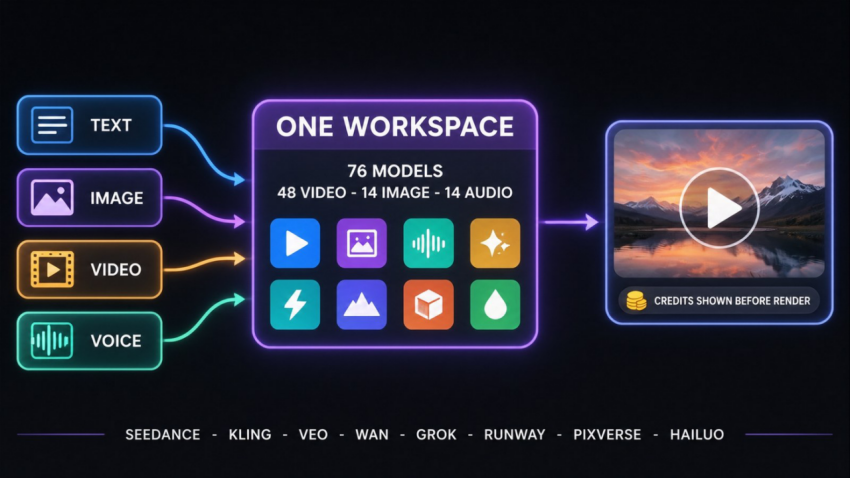
The Viddo AI video generator is an all-in-one creation platform that turns text prompts, still images, existing footage, or a voice track into finished video and audio, with 76 models from Google, ByteDance, Kuaishou, Alibaba, OpenAI, and other vendors behind a single login.
Most people arrive here with one specific job in mind: a product clip that needs a clean hero shot, a talking character for a course, or a 30-second version of a script they already wrote.
· One account covers video, image, voice, and music generation.
· Credits, assets, and settings live in one place, not in eight browsers.
· The credit cost of a render is shown before you spend anything.
The rest of this guide walks through what the platform can make, which model suits which shot, what it costs, and how to run the same brief from an AI agent.
What Is the Viddo AI Video Generator
The Viddo AI video generator is a single workspace holding 76 generation models, where 48 handle video, 14 handle images, and 14 handle audio, and every model draws from the same credit balance.
That distinction matters. A single-model tool asks you to accept its strengths everywhere. A multi-model workspace lets you send each shot to the engine that fits it, while the brief, the references, and the credit balance stay put.
· 76 models total, reachable from the same prompt panel.
· 48 video, 14 image, and 14 audio models.
· Each model exposes its own limits and fields.
· Output lands in one project history, watermark-free on paid plans.
The catalogue is worth reading on its own. The Viddo AI model catalogue breaks down the specs for each model, and the AI video workspace shows the tools themselves.
What You Can Create on Viddo AI
The tools are organised by input rather than by model. You pick the shape of the job, and the model picker narrows down to the engines that support it.
From text
· Short clips written from a prompt, with camera and motion described.
· Scripts turned into scenes with a shot order you control.
· Music videos where the track drives the picture.
Text to video is the fastest way to test a look, because one sentence is enough to see whether an engine suits the shot.
From images
· Still photos animated into shots.
· A first and a last frame joined into one transition.
· Product, character, and location references carried across shots.
Image to video is the stronger route when you already own the frame, because the reference locks the composition before the model starts moving.
From existing video
· Restyled footage that keeps the motion and changes the look.
· Clips extended past their original length.
· Long recordings cut down into platform-ready shorts.
From voice and audio
· Spoken narration and dialogue.
· Voice cloned from a short sample.
· Sound effects and background music generated to fit.
The image side sits next to it
· Text to image and image to image for frames, posters, and product shots.
· Layer separation for editable graphics and transparent cutouts.
· A canvas for composing images before they become video.
Key Features of the Viddo AI Video Generator
One Login, One Credit Balance
Switching engines mid-project should cost a prompt, not a subscription. On Viddo AI it does.
· Every model runs on the same account and the same balance.
· No separate vendor signup, invoice, or export step.
· Unlimited simultaneous generation tasks on paid plans.
· Failed generations refund or restore the credits used.
Each Model Exposes Its Own Field Contract
The reliable way to pick a model is to read the fields it accepts instead of trusting a feature summary. Those fields are visible in the panel before you generate.
· Veo 3.1 accepts a fixed 8-second duration and 720p, 1080p, or 4K.
· Sora 2 accepts clip lengths of 4, 5, 8, 10, 12, 15, or 25 seconds.
· Kling 4.0 takes reference elements and can keep the original sound.
· Seedance 2.5 accepts web search and omni-reference task types.
· Veo 3.1 Lite takes no duration field, so its clip length is fixed.
Read the contract, then write the prompt. Most bad renders start as a parameter mismatch.
References That Carry Character and Product
Consistency comes from the reference, not from the model name. Reuse the same locked reference across every shot and the identity holds.
· 8 video models accept first and last frame input.
· 40 models accept an image as the starting point.
· 9 models accept an existing video as the source.
· Type @ in the prompt to point at a specific uploaded asset.
Kling V3.0, MiniMax H3, Hailuo 02, Pixverse V6, Vidu Q3 Pro, Vidu Q4 Preview, Veo 3.1 Lite, and Veo 3.1 transition all handle first and last frame work.
Sound Generated With the Picture
A clip that arrives silent is half a deliverable. Several models plan the audio against the same shot list as the visuals.
· Veo 3.1 and Seedance 2.5 generate dialogue, effects, and ambience in one pass.
· MAGI-2 produces lip-synced speech and foley in the same backbone.
· Kling 4.0 can keep the original audio from a reference clip.
· Text to speech, voice cloning, and sound effects cover the rest.
Longer Clips and Multi-Scene Output
Runtime decides how much stitching a project needs. Longer native clips mean fewer cuts and fewer continuity breaks.
· Seedance 2.5 renders up to 30 seconds natively at 4K.
· Kling 4.0 produces clips from 3 to 30 seconds in one pass.
· The one-click video creator assembles scenes up to 180 seconds.
· Up to 50 reference assets attach to a single Seedance 2.5 request.
The Cost Is Visible Before the Render
Every panel shows the required credits and updates them as settings change. Nothing gets billed before you click generate.
· Credits depend on model, clip length, output count, and resolution.
· Estimates are available before a job is created.
· Higher resolution and longer clips cost more.
· There are no hidden fees on top of the displayed price.
Which Model to Use for Which Job
Match the model to the shot requirement. The list below is a lookup, not a ranking.
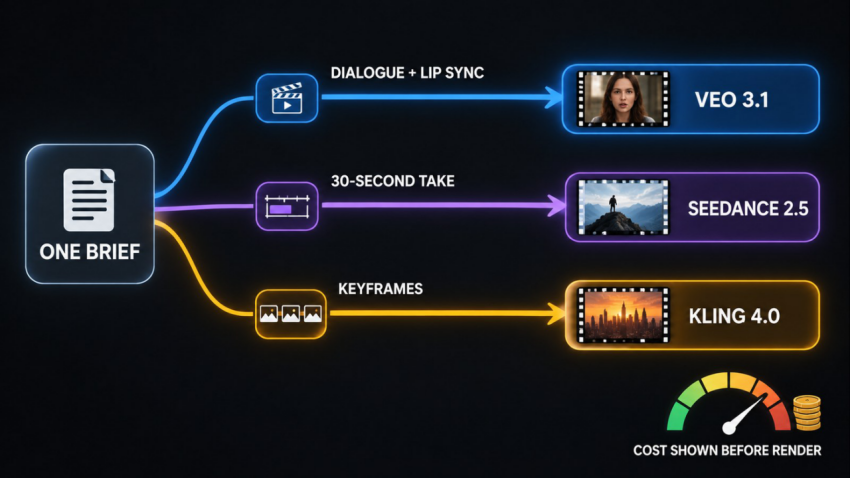
· Photoreal look — Veo 3.1, with 720p, 1080p, and 4K tiers.
· Long native clip — Seedance 2.5, from 4 to 30 seconds at 4K.
· Keyframes and kept audio — Kling 4.0, from 3 to 30 seconds.
· Cheapest long draft — Veo 3.1 Lite, quoted at 10 credits per render.
· Dialogue with lip sync — Veo 3.1, Seedance 2.5, MAGI-2.
· First and last frame — Kling V3.0, Pixverse V6, Vidu Q3 Pro.
· Music-driven clip — Pixverse V6, Flux 3.0.
· Restyle existing footage — Runway Aleph, Video Style Transform.
Model comparison guides go deeper. Kling 4.0, Veo 3.1, Seedance 2.5, and MAGI-2 each have their own page with the full spec list.
How to Use the Viddo AI Video Generator
Step 1: Open the Workspace
Start at the AI video workspace. The prompt panel, model picker, upload area, and output controls are all in view.
Step 2: Choose the Input Mode
Decide what the job starts from. Text, image, and video modes change which models appear in the picker.
Step 3: Pick the Model and Set the Output
Choose the engine, then set the aspect ratio and resolution. The required credits update as you change either one.
Step 4: Write the Prompt and Attach References
Name the subject, the action, the camera move, and the sound. Upload reference material and tag it with @ so the model knows which asset to use.
Step 5: Generate and Review
Click generate and wait for the render. Check the motion, the reference consistency, and the audio together before you accept the take.
Who Can Benefit from Viddo AI
· Short-form creators produce vertical clips for Reels, Shorts, and TikTok in one pass.
· E-commerce teams hold one product across several angles with reference images.
· Agencies batch variations of the same brief across several models.
· Educators build lessons with generated narration and matched visuals.
· Marketing teams restyle and resize one master into every channel format.
· Developers drive the same catalog from an agent with the MCP server.
Teams that were already paying for two or three separate video subscriptions usually find the shared balance is the part that changes the maths.
What Viddo AI Costs and How Credits Work
Every generation draws on a credit balance. The credit cost of a single render depends on the model, the duration, the output count, and the resolution.
Listed unit prices on the pricing page:
· Grok Imagine: $0.0115 per second.
· Muse Video: $0.017 per second.
· Sora 2: $0.017 per second.
· Veo 3.1 Lite: $0.0575 per video.
· Suno V6: $0.1035 per song.
· Seedance 2.0: $0.345 per video.
Measured credit quotes for a single render, taken from the live estimate tool:
· Veo 3.1 Lite, one clip: 10 credits.
· Veo 3.1 at 8 seconds: 200 credits.
· GPT Image 2.6, default output: 12 credits.
· GPT Image 2.6 at 2K: 24 credits. At 4K: 40 credits.
· Nano Banana 2.1, one image: 3 credits.
The practical rule is to draft at the cheapest setting that holds the shot, then spend the expensive model on the shots that earn it. Failed generations return the credits used, so one bad take does not become a permanent charge.
Using the Viddo AI Video Generator From an AI Agent
The same catalog is reachable without the browser. A remote MCP server exposes the models as tools, so an agent can read the list, quote the cost, and create the job inside the conversation where the brief already lives.
· One server URL, no API key to manage, OAuth sign-in with your own account.
· 19 tools for listing models, quoting cost, creating, and polling jobs.
· Up to 12 independent shots per batch request, each with its own status.
· Works with ChatGPT, Claude, Cursor, Gemini, Codex, VS Code, and Grok.
The MCP documentation covers client setup and cost control, and the video MCP page covers the video-specific tools.
Viddo AI Video Generator FAQ
What is the Viddo AI video generator?
The Viddo AI video generator is an all-in-one platform that creates video, images, voice, and music from prompts, stills, footage, and audio, with 76 models sharing one account and one credit balance.
How many AI video models can I use?
The catalogue holds 48 video models, 14 image models, and 14 audio models, so 76 in total. 27 of the video models accept text to video and 40 accept an image as the starting point.
Does the Viddo AI video generator make videos with sound?
Yes. Veo 3.1, Seedance 2.5, and MAGI-2 generate dialogue, effects, and ambience together with the picture, and lip sync matches mouth movement against finished audio.
How much does the Viddo AI video generator cost?
It depends on the model, clip length, output count, and resolution. Listed unit prices start at $0.0115 per second for Grok Imagine, and Veo 3.1 Lite is listed at $0.0575 per video. Check the pricing page for current rates.
Do I need a separate account for each model?
No. Every model runs on the same Viddo AI account and the same credit balance, so switching engines mid-project never means opening a second subscription.
Can I use videos made on Viddo AI commercially?
Yes. Paid plans include commercial use and add no watermark to the output, and failed generations return the credits that were used.
Can an AI agent use the Viddo AI video generator?
Yes. Through the remote MCP server, an agent reads the live model list, quotes the credit cost, and submits a batch of up to 12 shots, each tracked separately, inside your own chat client.
Get Started with the Viddo AI Video Generator
Open the workspace, send one brief through two models, and compare the takes on your own material. The cost of that comparison is smaller than the cost of guessing.