

What Is Viddo AI? All-in-One AI Video Generator Guide
November 27, 2026 | Ryan Carter
Viddo AI is an all-in-one creation platform for generating and editing videos, images, and music, where models from Google, OpenAI, ByteDance, Alibaba, Grok, Kling, Runway, Vidu, MiniMax, Midjourney, and Suno run behind one account and one credit balance.
This guide covers what Viddo AI is, which models sit inside it, what each workflow costs, and how creators and AI agents use it.
What Is Viddo AI?
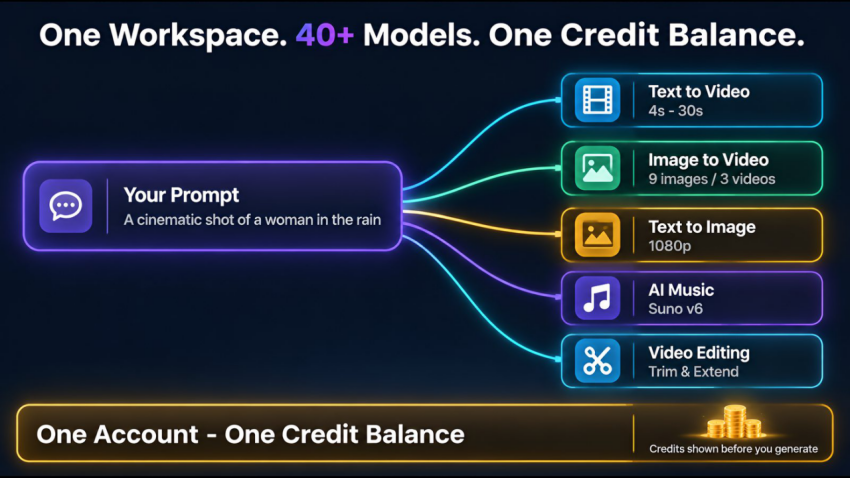
Viddo AI is a web platform that puts many third-party AI video, image, music, and voice models behind a single workspace, where you generate and edit media from text, images, video, or audio, compare models on the same brief, and pay for every tool from one credit balance.
The difference from a single-model site is the choice itself. The platform runs Veo, Seedance, Kling, Wan and 30+ more video models, so you can compare engines without opening separate tools.
· Video, image, music, and voice tools share one account
· 40+ video, image, and audio models sit behind it
· One credit balance covers every model and every effect
· Commercial use is allowed on paid plans
· Paid plans include no watermark on exports
· Failed generations refund or restore the credits used
· A remote MCP server puts the tools inside AI agents
What You Can Create on Viddo AI
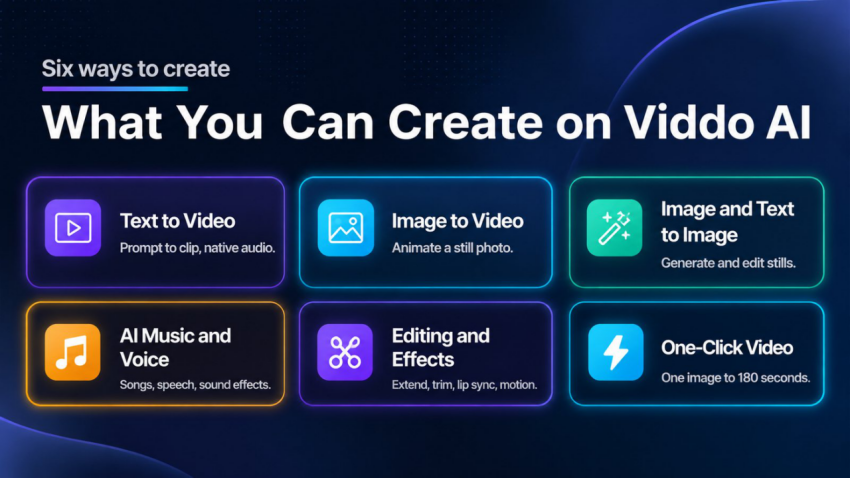
Six working modes cover most production work, and each one starts from a different input.
Text to Video
Describe a subject, a camera move, and a mood in one prompt, then render it as a clip.
· Six aspect ratios: 16:9, 9:16, 4:3, 3:4, 1:1, and 21:9
· Resolution choices at 480p, 720p, and 1080p
· Native audio on models that generate sound with picture
· Optional web search for prompts that need current facts
Image to Video
Animate a still photo instead of starting from text.
· Upload up to nine reference images in one generation
· Upload up to three reference videos and three audio files
· Hold a product, character, or wardrobe across a series of shots
· Reference an uploaded asset directly with @ inside the prompt
Image Generation and Editing
Make stills and adjust them without leaving the same thread.
· Generate artwork, layouts, and concepts from a text prompt
· Edit an existing image with instructions rather than sliders
· Use the image canvas for doodles, layers, and touch-ups
· Reference image models include GPT Image 2.6, Nano Banana, Seedream 5.5, and Midjourney
AI Music, Voice, and Sound
Songs and speech live in the same account as the visuals.
· Generate songs with vocals across genres and languages
· Turn text into spoken audio with selectable voices
· Clone a voice, add vocals, or separate vocals from a track
· Create sound effects for a scene without a sound library
Editing and Effects
Finish the cut with platform tools rather than a separate editor.
· Extend a short clip into a longer sequence
· Trim, merge, and cut footage in the video trimmer
· Turn a long video into vertical shorts automatically
· Sync lip movements to existing audio
· Copy motion from a reference clip onto your subject
· Turn one still into a one-click video of up to 180 seconds
The Models Inside the Platform
Every model comes from a different lab, and each one has a different strength.
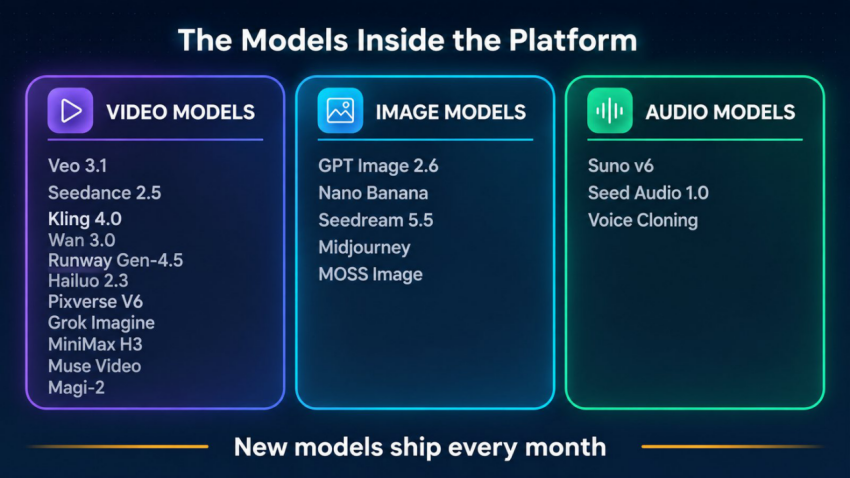
· Veo 3.1 and Veo 3.1 Lite for cinematic text-to-video
· Seedance 2.5, 2.0, Flash, Mini, and Fast for image-to-video
· Kling 4.0, 3.0, 2.6, and V2.1 for motion and character work
· Wan 3.0, 2.7, 2.6, and 2.5 from Alibaba
· Runway Gen-4.5, Hailuo 2.3, Pixverse V6, Vidu, MiniMax H3
· Muse Video, Happy Horse 1.1, Grok Imagine, Gemini Omni, Magi-2
· GPT Image 2.6, Nano Banana, Seedream 5.5, and Midjourney for stills
· Suno v6 and Seed Audio 1.0 for music and spoken dialogue
New models arrive often, so the catalogue on the site is more current than any static list.
Which Model Should You Pick?
Start from the shot you need, not from the model name.
· Need dialogue and lip-sync? Choose a model with native audio.
· Need a product still? Use an image model, then animate it.
· Need a long clip? Use the one-click creator for up to 180 seconds.
· Need many variations fast? Pick a per-second priced model.
· Not sure? Try two models on the same prompt and compare.
· Need a full brief in one file? Use the marketing video studio.
· Need to reuse a winning ad? Clone it with the ad cloner.
Viddo AI Compared With One-Model Sites
Most single-model sites make you choose a tool first and a provider second. A multi-model platform reverses that order.
· One login instead of an account per provider
· One credit balance instead of a subscription per tool
· 30+ video models plus image, music, and voice models in one subscription
· Editing, effects, and trimming inside the same workspace
· A remote MCP endpoint for agents, with no API key
· Failed jobs refunded or restored instead of charged twice
The trade-off is straightforward. You do not train weights or tune a model here, because the models are built by other labs. What you gain is the ability to switch engines without moving your files.
How to Use Viddo AI
Five steps cover a first project, and none of them require editing experience.
Step 1: Pick the Tool and the Model
Choose the mode that matches your input, then open the model dropdown to see what is available.
Step 2: Give It Something to Work From
Type a prompt, or upload files. The panel accepts up to nine images, three videos, and three audio files at once.
Step 3: Set the Output
Set aspect ratio, resolution, and clip length. A seed field keeps a take reproducible when you want a variation of the same prompt.
Step 4: Generate and Watch the Credit Cost
The panel shows the required credits before you run a job, so a long clip does not surprise you after the fact.
Step 5: Refine, Then Export
Regenerate with a tighter prompt, edit the still in the image canvas, then download the final file without a watermark.
What It Costs on Viddo AI
Generation is metered by model, resolution, and output unit, so the cost follows the job.
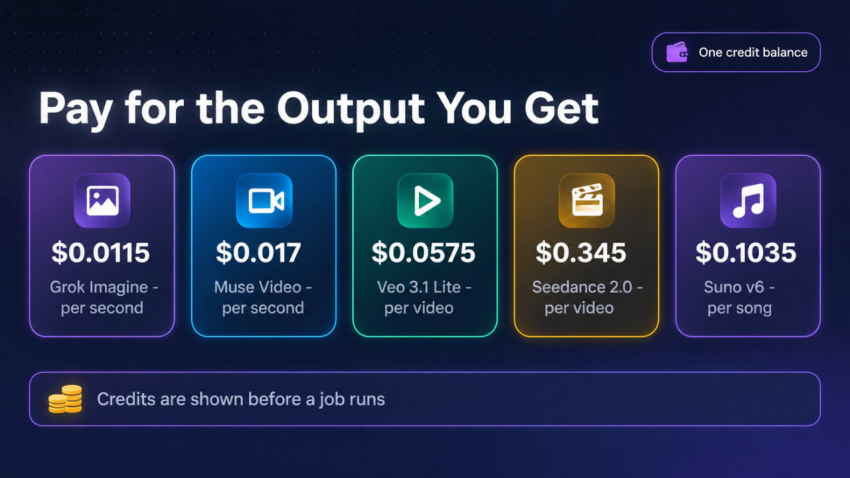
· Grok Imagine from $0.0115 per second of output
· Muse Video and Sora 2 at $0.017 per second
· Veo 3.1 Lite at $0.0575 per video
· Grok Imagine 1.5 at $0.086 per second, and $0.143 at 720p
· Seedance 2.0 at $0.345 per video
· Suno v6 at $0.1035 per song
The billing unit follows the output you ask for.
· Video models bill per second of output or per finished video
· Image models bill per image, and higher resolutions cost more
· Music models bill per song, and voice tools bill per generation
· The panel shows the required credits before a job runs
· Agents estimate the same cost and wait for approval over MCP
· Failed creations refund or restore the credits they used
In Viddo testing in November 2026, Seedance 2.5 billed 20 credits per second at 480p, 44 at 720p, 100 at 1080p, and 160 at 4K.
Every plan lists the same baseline promises on the pricing page.
· Commercial use allowed on paid plans
· No watermarks on paid-plan exports
· No queue on generation
· Unlimited simultaneous generation tasks
· Credits refunded or restored when a creation fails
Using Viddo AI Inside AI Agents
A remote MCP server exposes the platform's tools to assistants and editors such as ChatGPT, Claude, Cursor, Gemini, and Grok.
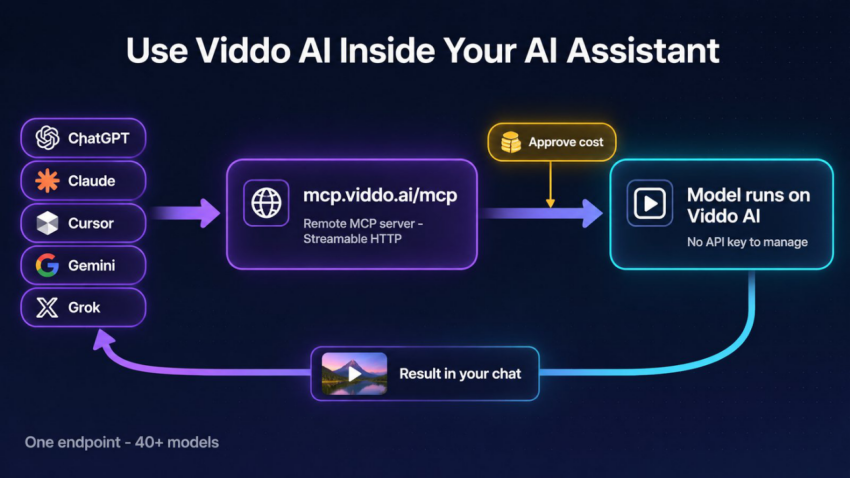
· One endpoint for every tool: https://mcp.viddo.ai/mcp
· Streamable HTTP transport with browser OAuth sign-in
· No API key to create, copy, or rotate in a config file
· The agent reads the live model list before it generates
· Credit cost is estimated and approved before any job runs
· Batches run in the background with a separate status each
The same server is documented separately for video, image, and music, so you can point an agent at the scope it needs: the video MCP server, the image MCP server, and the music MCP server.
Is Viddo AI Safe? Data, Retention, and Rights
Trust questions come up early, and the answers sit in the platform policies rather than in marketing.
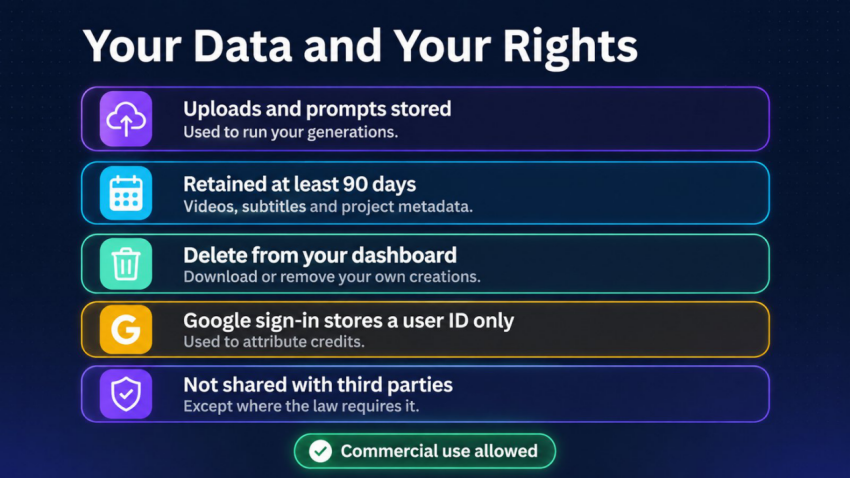
· Uploads, prompts, and preferences are collected to run your generations
· Google sign-in stores a Google user ID to attribute credits to your account
· Personal data is not shared with third parties except as required by law
· Created videos, subtitles, and project metadata are kept at least 90 days
· You can download or delete your own creations from the account dashboard
· The operator is registered in Hong Kong as HONGKONG BEAUTY DANCE COMPANY LIMITED
You still own the responsibility for your inputs. Commercial use is allowed, but reference photos, logos, music, and footage need rights you can show.
Who Uses Viddo AI
· Short-form creators need vertical clips with sound and lip-sync for daily posting
· Marketing teams test several ad concepts from one brief before production
· E-commerce sellers hold a product look across frames with reference images
· Educators turn a lesson outline into an explained video with narration
· Agencies compare two models on the same script before committing a budget
· Small studios prototype scenes before booking a shoot
Pro Tips: Getting Better Results on Viddo AI
· Write the subject first, then camera, then lighting.
· Name one shot per prompt; two shots rarely land together.
· Reference an uploaded asset with @ instead of describing it.
· Translate non-English prompts in the panel before generating.
· Render twice on two models before you accept a take.
· Keep a fixed seed when you want a controlled variation.
Frequently Asked Questions
What is Viddo AI?
Viddo AI is an all-in-one AI video generator and image studio. It runs 40+ models from Google, OpenAI, ByteDance, Alibaba, Kling, Runway, and others behind one account, one credit balance, and one set of editing tools.
Is Viddo AI free to use?
Yes. You can create a free account and sign in, and some models offer free trial credits while others do not. Generation itself runs on credits, and paid plans buy the balance every model spends from.
Which models can I use on Viddo AI?
The catalogue covers video, image, music, and voice models from Google, OpenAI, ByteDance, Alibaba, Grok, Kling, Runway, Vidu, MiniMax, Midjourney, and Suno. New releases are added as they ship.
Can I use the output commercially?
Yes, commercial use is allowed under your plan and the acceptable use policy. As the creator, you remain responsible for rights to your inputs, including photos, logos, and reference footage.
How much does a video cost on Viddo AI?
It depends on the model and output. Reference pricing lists Grok Imagine from $0.0115 per second, Veo 3.1 Lite at $0.0575 per video, and Seedance 2.0 at $0.345 per video. Full details sit on the pricing page.
Do the exports carry a watermark?
Paid plans include no watermark on exported files, so the file you download is the file you publish.
What happens if a generation fails?
A failed creation is refunded, or the credits it used are restored to your balance. A failure does not quietly turn into a second charge on your next invoice.
Can an AI assistant use Viddo AI?
Yes. The remote MCP server lets an agent in ChatGPT, Claude, Cursor, Gemini, or Grok list models, estimate the credit cost, and run a job after you approve it. No API key is required.
Get Started with Viddo AI
Create a first clip, a first image, or a first track in one workspace, and keep the credit balance and the model choice in the same place.
· Open the all-in-one AI video generator and pick a model
· Start from text with the text to video workflow
· Animate a still with the image to video workflow
· Generate stills and edit them in the image canvas
· Write songs and voiceover in the AI music generator
· Make long clips in the one-click video creator
· Browse ready-made prompts in the prompt library
· Read the step-by-step guides in the tutorial section
· Check live plan details on the pricing page
Further reading: the MAGI 2 guide covers a native-audio model, the Kling 4.0 guide covers a long-clip workflow, and the GPT Image 2.6 guide covers still image work.