

Sawadika Dance AI: Turn Your Photo Into a Dance Video
October 17, 2026 | AVON
Sawadika Dance AI: Turn Your Photo Into a Dance Video
Want to join the Sawadika dance trend without learning the choreography or recording yourself dancing? With a Sawadika Dance AI video, you can transform a regular photo into a fun dance clip inspired by the viral trend surrounding LISA's song “SaWaDiKa.”
Use Viddo AI’s Motion Control feature. Simply upload a reference video you’d like to use, then upload your own image to create your video.
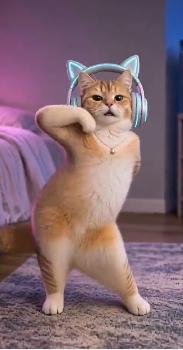
Whether you want to create a funny video of yourself, surprise a friend, or make your pet the star of a dance challenge, AI video tools make it easier to experiment with creative dance content.
In this guide, you'll learn what the Sawadika dance trend is, how to create your own AI dance video, and how to get more natural-looking results.
What Is the Sawadika Dance Trend?
The Sawadika dance trend is inspired by “SaWaDiKa,” a song by LISA that gained attention across social media in 2026. Its energetic choreography and recognizable hand gestures have inspired dance videos, covers, and AI-generated variations.
The routine combines expressive arm movements, palms-together gestures inspired by the Thai greeting, hip sways, kicks, and quick changes in pose. These movements give the dance a distinctive look that works well in short-form videos.
The trend isn't limited to traditional dance covers. Creators can also experiment with AI-generated characters, funny pet dances, and personalized clips featuring their own photos.
That's where Sawadika Dance AI comes in: instead of filming the entire routine yourself, you can use AI video generation to bring a still image to life.
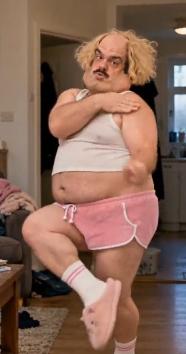
4 Creative Ways to Try Sawadika Dance AI
Before creating your video, think about what would make it entertaining. Here are four ideas worth trying.
1. Turn Your Own Photo Into a Dance Video
Start with a clear photo of yourself and use an image-to-video or motion-reference workflow to create a dancing version of yourself.
For the best starting point, choose a full-body photo with your face clearly visible, your arms unobstructed, and enough space around your body. This gives the AI more visual information to work with when generating movement.
2. Create a Funny AI Pet Dance
Imagine your cat performing sharp dance moves or your dog joining a viral dance challenge. AI pet dance videos can turn an ordinary pet photo into a playful social media clip.
Use a well-lit photo that shows your pet's body clearly. Since animals have different body shapes from humans, results may vary, especially for complicated hand-like gestures or upright poses.
3. Make a Dance Video With a Friend
Want to create something to share with a friend? Try making individual dance videos from two separate photos, then combine the clips in a video editor.
You could also create a matching pair of videos with similar backgrounds, outfits, or visual styles. This is a simple way to create a personalized dance challenge without needing to record both people together.
4. Experiment With Different Visual Styles
The same dance concept can look very different depending on the visual direction you choose.
Try a colorful studio, a neon-lit room, a concert-inspired background, or a playful cartoon aesthetic. If your AI video tool supports reference videos or motion control, you can also experiment with using a dance clip as a movement reference.
How to Create a Sawadika Dance AI Video With Viddo.ai
Ready to turn your idea into a video? Follow these steps.
Step 1: Choose a clear source image
Upload a photo of yourself, a consenting adult, or your own pet. A sharp image with good lighting usually provides a better starting point than a blurry or heavily filtered photo.
Step 2: Choose an appropriate AI video workflow
Open Viddo.ai and select an image-to-video tool or a motion-control workflow, depending on the result you want.
Image-to-video is useful when you want to animate a still image from a written description. A motion-control workflow may be more suitable when you want to follow the movement of a reference dance video.
Step 3: Describe the dance movement
If your selected model supports text prompts, describe the movement, camera framing, and visual style clearly. For example, you can ask for energetic arm movements, rhythmic hip sways, coordinated steps, and a continuous full-body shot.
If the tool supports a reference video, use a clip you have permission to use.
Step 4: Generate and review the result
Preview your video and check the face, hands, legs, and overall movement. If the result looks unnatural, try a clearer source image, simplify the requested movement, or adjust the prompt.
Step 5: Add music and share
Once you're satisfied with the video, you can prepare it for TikTok, Instagram Reels, or YouTube Shorts. Use music available through the relevant platform's licensed music library or music you have permission to use.
Example Prompt for a Sawadika-Inspired AI Dance Video
If your chosen video model supports text prompts, try this example to create an original dance inspired by the trend.
Prompt:
“Create a lively, high-energy dance video featuring the person in the uploaded photo. The dancer performs rhythmic arm gestures, palms-together greeting-inspired movements, quick side steps, coordinated kicks, and playful hip sways. Maintain the person's recognizable facial features, hairstyle, and outfit. Keep the full body visible throughout the video, with natural body proportions, smooth transitions, realistic movement, and consistent lighting. Use a stable camera and a colorful, upbeat background. The overall mood should be fun, expressive, and suitable for a short social media dance video.”
Tip: This prompt describes an original dance concept rather than guaranteeing an exact reproduction of LISA's choreography. Different AI models interpret movement instructions differently, so you may need to adjust the prompt or use a suitable reference video.
Tips for Better Sawadika AI Dance Results
A good result starts with the source image, but a few additional details can also make a difference.
-
Show the full body: Dance movements involving arms and legs are harder to generate when parts of the body are cropped out.
-
Avoid obstructed poses: Keep the hands, arms, and legs visible whenever possible.
-
Keep the prompt focused: Describe a few key movements rather than asking for too many complicated actions at once.
-
Use a suitable aspect ratio: Vertical video is a practical choice for TikTok, Reels, and Shorts.
-
Check movement consistency: Look for distorted hands, unnatural foot placement, changing facial features, or sudden background shifts.
-
Experiment with models: If one model struggles with fast choreography, try another suitable video model or simplify the movement.
Remember that AI-generated videos can vary from one attempt to another. A clear source image and a well-defined prompt can help, but they cannot guarantee a perfect result.
Frequently Asked Questions
What is Sawadika Dance AI?
Sawadika Dance AI refers to using AI video tools to create dance videos inspired by the Sawadika trend associated with LISA's song. Depending on the tool, you may be able to animate a photo, use a movement reference, or create an original dance scene.
Can I make a Sawadika dance video from a photo?
Yes. Image-to-video tools can animate a still image based on a text prompt. For more specific choreography, look for a tool that supports motion references or motion control.
Can I make my cat or dog do the Sawadika dance?
You can experiment with AI-generated pet dance videos using a clear photo of your animal. However, results depend on the model, and complicated human-style movements may not look anatomically realistic.
Do I need to know how to dance?
No. You don't need to perform the choreography yourself when using an AI-generated workflow. You can start with a photo and let the video model generate the movement.
Can I post my AI dance video on social media?
Generally, you can share videos you create, but you should check the AI tool's terms and the social platform's rules. Copyright, music licensing, consent, and disclosure requirements may apply, particularly to commercial content.
How can I make my AI dance video look more realistic?
Start with a clear full-body image, use a focused movement description, and avoid overly complex actions. If the model supports motion references, a suitable reference clip may help guide the choreography.
Create Your Own AI Dance Video
The Sawadika dance trend offers a fun way to experiment with personalized short-form content. Whether you want to create a dance video of yourself, make a funny pet clip, or try a new visual style, AI video generation gives you room to explore different ideas.
Visit Viddo.ai to explore AI video tools, experiment with your own images, and bring your next creative dance idea to life.
Start with one photo, try a few movement ideas, and see what you can create.