

Window Peeper AI: Make the Viral TikTok Video
October 23, 2026 | Ethon
Window Peeper AI: How to Make the Viral Window Peeper Video
What Is the Window Peeper AI Trend?
Have you seen a video where someone sits behind a brightly lit window at night, eats a burger, and stares directly at the camera before suddenly closing the curtains? That's the idea behind the Window Peeper AI trend, a funny and slightly creepy video format circulating through TikTok and CapCut templates.
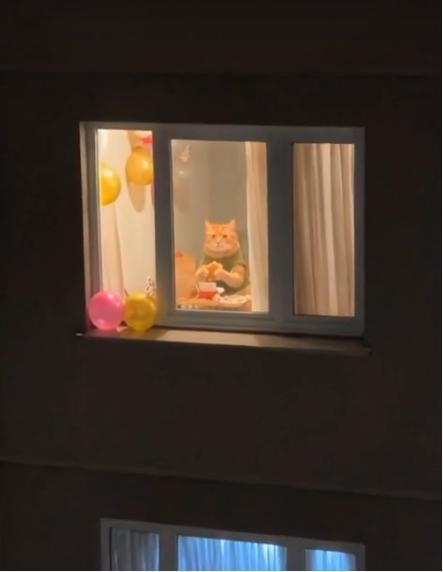
The scene starts like a suspense movie. The camera slowly zooms toward a single illuminated apartment window. Inside, someone is casually eating a burger while looking straight out of the window. Just when the moment becomes awkward, the person notices the viewer and pulls the curtains shut.
The unexpected ending makes the video funny, memorable, and easy to remix.
The trend has inspired variations featuring different people, pets, and familiar characters. With AI video generation, you can recreate the general concept using your own photo instead of filming an entire scene.
Why Is the Window Peeper Video So Funny?
The Window Peeper trend works because it combines three simple elements.
1. A Suspenseful Camera Zoom
The video begins with a dark apartment building and a single illuminated window. The slow zoom creates the feeling that the viewer is discovering something they were not supposed to see.
2. An Unexpected Stare
Inside the window, the subject is doing something completely ordinary, such as eating a burger. The humor comes from the subject calmly staring back at the camera instead of reacting naturally.
3. A Perfectly Timed Ending
The final curtain pull delivers the punchline. The subject appears to catch the viewer watching and immediately ends the encounter.
Because the format requires little or no dialogue, it can work across languages and audiences. The same scene can become a relatable joke about a friend, a roommate, a late-night snack, or even a mischievous pet.
How to Make a Window Peeper AI Video
You don't need to rent a location, set up a camera across the street, or film a complicated scene. You can use an AI video generator to create your own interpretation of the trend.
Step 1: Choose a Photo
Start with a clear photo of yourself, a friend who has agreed to participate, or your pet. A front-facing portrait with good lighting usually gives an AI tool more useful visual information.
For the best results:
-
Choose one clearly visible subject.
-
Avoid blurry photos or heavily obstructed faces.
-
Include enough of the upper body if you want the subject to sit at a table.
-
Use a photo you own or have permission to use.
Step 2: Open an AI Video Generator
Visit Viddo.ai and choose an image-to-video workflow if available in your selected model. Upload your reference photo and describe the scene you want to create.
Different models interpret reference images and complex movements differently, so you may need to try a few variations to achieve the intended result.
Step 3: Use a Window Peeper AI Prompt
A detailed prompt can help establish the nighttime atmosphere, camera movement, subject behavior, and ending.
Example AI video prompt:
Create a funny, cinematic nighttime scene in a vertical 9:16 format. Show a dark apartment building across the street with one warmly illuminated window. Inside the window, the person from the reference image is sitting at a small table, casually eating a burger. The camera slowly zooms toward the window from outside. The person keeps eating while staring directly at the camera with an expressionless, slightly awkward face. After a brief pause, the person suddenly stands up, walks toward the window, and pulls the curtains shut. End immediately after the curtains close. Use realistic nighttime lighting, natural body movements, a subtle suspenseful atmosphere, and comedic timing. Keep the scene in one continuous shot without unnecessary camera cuts.
Tip: If your AI model struggles with the entire sequence, simplify the prompt or generate a shorter clip. Some models may have difficulty maintaining the same face, outfit, and body position throughout multiple actions.
Step 4: Generate and Review Your Video
Generate the clip and check the following details:
-
Does the scene look like a nighttime apartment building?
-
Is the subject recognizable from the reference photo?
-
Does the camera move toward the illuminated window?
-
Does the subject maintain eye contact long enough for the joke to work?
-
Does the curtain close at the end?
If the result misses an important action, adjust the prompt and try again. You can also experiment with different facial expressions, outfits, or subjects.
Step 5: Share Your Window Peeper Video
Once you are happy with the result, download your video and prepare it for TikTok, Instagram Reels, or YouTube Shorts.
A vertical 9:16 format is a natural choice for short-form social videos. Add a suitable sound or caption if needed, and check that you have permission to use any music you include.
Window Peeper AI Video Ideas to Try
You don't have to reproduce the original burger scene exactly. Here are a few ways to make the format your own.
The Midnight Snack
Your subject is eating a burger or another late-night snack, staring at the camera as if they have been caught doing something suspicious.
Caption idea: “Me when someone catches me eating at 2 AM.”
The Window Peeper Cat
Replace the person with a cat sitting at a table or near a window. Have the cat stare directly at the camera before disappearing behind the curtains.
Caption idea: “My cat knows what I did.”
The Roommate Edition
Put your roommate or consenting friend behind the window, casually eating while maintaining an uncomfortably serious stare.
Caption idea: “When your roommate hears you open the fridge.”
The Halloween Edition
Make the apartment building darker, add subtle fog, and use an eerie light in the window. Keep the subject's behavior completely ordinary to preserve the contrast between suspense and comedy.
Caption idea: “Something strange is happening across the street.”
The Unexpected Celebrity Look
Create a fictional character or a playful look inspired by a particular visual style. If you use a real person's likeness, make sure you have the appropriate permission and follow the applicable platform rules.
Tips for Better Window Peeper AI Results
Keep the prompt focused. Too many actions can make the sequence difficult for a video model to follow. Prioritize the slow zoom, direct stare, and curtain pull.
Use a clear reference image. A recognizable subject and unobstructed face can improve the consistency of the result.
Describe the camera movement. A slow push-in or zoom toward the window is essential to the visual joke.
Give the stare enough time. The awkward pause is part of the humor. If the subject immediately closes the curtains, the punchline may feel rushed.
Keep the ending simple. A clean curtain close is usually more effective than adding several extra actions.
Review the final clip before posting. Check for distorted faces, unnatural hands, inconsistent clothing, or unexpected changes in the scene.
Create More AI Video Trends with Viddo.ai
The Window Peeper trend is one example of how a simple visual idea can become a memorable short-form video. With an AI image-to-video workflow, you can explore similar concepts without filming every scene yourself.
Try different reference images, camera movements, lighting styles, and comedic situations to develop your own version of the trend.
Visit Viddo.ai to explore AI video creation tools and experiment with your next short-form video idea.
Frequently Asked Questions
What is Window Peeper AI?
Window Peeper AI refers to AI-assisted videos inspired by a social media trend featuring a person inside a lit window at night, staring at the camera before closing the curtains. The format combines suspense, awkward humor, and a surprise ending.
How do I make a Window Peeper AI video from a photo?
Choose a clear reference photo, open an AI image-to-video tool, and use a prompt describing the nighttime window, slow camera zoom, subject staring at the viewer, and curtain-closing ending. Generate and review the result, then adjust the prompt if necessary.
Is Window Peeper AI a TikTok filter?
The trend is associated with TikTok videos and CapCut templates. The exact creation method depends on the version you find: some use templates, while others recreate the scene using AI video generation. Availability may vary by region and platform.
Can I use a photo of my pet?
Yes, if your chosen AI tool supports animal reference images. A clear photo of your pet can be used to create a playful variation, although the model may not reproduce every detail perfectly.
Why does my AI video fail to close the curtains?
Video models can struggle with multiple sequential actions. Try simplifying your prompt, describing the curtain movement explicitly, and generating a shorter clip if the selected model supports it.
Can I post my Window Peeper AI video on social media?
You can generally share AI-generated videos subject to the rules of the platform you use, the rights associated with your reference material, and any applicable disclosure requirements. Obtain permission before using another person's likeness and use music you are authorized to share.
Which AI video generator should I use for the Window Peeper trend?
Choose a tool that supports image-to-video generation, reference-image input, and prompts describing camera movement and subject actions. Viddo.ai offers AI video creation workflows you can explore, though results and available controls depend on the model you select.