

Semrush Keyword Research Workflow for AI Video Tools (2026)
November 27, 2026 | Ryan Carter
Most keyword research tutorials stop at "export your list and start writing." That advice breaks on AI video pages, because the biggest search terms in the category are already taken by platforms with domain authority we cannot match. This is the Semrush keyword research workflow we actually run at Viddo AI, including the check that stopped us from building eight model pages for a demand that did not exist.
At Viddo AI we make video and image models from Google, OpenAI, ByteDance, Alibaba, Kling, Runway and others available in one place. Finding the right keywords for those pages is part of the job, not a side quest.
Why Keyword Research for AI Video Tools Is Different in 2026
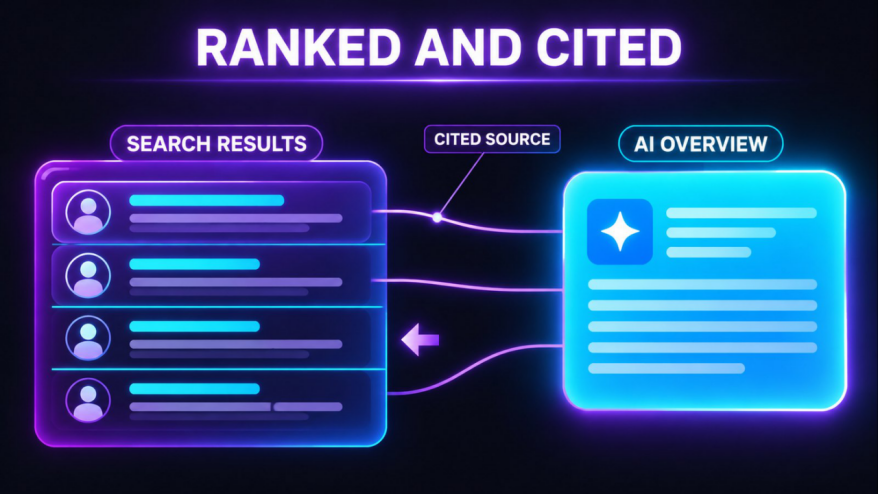
Two things changed. Search results now answer the query directly, and AI assistants quote sources inside the answer rather than sending people to a page.
Both compress the value of a page that only restates what a tool does. What still earns a click is evidence: a measured number, a reproducible method, a mistake that is documented rather than hidden.
· The category head terms are owned by platforms with years of domain authority.
· Answer engines quote a handful of sources, so citation strategy matters as much as rank.
· Search demand is uneven, and the gap between adjacent terms can be very wide.
· Model names release monthly, so a keyword set expires faster than in other niches.
What We Actually Do: The Five-Stage Workflow
This is the pipeline behind every content page we publish. Each stage has a gate, and a keyword that fails any gate does not become a page.
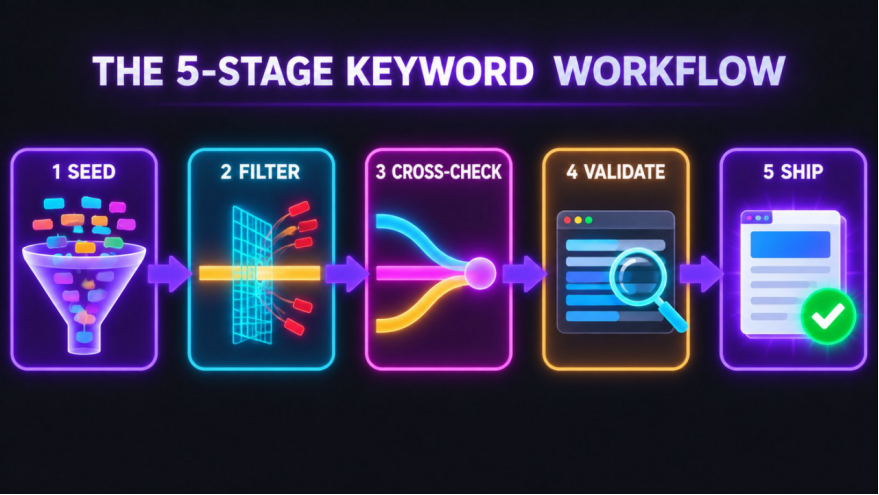
Stage 1: Seed From What You Already Own
Open Semrush and start from a term you can already rank near the top for. We use Organic Rankings on our own domain first, because a keyword where you already hold position 6 needs a better page, not a new domain.
· Pull terms ranking positions 2 to 20 for your money pages.
· Pair them with Search Console queries, which show real clicks rather than modelled volume.
· Read support tickets and sales questions for the phrases customers actually type.
· Keep any term where a page already exists and could plausibly hold position 3.
Stage 2: Filter on Business Value, Not Volume
Semrush reports volume, difficulty, CPC and intent. We sort by what a page is worth to us, and only then by how hard it is to rank.
· Start with commercial and transactional intent, since those pages convert.
· Use Keyword Difficulty under 30 to 49 for newer or lower-authority domains.
· Treat CPC as a proxy for commercial value, not as a bidding recommendation.
· Exclude branded terms owned by other companies from your own page plan.
Stage 3: Cross-Check Against Three Independent Sources
This is the stage that changes decisions. Semrush tells you what a database believes. Autocomplete and the live SERP tell you what people are actually doing right now.
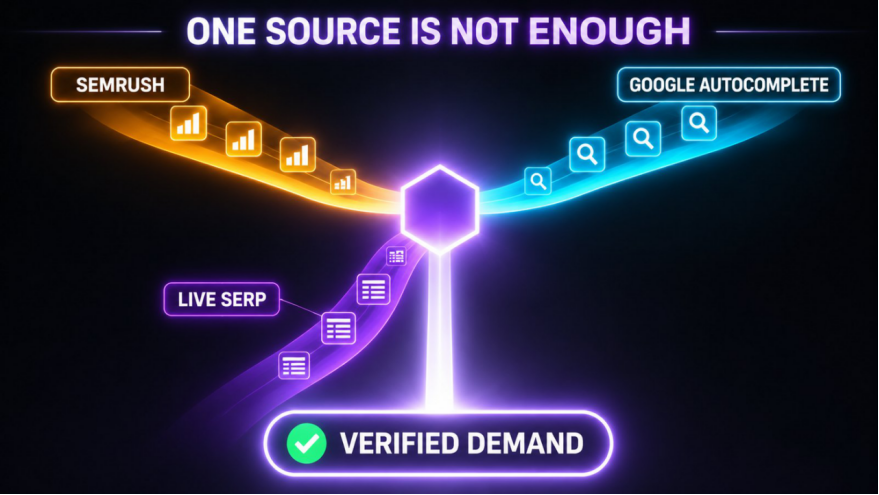
· Semrush for volume, difficulty, CPC, intent and the competitor gap.
· Google autocomplete for the live long tail, which a keyword database lags behind.
· The live SERP for format, and for whether an AI Overview already answers the query.
A term needs two of the three to agree before it survives. One source alone will eventually send you to build the wrong page.
Stage 4: Validate the Format Against the SERP
Open the top results and look at what is actually ranking. This is where most keyword lists die, because the winning format rarely matches the page you planned.
· If every result is a list, publish a list, not an essay.
· If the results are all tool pages, a blog post will not outrank them.
· If an AI Overview already answers it, aim for a citation, not a click.
· Check whether the SERP is video, image or forum shaped before choosing a format.
Stage 5: Cluster, Prioritize, and Ship One Page Per Cluster
One page should own one intent. Use Keyword Strategy Builder to group terms that share intent, then write a single page that satisfies the whole cluster instead of one page per synonym.
· Group terms by intent, not by word similarity alone.
· Write one page per cluster, with the primary term in title and H1.
· Add supporting terms as H2s and FAQ questions.
· Record the decision, the demand evidence and the date in the brief.
How to Copy This: The Same Workflow, Step by Step
Here is the process in the order you can run it this afternoon, with the specific Semrush tools at each step.
Step 1: Set the Database and the Seed
Open Keyword Magic Tool, set the database to United States, and type a broad seed. You want the widest possible net before you filter.
· Enter one seed per product line, not per keyword.
· Save every candidate into a named list as you go.
· Run the Questions tab for question-shaped queries.
· Use the related terms tab to catch phrasing you would not have guessed.
Step 2: Apply the Filters That Matter
In the Keyword Magic Tool table, filter down before you read anything. The default column set hides the columns that decide the outcome.
· Filter by intent to separate research from purchase queries.
· Filter by Keyword Difficulty to match your site's actual authority.
· Filter by volume floor to cut terms that cannot move traffic.
· Sort by CPC to find the terms with money behind them.
Step 3: Read the SERP for Every Candidate You Like
Click through to Keyword Overview for your shortlist and check what is ranking, not just what the numbers say.
· Read the snippets to learn the angle competitors took.
· Note SERP features like AI Overviews and People Also Ask boxes.
· Check the top-ranking pages for format and depth.
· Confirm the intent matches what your page can deliver.
Step 4: Find What Competitors Miss
Run Keyword Gap against the two or three competitors you actually lose to. It reports missing terms and weak terms, and the weak list is often more useful.
· Filter out branded and navigational terms you cannot win.
· Prioritize terms that match the product you want to sell.
· Look for gaps on topics competitors cover shallowly.
· Use the terms to reshape an existing page before creating a new one.
Step 5: Write the Brief and Protect the Decision
Record why you picked the page, which sources agreed, and when you checked. Six months later this is the only way to know whether the page worked or the keyword was wrong.
· Log the primary term, the cluster and the intent.
· Note the demand evidence and the date of the check.
· Record which competing pages rank today.
· Revisit the brief when the model or the SERP changes.
The Three Mistakes That Cost Us the Most
These are our own errors, not a generic list. Each one changed a decision we had already made.
Trusting Volume Without Cross-Checking
We once treated a nonzero volume number as proof of demand. Google Trends showed the term averaged 1.19 against an anchor of 35.76, so we widened the page's primary keyword instead.
· Volume in a database is a model, not a measurement.
· A keyword with real demand shows up in autocomplete too.
· A term with zero readings in 53 weeks is a warning, not a maybe.
Building a Page for a Term With No Demand
We mapped eight model-specific terms onto eight separate pages. Model-level terms averaged 0.00 on the Trends index across 53 weeks, so we shipped none of them and built three category pages instead.
· A long tail is not the same as a zero-volume tail.
· Check the trend line before you check the difficulty score.
· Fewer pages that rank beat many pages that do not.
· We built /video-mcp, /image-mcp and /music-mcp instead of eight model pages.
Ignoring the Format the SERP Rewards
We planned a written explainer for a query where the results were mostly video and forum threads. The page was correct and out of format, so we rebuilt it as a short demo page instead.
· Look at the SERP shape before you choose the page type.
· A tool page needs a tool, and a list query needs a list.
· When an AI Overview owns the answer, write something worth citing.
What We Learned Measuring Demand on AI Video Terms
The clearest lesson from our own data is how steep the demand curve is. Two terms that looked equally plausible when we first wrote them down were 37 times apart.
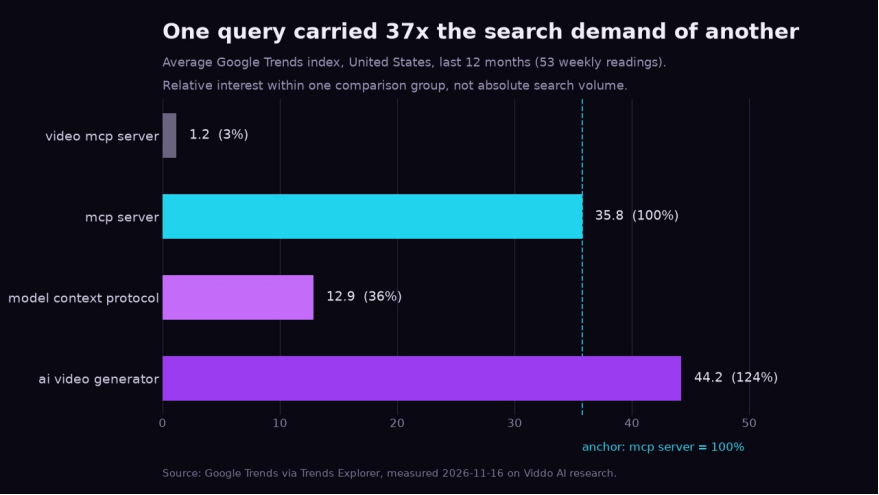
· ai video generator averaged 44.21 on the Trends index.
· model context protocol averaged 12.87, about 36% of the anchor.
· video mcp server averaged 1.19 in the same comparison.
· mcp server for video generation recorded zero nonzero weeks.
The wider term was worth roughly 37 times the narrow one. We had been treating them as comparable because both sounded like the same market.
Copyable Template: The Keyword Brief We Use
Every page starts with this block filled in. It takes a few minutes and it stops the decision from being revisited on a hunch.
· Primary term the exact query this page targets.
· Cluster the other terms this same page covers.
· Intent informational, commercial or transactional.
· Format the shape the live SERP rewards.
· Demand evidence the Semrush, autocomplete and SERP checks, with dates.
· Competing pages the current top results for the query.
· Decision build, reshape an existing page, or do not build.
· Owner and review date when this gets re-checked.
FAQ
Is Semrush keyword research still worth it in 2026?
Yes, but not on its own. Semrush gives you volume, difficulty, intent, CPC and competitor gaps across a large multi-geo database, which no free tool matches. Confirm every candidate against live autocomplete and the live SERP before you build.
Do I need a Semrush subscription to run this workflow?
The structure is free. Pull autocomplete from Google, read the live SERP, and use free volume checkers for a first pass. Semrush earns its cost at the filtering and competitor-gap stages.
· We run this workflow at Viddo AI on every page we publish.
· Our MCP server pages came out of the same process.
How many keywords should a page target?
One primary term per page, with the rest of the cluster covered by H2s and FAQ answers inside that page. We stopped writing one page per keyword after we saw how thin the results became for overlapping variants.
How often should I redo keyword research?
Every quarter for stable topics, and every time a new model ships if your page covers model names. Model keywords decay quickly, since the model that ranked yesterday is often not the model people search for this month.
Should I write for the AI Overview or for the traditional results?
Both, because the sources overlap. Google pulls from a small set of pages when it generates an answer, so the same clear, factual, well-structured page can earn the citation and the ranking.
How do you pick a keyword difficulty threshold?
Set it against your site's real authority, not a rule of thumb. For newer or lower-authority domains we start under 30 to 49, then judge each candidate by the live SERP, because the score does not know what is already ranking in front of you.
What about tools other than Semrush for keyword research?
The stages transfer to Ahrefs, Moz and Google Search Console. The workflow is the value, not the vendor, since the expensive mistakes are thinking one source is enough and building a page before reading the SERP.
Start With the Tools, Keep the Method
Semrush supplies the numbers, but the workflow decides what you build. The rule we keep coming back to is simple: confirm demand in more than one place, match the format the SERP already rewards, and write down why you chose it.
If you are building pages for AI video, image or audio models, you can test the demand yourself in the same workspace where those models run.
· Open Viddo AI to generate with Seedance, Veo, Kling, Runway and Midjourney.
· Keyword research for AI video generators for the category overview.
· Our prompt guide and Seedance workflow tutorial cover the craft side.