

About Viddo AI: All-in-One AI Video, Image & Audio Platform
November 27, 2026 | Ryan Carter
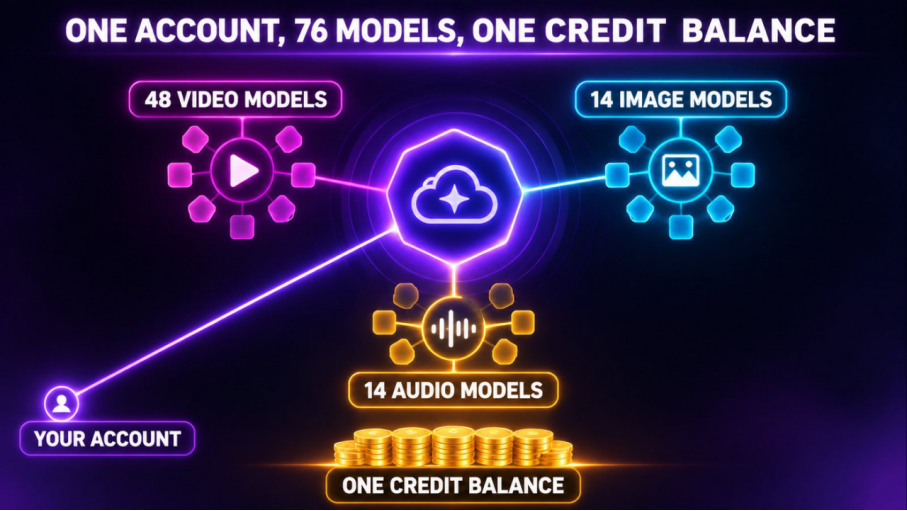
Viddo AI is an all-in-one AI media platform that puts an AI video generator, an AI image generator, and an AI audio studio inside one workspace. Instead of holding separate subscriptions with every model lab, you pick from one catalogue of 76 models and pay only for what you actually generate.
The platform's own homepage reports 2.5 million users across more than 70 countries, and it runs a public Model Context Protocol server so AI agents can drive the same catalogue.
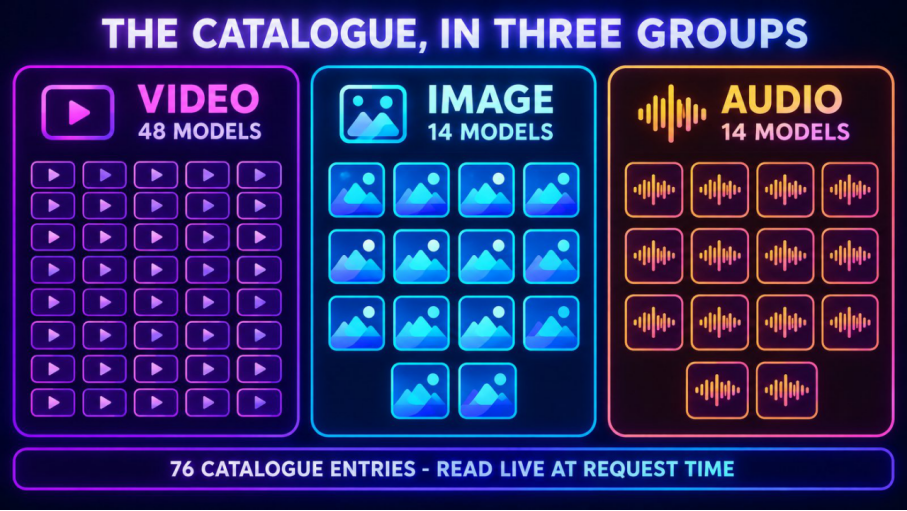
· 76 catalogue entries, split across 48 video, 14 image, and 14 audio models
· More than 100 preset effects for lip sync, motion control, transitions, and avatars
· One login and one credit balance covering every model and tool
· Reference pricing starting at $0.0115 per second of generated video
· Commercial use and watermark-free output on paid plans
· A web app plus a native iOS app for iPhone and iPad
What Viddo AI Is
Viddo AI is an all-in-one AI media platform for generating and editing videos, images, voice, and music, with more than 100 preset effects layered over a multi-model catalogue.
One account covers text to video, image to video, video to video, text to image, image to image, text to speech, voice cloning, music generation, and sound effects. Every job draws down the same credit balance.
One note on the name, because it matters for a brand search.
Viddo AI is an AI creation company registered in Hong Kong. It is not to be confused with VDO.AI, an unrelated advertising technology company. If you searched that name and landed on ad monetization software, you are in the wrong place.
· Video, image, and audio models from Google, OpenAI, ByteDance, Kling, Runway, and Midjourney
· One account and one credit balance behind every tool
· Reference images and video attached directly inside a prompt
· Output ratios from 21:9 down to 9:16, including 16:9, 4:3, 3:4, and 1:1
· Seventeen interface languages, including English, Japanese, Spanish, and Simplified Chinese
· An image canvas for editing results without leaving the page
Why One AI Video Generator Instead of Many Subscriptions
Model labs ship their own interfaces, billing systems, and export buttons. Running one production shot across three of them means three accounts and three invoices.
Viddo AI takes the opposite approach. Models sit behind one interface and one balance, so moving from Kling to Veo is a dropdown change, not a migration. The catalogue is read live at request time, which matters when model versions turn over fast.
· One checkout instead of a subscription per model lab
· The same prompt, references, and settings across every engine
· Side-by-side comparison of the same brief through two models
· A reusable voice reference across models that accept audio
What Is Inside the Model Catalogue
The platform's own site advertises 20+ AI models. The live catalogue its server exposes returns 76 entries, because it counts variants and platform tools separately from headline names.
Video Models (48 Entries)
Video is the largest group, covering both flagship engines and the platform's own tools.
· Seedance 2.5, 2.0, 2.0 Fast, and 2.0 Mini from ByteDance
· Kling V4.0, V3.0, V2.6, V2.6 Master, and V2.1
· Runway Gen-4 and Runway Aleph
· Google Veo 3, 3.1, 3.1 Lite, and 3.1 Fast
· Wan 3.0, 2.7, 2.6, 2.5, and 2.2 Animate
· MiniMax H3, Hailuo 2.3, Hailuo 02, Pixverse V6, and Flux 3.0
· Sora 2, Sora 2 Pro, and Sora 2 Pro Storyboard
· Gemini Omni, Grok Imagine, Grok Imagine V1.5, and Muse Video
· MAGI-2, Vidu Q4 Preview, Vidu Q3 Pro, Vidu Q3 Mix, and Happy Horse 1.1
· Platform tools including Video Extend, Long Video to Shorts, and Video Style Transform
Image Models (14 Entries)
· GPT Image 2.6, 2.5, 2, and 1.5 from OpenAI
· GPT 4o image generation
· Nano Banana, Nano Banana Pro, Nano Banana 2, and Nano Banana 2.1 from Google
· Seedream 5 Pro and Seedream 4.5 from ByteDance
· Grok Imagine, Midjourney, and MOSS Image
Audio Models (14 Entries)
· MiniMax Speech 2.8 HD and MiniMax Speech 2.8 Turbo
· MiniMax Voice Clone for building a custom voice
· Seed Audio 1.0
· Suno, plus instrumental, vocal, mashup, stem separation, and sound effect tools
· Tools for uploading your own audio to cover, extend, or split it
The Tools Around the Models
The catalogue is the engine. The tools around it turn a single clip into a finished piece, and they run on the same balance and the same account.
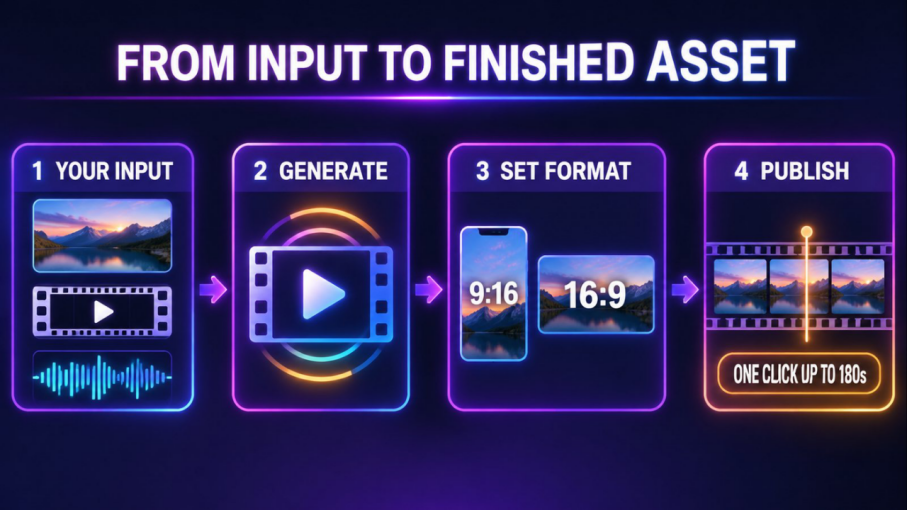
· Text to video, image to video, and video to video for the three starting points
· One-Click Video Creator for multi-scene cuts up to 180 seconds long
· Lip Sync and Motion Control for matching performance to a source
· Video Extend for lengthening a finished clip, Video Transition for cuts
· Long Video to Shorts for repurposing long footage into vertical clips
· AI Avatar, Video Enhancer, and Ads Video for branded output
· Image Canvas for editing a generated still with clicks and doodles
· AI Music Generator, Text to Speech, and Voice Cloning for the audio side
· Sound Effects, Prompt Library, and Video Trimmer as finishing tools
The One-Click Video Creator behaves differently from the other tools. It accepts up to seven reference images and plans the scenes itself, then returns a joined multi-scene cut rather than a single clip that still needs editing.
Two other tools shorten the path from a finished render to a published one. Video Extend lengthens an existing clip indefinitely from a base render. Long Video to Shorts cuts long footage down into vertical clips for social feeds.
How Viddo AI Pricing Works
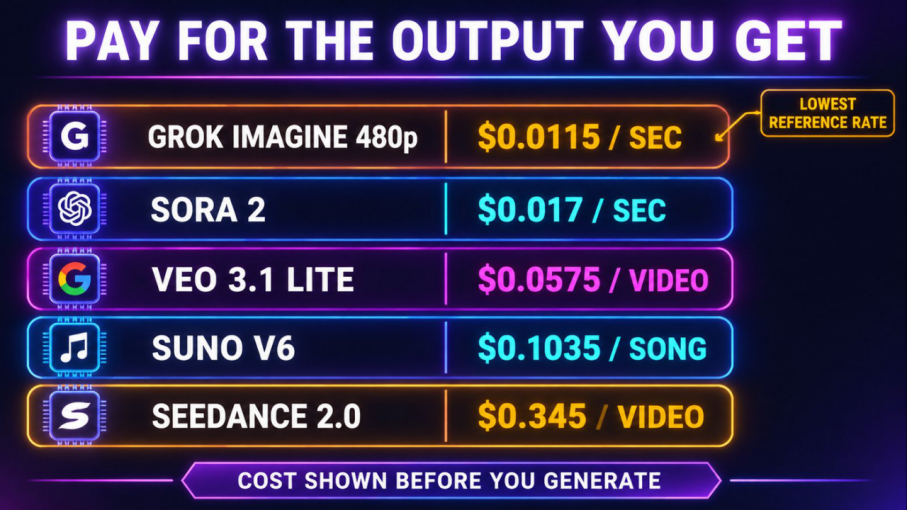
Every model is priced per output unit, and the price is published before you generate. Nothing runs, and no credits are spent, until the model, the parameters, and the cost are confirmed.
Reference rates from the platform pricing page:
· Grok Imagine at 480p, $0.0115 per second
· Muse Video and Sora 2, $0.017 per second
· Grok Imagine at 720p, $0.023 per second
· Veo 3.1 Lite, $0.0575 per video
· Grok Imagine 1.5 at 480p, $0.086 per second
· Suno v6, $0.1035 per song
· Grok Imagine 1.5 at 720p, $0.143 per second
· Seedance 2.0, $0.345 per video
Credits are consumed according to the model, the clip length, the number of outputs, and the resolution, so a longer or higher-resolution render costs more than a short draft. Buying works in three ways: an annual subscription, a monthly subscription, or a one-time credit pack.
Two policies matter for planning a budget. The free plan watermarks its output, and commercial use comes with the paid plans. If a generation fails, the credits are returned to your balance.
Generate From ChatGPT, Claude, and Cursor With Viddo MCP
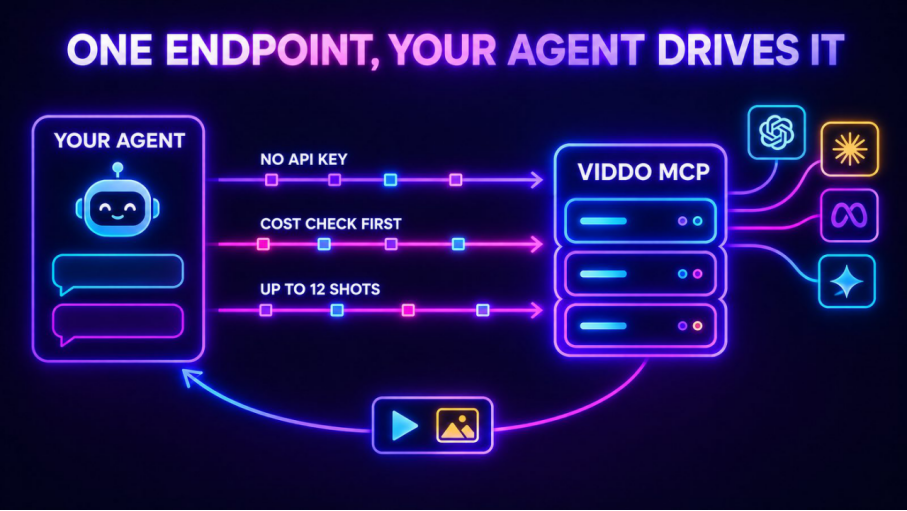
The platform also runs a remote Model Context Protocol server at a fixed address, which lets an AI agent drive the catalogue from inside the assistant or editor you already use.
Rendering takes time, so the server runs jobs in the background while the agent polls for status. Sora 2 in basic mode takes about two to three minutes, while a 10-second HD run typically takes 10 to 20 minutes.
· One fixed endpoint for every video, image, and audio model
· Browser authorization instead of an API key to manage
· The agent reads your balance and estimates cost before any job starts
· Batch requests covering up to twelve shots, each with its own status
· Model-specific parameters, so the agent never guesses a rejected value
· Results return as signed links that expire and can be re-queried
Setup guides are published for Grok, Claude, Gemini, and Cursor. The documented rule is simple: never paste a personal access token into a field that only accepts a static key, and a normal user never needs to supply a client ID or client secret.
Who Is Viddo AI For
The platform is at its best when one person needs several media types without several billing relationships.
· Social creators posting daily across vertical and landscape formats
· Marketers producing ad variants for testing
· Small studios needing a fast draft before committing to a full render
· Music makers who want a song, a voice, and a visual in one session
· Developers wiring media generation into an existing agent workflow
The AI video generator comparison is worth a look if you are still deciding between engines. The model pages for Veo 3.1, Seedance 2.5, and Kling 4.0 go deeper on what each one handles well.
What Viddo AI Is Not Good At
Honest limits are easier to plan around than surprises, so here is where this platform is the wrong tool.
· Long-form storytelling with frame-by-frame timeline control
· Work that needs a keyframe editor rather than a prompt
· Projects where a few minutes of render time per clip is unacceptable
· Budgets that do not fit a per-generation credit model
· Situations where you need frame-exact edits across many shots
For those jobs, a dedicated video editor or a direct model subscription is the better fit. Viddo AI covers the fast iteration and multi-asset side of production well.
How to Get Started With Viddo AI
· Create an account and pick a free or paid plan
· Choose a starting point: text to video, image to video, or video to video
· Upload a reference image or video if the model supports one
· Set the ratio, resolution, and duration for the shot
· Review the credit cost shown on the generate button
· Generate, then regenerate in the same thread with a revised prompt
· Move the result into an effect tool, a trimmer, or a longer cut
The prompt library holds tested starting points, and the operation tutorial walks through the interface tool by tool.
About the Company Behind Viddo AI
The company is registered in Hong Kong and publishes its legal documents in full.
Viddo AI is operated by HONGKONG BEAUTY DANCE COMPANY LIMITED, registered at Flat A, 15/F, Goldfield Industrial Building, 140-150 Tai Lin Pai Road, Kwai Chung, Hong Kong. The contact address for support and media enquiries is contact@viddo.ai.
· The user agreement and privacy policy are published in full
· Official accounts on TikTok and YouTube
· A native iOS app for iPhone and iPad
· No watermarking on paid plans, and commercial use included
The iOS app is listed on the US App Store as AI Video Generator - Viddo AI, with a 4.55 out of 5 rating across 208 ratings at the time of writing.
Frequently Asked Questions About Viddo AI
Is Viddo AI free to use?
Viddo AI has a free plan with watermark output, and paid plans unlock watermark-free exports and commercial use. Credits are metered on every tier of the AI video generator.
Does Viddo AI add watermarks to free videos?
Yes. Output generated on the free plan carries a Viddo AI watermark. Paid plans remove it and add commercial usage rights.
How many AI models does Viddo AI have?
The live catalogue returns 76 entries: 48 video models, 14 image models, and 14 audio models. An AI video generator lineup this broad changes as new models land.
How much does a video cost on Viddo AI?
Pricing is per output unit, starting at $0.0115 per second for Grok Imagine at 480p. Veo 3.1 Lite starts at $0.0575 per video and Seedance 2.0 at $0.345.
Does Viddo AI use its own AI models?
No. Viddo AI is an aggregator. It integrates models from Google, OpenAI, ByteDance, Alibaba, Grok, Kling, Runway, Vidu, MiniMax, ElevenLabs, and Midjourney behind one account.
Can I use Viddo AI for commercial work?
Yes. Commercial use is included with paid plans. Credits are also returned if a generation fails.
Do I need an API key to use Viddo AI with an AI agent?
No. The MCP server authorizes through the browser with OAuth, so there is no key to create, rotate, or paste into a config file.
Can Viddo AI make long videos?
Yes. The One-Click Video Creator accepts up to seven reference images and returns a multi-scene cut of up to 180 seconds in a single generation.
Final Thoughts
Viddo AI is an aggregator first and a generator second. The value is not that it trains its own model. It is that one account reaches 76 of them, one balance pays for all, and the tools turn one shot into a finished asset.
· Start with the free plan and one model
· Run the same brief through two engines and compare
· Check the pricing page before you commit
· Connect the MCP server if you already work inside an AI agent
· Send questions to the contact page