
Seedance 2.0: As low as $0.345 per video
Veo3.1 Lite: As low as $0.0575 per video

Viddo AI is an advanced all-in-one AI video and image generation platform that lets you quickly and easily create stunning videos and images from various inputs. These AI Model powered by Google, OpenAI, Grok AI, ByteDance, Alibaba, Kling, Runway, Vidu, Minimax, Elevenlabs, Midjourney,and so on.
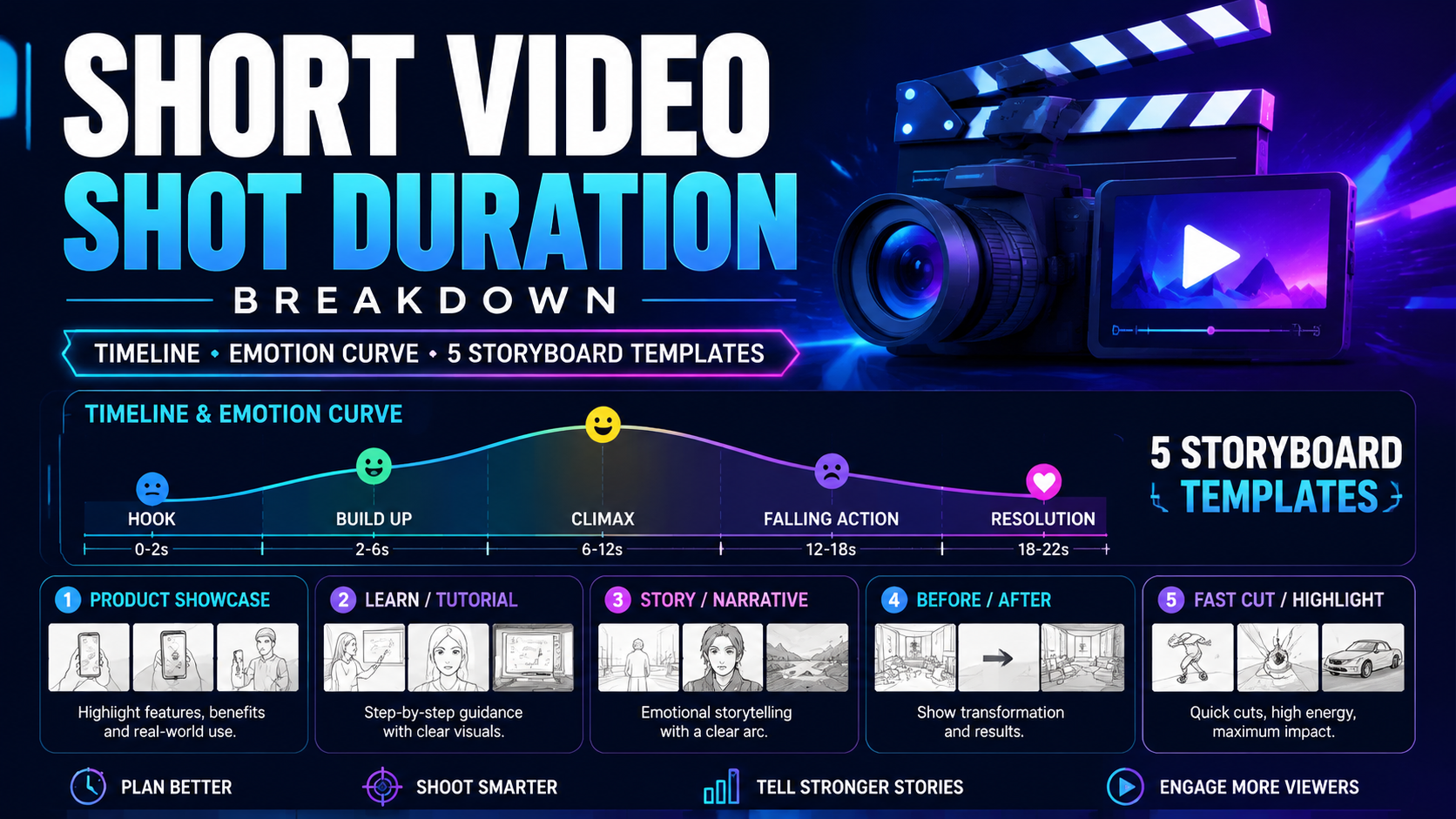
How do you scientifically allocate the duration of each shot when generating short videos with Viddo AI? This article provides a complete shot duration methodology + 5 content templates + ready-to-use prompt examples.
When you generate a short video with Viddo AI, all you need to do is type a text description (a prompt) and the AI generates the visuals for you. But most creators overlook one critical question: how long should each shot actually be?
Too long, and viewers scroll away. Too short, and your message doesn't land. This guide gives you a proven framework for splitting shot duration — so every video you create with Viddo AI hits the right rhythm.
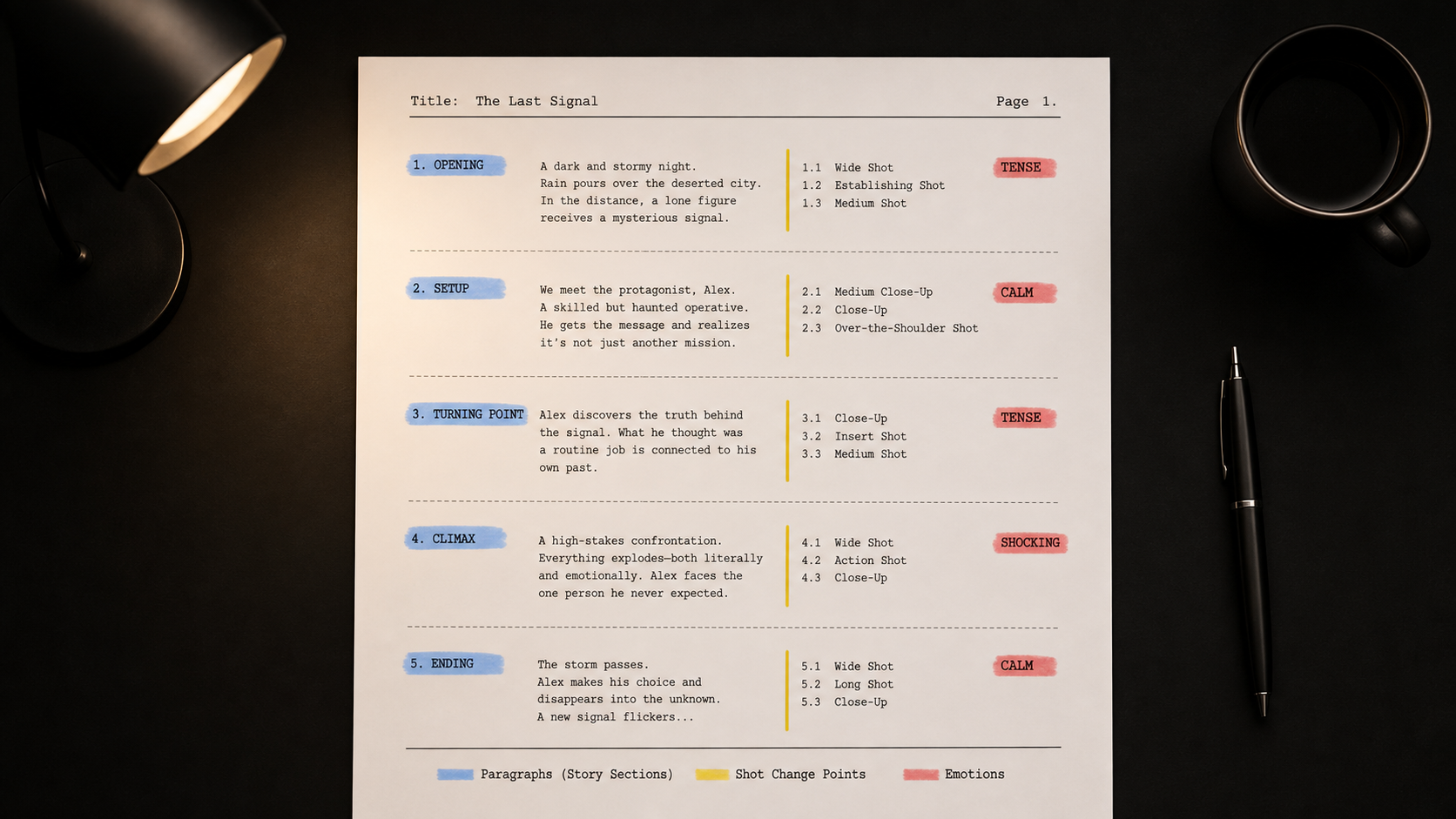
When you get a script, don't open your editing software right away. Grab a pen and do three things on the script first:
① Mark the Segments — Break the script into narrative blocks
Every short video has natural narrative segments: Opening, Setup, Twist, Climax, and Ending. Highlight each segment in a different color.
② Tag the Shots — Which visuals need their own shot?
The rule: if the shot size changes (close-up to wide), the location changes (indoor to outdoor), the character changes, or the action changes — that's a new shot.
③ Define the Emotion — What's the mood of each shot?
Tense? Calm? Awe-inspiring? Warm? The emotion determines whether a shot should be short or long.
How Do You Do This in Viddo AI?
Viddo AI's Text-to-Video feature lets you input a shot description and generate each shot directly. Once you've completed the three steps above — mark segments, tag shots, define emotions — you can feed each shot description into Viddo AI as a separate prompt, generate each clip independently, then stitch them together into a complete video.
For example, here's how you'd write the hook shot of a product ad:
"Extreme close-up of a product surface, cold light on one side, 1 second, slow push-in, cinematic 4K"
The first anchor for shot duration splitting is the total video length. Different platforms prefer different lengths, which directly determines how many cuts you can make and how long each one should be.
|
Platform |
Recommended Length |
Rhythm Style |
Shot Density |
|
TikTok |
15–60 sec |
Fast-paced, strong hook, high density |
~4–6 shots per 15 sec |
|
YouTube Shorts |
30–60 sec |
Medium pace, Hook-Content-CTA |
~5–7 shots per 30 sec |
|
Instagram Reels |
15–90 sec |
Polished, aesthetic, trending audio |
~4–6 shots per 15 sec |
|
AI Short Drama (single episode) |
45–70 sec |
Fast-paced, strong conflict, cliffhanger ending |
~8–12 shots per episode |
|
�� Viddo AI Tip: Viddo AI generates video clips in 5-second and 15-second durations. If your total video is 30 seconds, you'll need 2–6 clips stitched together. The good news: Viddo AI's Video Extend feature can continue a short clip to any length — no manual splicing needed. |
|||
This is the #1 question beginners ask: how many shots should a 30-second video have?
Number of Shots ≈ Total Duration (sec) ÷ Average Shot Duration (sec)
The average shot duration depends on your content type:
|
Content Type |
Avg Shot Duration |
~Shots in 30 sec |
~Shots in 60 sec |
|
High-energy ad / fast-cut montage |
1–2 sec |
15–30 |
30–60 |
|
AI short drama / narrative |
3–5 sec |
6–10 |
12–20 |
|
Product showcase / e-commerce |
2–4 sec |
8–15 |
15–30 |
|
Educational / talking head |
3–6 sec |
5–10 |
10–20 |
|
Mood / ambient piece |
4–8 sec |
4–8 |
8–15 |
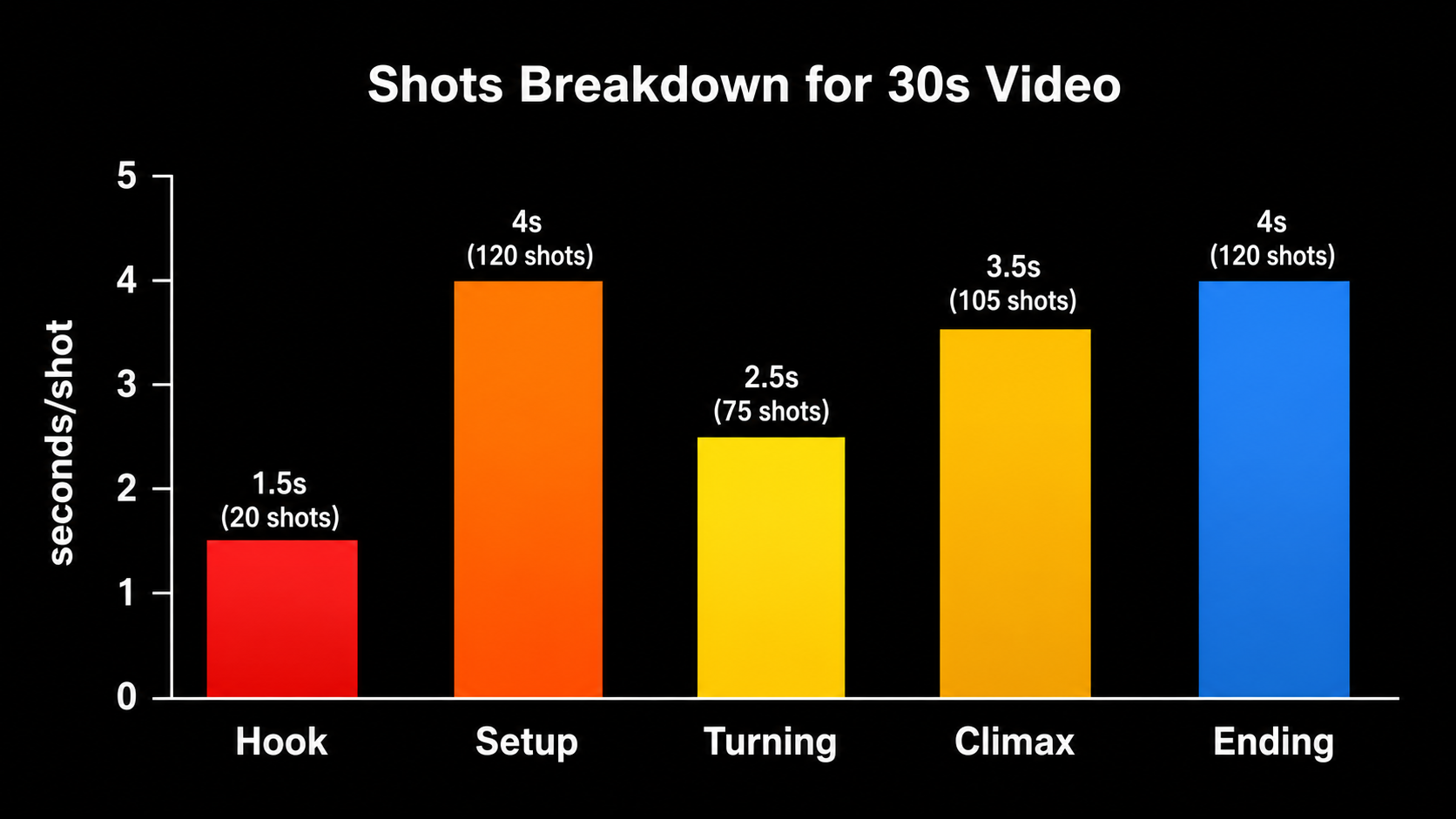
The quick formula gives you a total, but in practice, different segments need different shot densities. Core principles:
• Opening (Hook): Shortest, densest shots. 1–2 sec/shot, rapid cuts to create impact.
• Setup: Medium shots. 3–5 sec/shot, give viewers time to understand the context.
• Twist / Climax: Flexible. Tense moments = 1–2 sec fast cuts. Awe-inspiring moments = 4–6 sec long shots.
• Ending: Longer shots. 3–5 sec, give viewers time to absorb and take action.
The shot type itself "tells" you how long it should be. A close-up that drags to 5 seconds bores viewers. A wide shot that gets only 1 second leaves them confused.
|
Shot Type |
Suggested Duration |
Why This Duration |
|
Extreme close-up (ECU) |
1–2 sec |
High detail impact, low info volume — 2 seconds is enough |
|
Close-up (CU) |
2–3 sec |
Focuses on emotion or key info — viewers need reaction time |
|
Medium close-up (MCU) |
3–5 sec |
Primary shot for dialogue and talking heads — must match speech length |
|
Medium shot (MS) |
3–5 sec |
Shows action and character relationships — moderate info density |
|
Wide shot (WS) |
3–6 sec |
Establishes spatial context — viewers need time to "scan" the frame |
|
Extreme wide / establishing |
4–8 sec |
Atmosphere-building — high info volume but slower pace |
|
Transition / cutaway |
1–2 sec |
Used only for transitions — keep it short |
|
Action shot |
1–3 sec |
Fast-paced movement — dragging it out kills the impact |
|
Reaction shot |
1–2 sec |
Captures a fleeting expression — shorter = more powerful |
|
Apply This in Viddo AI: These duration references go straight into your prompts. Viddo AI's models (Seedance 2.0, Veo 3.1, etc.) automatically adjust camera movement speed and pacing based on your duration description. Prompt template: [Shot Type] of [Subject], [Duration] seconds, [Camera Movement], [Style] Example: "Cinematic medium shot of a woman walking through a rain-soaked Tokyo street, 4 seconds, slow tracking shot, moody neon lighting" |
||
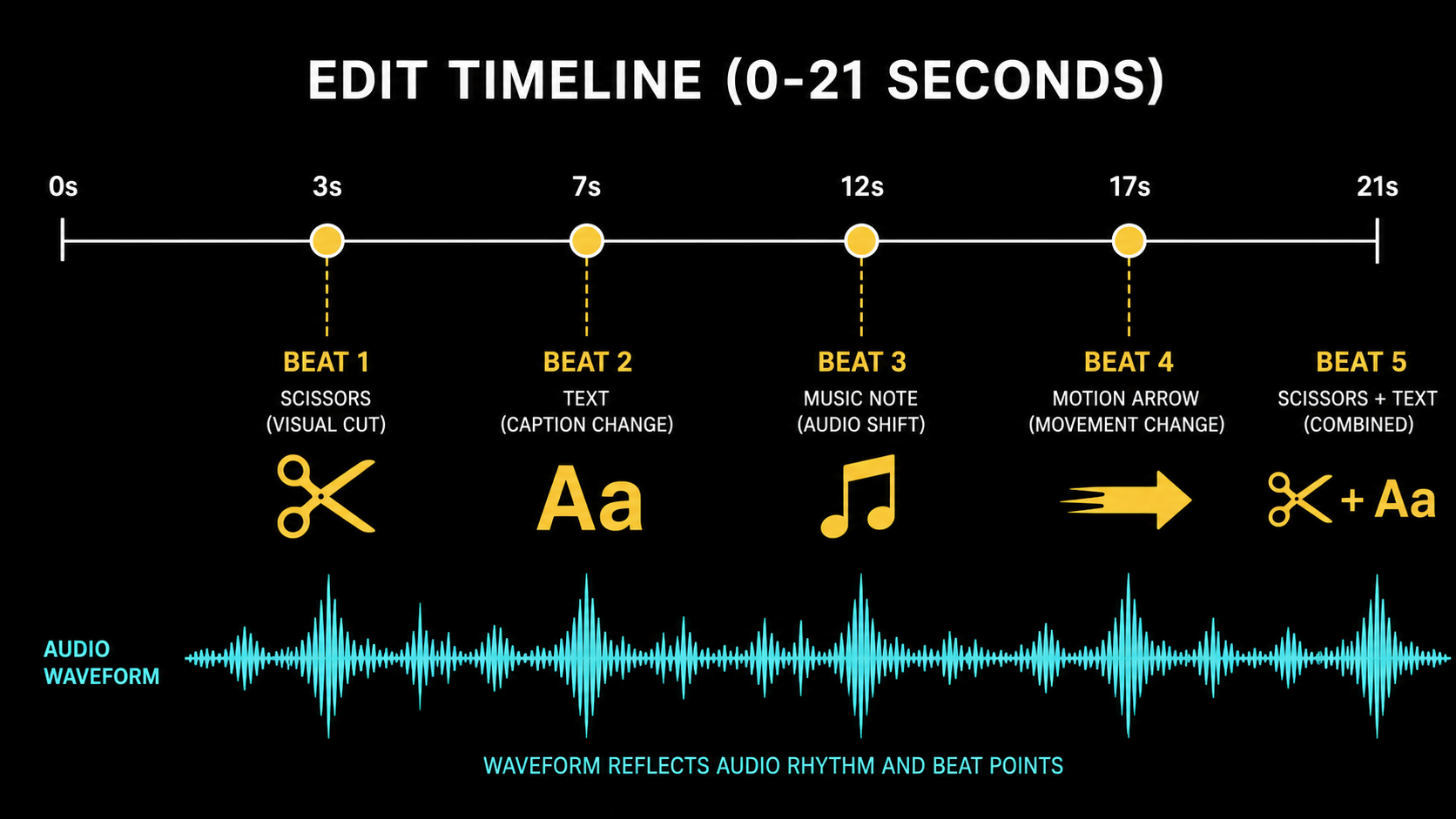
This is one of the most important pacing rules in short-form video, derived from data analysis of millions of viral videos on TikTok, YouTube Shorts, and Instagram Reels:
Every 3–7 seconds, viewers make a subconscious "stay or swipe" decision.
This means: if a shot lingers beyond 7 seconds without new visual stimulation (a cut, text appearing, a music shift, an action pivot), viewers start dropping off.
|
Platform |
Optimal Beat Interval |
Pacing Style |
|
TikTok |
3–5 sec/beat |
Most aggressive — viewers swipe fastest, needs densest visual changes |
|
Instagram Reels |
4–6 sec/beat |
Medium pace — slightly higher tolerance, values polished transitions |
|
YouTube Shorts |
5–7 sec/beat |
Most forgiving — allows more breathing room, but still needs continuous changes |
A beat change doesn't have to be a hard cut. Any of the following counts as an attention-refreshing "beat":
• Visual change: cut, angle switch, B-roll insert
• Text change: new subtitle pop-up, keyword highlight, number animation
• Audio change: music shift, sound effect, speech pace change, pause
• Motion change: push/pull/pan/tilt, speed ramp, subject movement
Pro tip: Stack two or more changes simultaneously (e.g., "shot cut + subtitle pop") — it's far more effective than a single change.
How to Achieve the 3–7 Second Beat in Viddo AI?
The most efficient approach: write a separate prompt for each "beat," generate them independently in Viddo AI, then assemble them in your editor according to the beat map. Keep each prompt to 1–2 sentences with clear duration and movement.
Why this works: each shot is individually optimized, so AI generation quality is higher. If you're unhappy with a single shot, you can regenerate just that one — no need to redo the entire video.
Whether your video is 15 seconds or 60 seconds, you can apply this 4-part framework. The only difference is how many seconds and shots each section gets.
|
Segment |
% of Total |
15-sec Video |
30-sec Video |
60-sec Video |
Core Task |
|
① Hook |
10–15% |
0–2 sec |
0–4 sec |
0–8 sec |
Grab attention in 3 seconds |
|
② Setup |
25–30% |
2–6 sec |
4–12 sec |
8–22 sec |
Build context, pose a question |
|
③ Climax |
35–40% |
6–12 sec |
12–22 sec |
22–44 sec |
Core content, emotional peak |
|
④ Ending |
15–20% |
12–15 sec |
22–30 sec |
44–60 sec |
Wrap up, call to action |
The hook is the most important 3 seconds of your entire video. Design principles:
• Second 1: Must deliver a visual punch (conflict, suspense text, unexpected action)
• Seconds 2–3: Amplify the punch (close-up push, bold text slam, sound effect hit)
• Hook shots: 1–2 sec each, rapid-cut 2–3 shots
Common hook types and durations:
|
Hook Type |
Duration |
Example |
|
Conflict opener |
1 sec |
Slamming a phone down, ripping a contract — no dialogue, ambient sound only |
|
Suspense question |
2–3 sec |
"Did you know 90% of videos fail in the first 3 seconds?" + subject stares into camera |
|
Visual contrast |
1–2 sec |
Before/After split-screen comparison |
|
Stat shock |
1 sec |
"97% of creators don't know this" + number zoom animation |
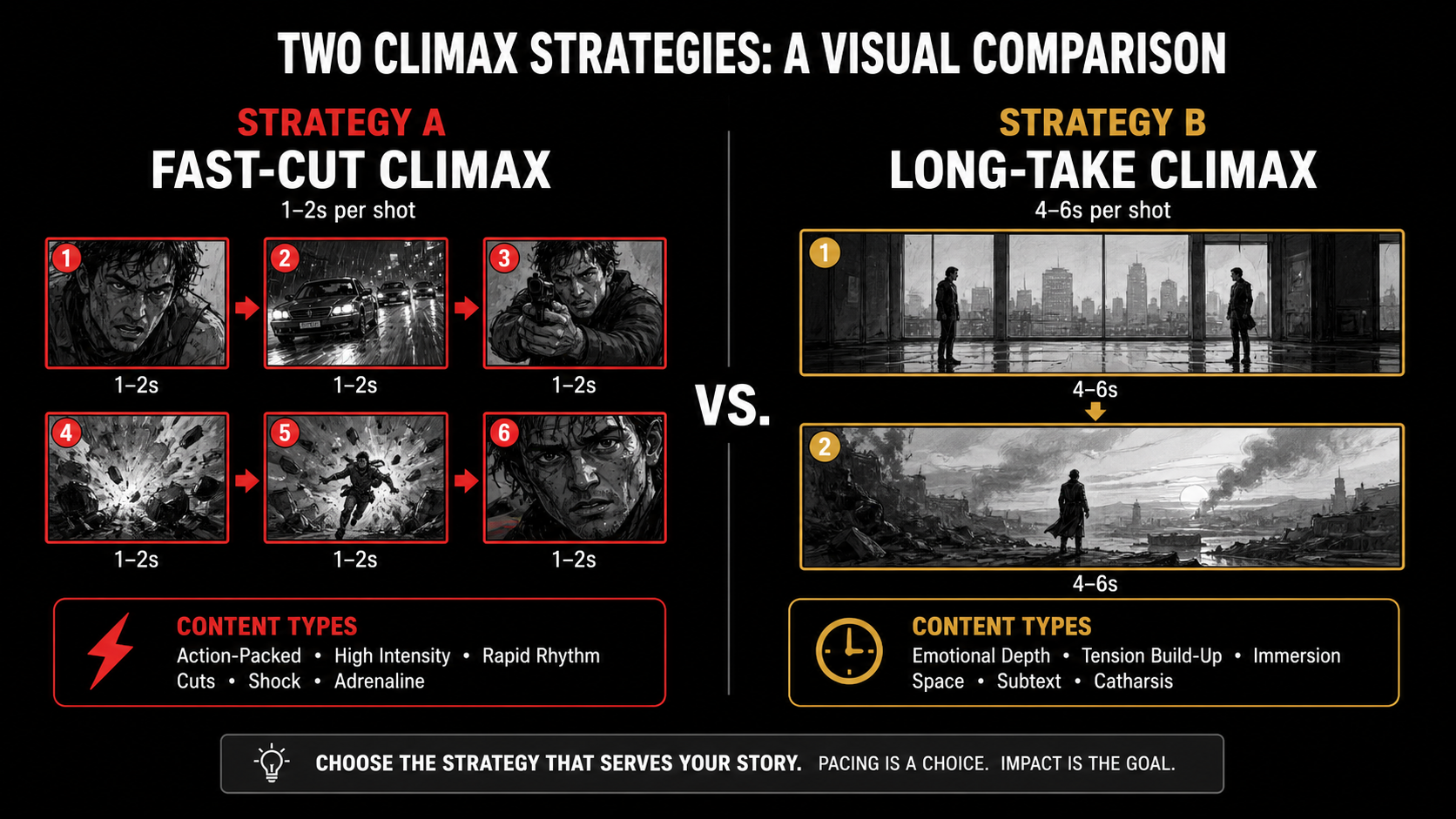
The climax is where viewers decide whether to finish the video. Two strategies:
Strategy A: Fast-Cut Climax (for tension, conflict, action)
• Compress shots to 1–2 sec each
• Rapid cuts create urgency
• Sync with beat drops in upbeat music
Strategy B: Long-Shot Climax (for emotion, awe, atmosphere)
• Extend shots to 4–6 sec each
• Use push-ins or slow motion to amplify emotion
• Sync with melodic crescendos in the soundtrack
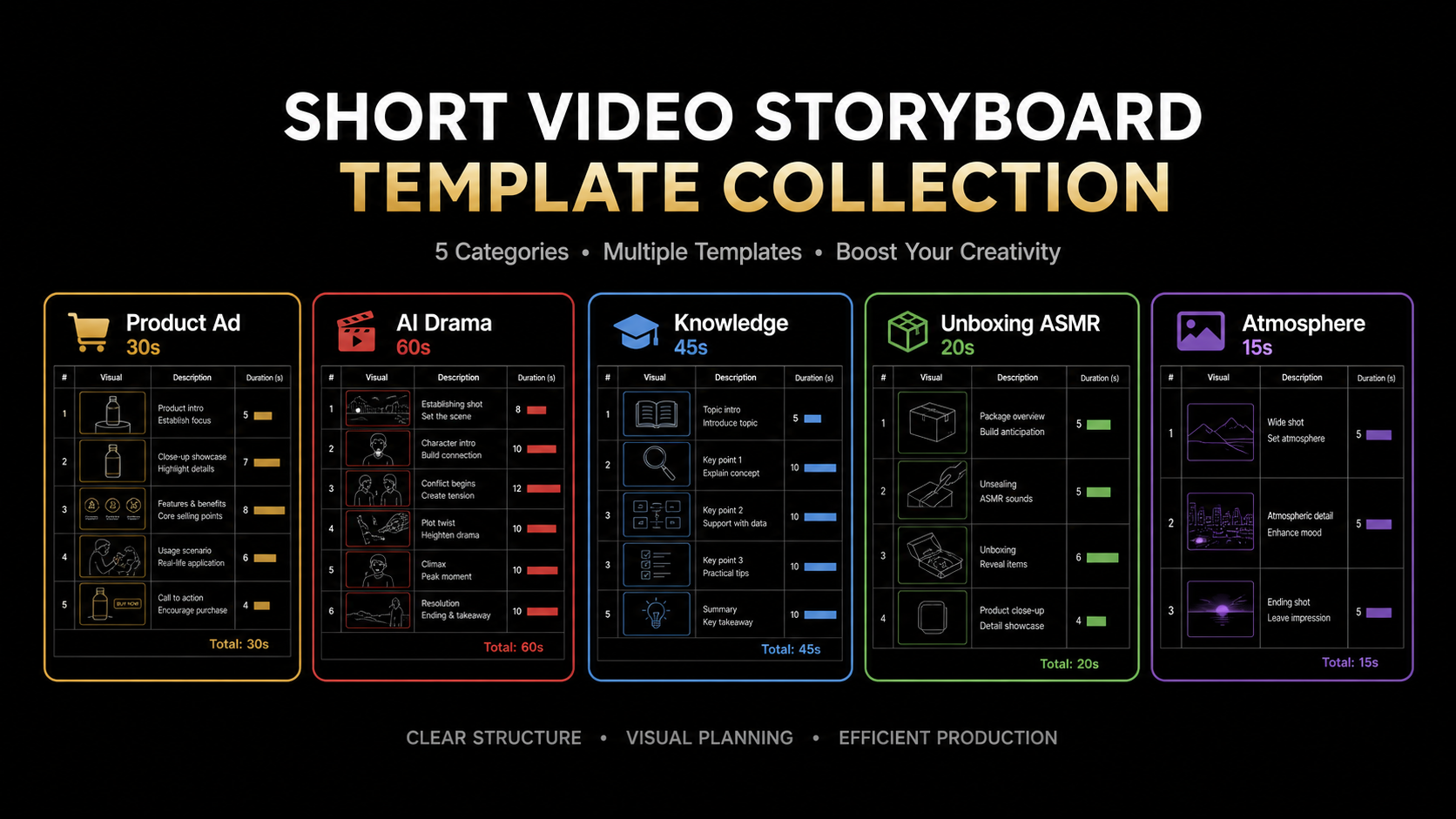
Below are five complete shot-by-shot duration breakdowns for common AI short video types. Use them as templates directly.
|
Shot # |
Time |
Shot Type |
Visual Content |
Duration |
Pace |
|
1 |
0–1 sec |
ECU |
Product material edge, single cold light source |
1 sec |
Fast |
|
2 |
1–4 sec |
CU→MS |
Slow push-in, product details come into focus |
3 sec |
Medium |
|
3 |
4–8 sec |
WS |
Quick pull-back, full product + use environment |
4 sec |
Fast |
|
4 |
8–14 sec |
MS |
Person using product, natural light, lifestyle feel |
6 sec |
Medium |
|
5 |
14–18 sec |
CU |
Core selling point close-up (button/screen/port) |
4 sec |
Slow |
|
6 |
18–22 sec |
MS |
Person smiling / satisfied reaction shot |
4 sec |
Medium |
|
7 |
22–26 sec |
WS |
Brand logo + product family shot |
4 sec |
Slow |
|
8 |
26–30 sec |
Text card |
Price/offer info + call-to-action |
4 sec |
Medium |
Rhythm: 1s hook → 3s detail → 4s wide → 6s usage → 4s selling point → 4s reaction → 4s brand → 4s CTA
Viddo AI Prompt Examples (Product Ad)
Shot 1 (Hook):
"Extreme close-up of a smartwatch edge, cold blue light, 1 second, slow push-in, product commercial, 4K cinematic"
Shot 3 (Wide):
"Wide shot of smartwatch on a wrist in a modern kitchen, natural daylight, camera pulls back, 4 seconds, smooth dolly out, lifestyle commercial"
Shot 4 (Usage):
"Medium shot of person using smartwatch while jogging in a park, golden hour light, 6 seconds, steady follow shot, energetic mood"
|
Shot # |
Time |
Shot Type |
Visual Content |
Duration |
Pace |
|
1 |
0–1 sec |
CU |
Conflict shot (slamming object / shocked expression) |
1 sec |
Ultra-fast |
|
2 |
1–3 sec |
Close shot |
Protagonist reacts: "What did you just say?" |
2 sec |
Fast |
|
3 |
3–8 sec |
MS |
Antagonist enters, dialogue sets up the conflict |
5 sec |
Medium |
|
4 |
8–13 sec |
Shot/reverse shot |
Dialogue clash (2–3 rounds, ~2 sec each) |
5 sec |
Fast |
|
5 |
13–18 sec |
MS→CU |
Key info revealed, camera pushes to protagonist's face |
5 sec |
Building |
|
6 |
18–25 sec |
WS |
Scene shift / situation reversal |
7 sec |
Medium |
|
7 |
25–33 sec |
MS |
Protagonist makes a decision / takes action |
8 sec |
Medium |
|
8 |
33–42 sec |
CU+MS |
Climax action / emotional eruption |
9 sec |
Fast→Slow |
|
9 |
42–50 sec |
WS→CU |
Result shown, camera pushes to key detail |
8 sec |
Slow |
|
10 |
50–55 sec |
Close shot |
Protagonist's expression (smirk/shock/smile) |
5 sec |
Slow |
|
11 |
55–60 sec |
CU/text |
Cliffhanger: "But then…" / next episode teaser |
5 sec |
Medium |
Rhythm: 1s conflict hook → 7s conflict build → 10s dialogue clash → 15s climax → 13s resolution → 5s cliffhanger
Viddo AI Prompt Examples (AI Short Drama)
Shot 1 (Conflict Hook):
"Close-up of a hand slamming a contract on a desk, dramatic side lighting, 1 second, static shot, thriller mood, cinematic"
Shot 8 (Climax):
"Medium shot of protagonist making a dramatic decision, emotional lighting, tears visible, 9 seconds, slow push-in then hold, dramatic"
|
Shot # |
Time |
Shot Type |
Visual Content |
Duration |
Pace |
|
1 |
0–3 sec |
Close shot |
Hook question: "Ever wonder why X happens?" |
3 sec |
Medium |
|
2 |
3–8 sec |
Screen/chart |
Problem visualization: data/case study |
5 sec |
Medium |
|
3 |
8–15 sec |
MS + whiteboard |
Principle explanation step 1 |
7 sec |
Slow |
|
4 |
15–22 sec |
CU + comparison |
Comparison demo: right vs. wrong |
7 sec |
Medium |
|
5 |
22–30 sec |
MS |
Principle explanation step 2 (core insight) |
8 sec |
Slow |
|
6 |
30–37 sec |
Screen/demo |
Hands-on demo / step-by-step walkthrough |
7 sec |
Medium |
|
7 |
37–42 sec |
Close shot |
Summary + emphasize key takeaway |
5 sec |
Medium |
|
8 |
42–45 sec |
Close shot + text |
Follow / comment / save CTA |
3 sec |
Fast |
|
Shot # |
Time |
Shot Type |
Visual Content |
Duration |
Pace |
|
1 |
0–2 sec |
Top-down |
Box on table, fingers gently touching the lid |
2 sec |
Slow |
|
2 |
2–5 sec |
CU |
Slowly lifting the lid, paper tearing sound |
3 sec |
Slow |
|
3 |
5–8 sec |
MS |
Product lifted out of box, light shift |
3 sec |
Medium |
|
4 |
8–11 sec |
Macro |
Product surface texture / logo detail |
3 sec |
Slow |
|
5 |
11–14 sec |
CU |
Product buttons / ports showcase |
3 sec |
Medium |
|
6 |
14–17 sec |
MS |
Product placed in its use environment |
3 sec |
Slow |
|
7 |
17–20 sec |
WS |
Final display, brand reveal |
3 sec |
Slow |
|
Shot # |
Time |
Shot Type |
Visual Content |
Duration |
Pace |
|
1 |
0–4 sec |
Wide |
Full environment, natural light shift, no people |
4 sec |
Ultra-slow |
|
2 |
4–7 sec |
MS |
Person walks into frame, wind catches their coat |
3 sec |
Slow |
|
3 |
7–10 sec |
CU |
Face/hand detail, shallow depth of field |
3 sec |
Slow |
|
4 |
10–13 sec |
Wide |
Person's silhouette merges with environment, slow pull-back |
3 sec |
Slow |
|
5 |
13–15 sec |
Empty shot |
Light shift / leaves / water surface, fade to black |
2 sec |
Ultra-slow |
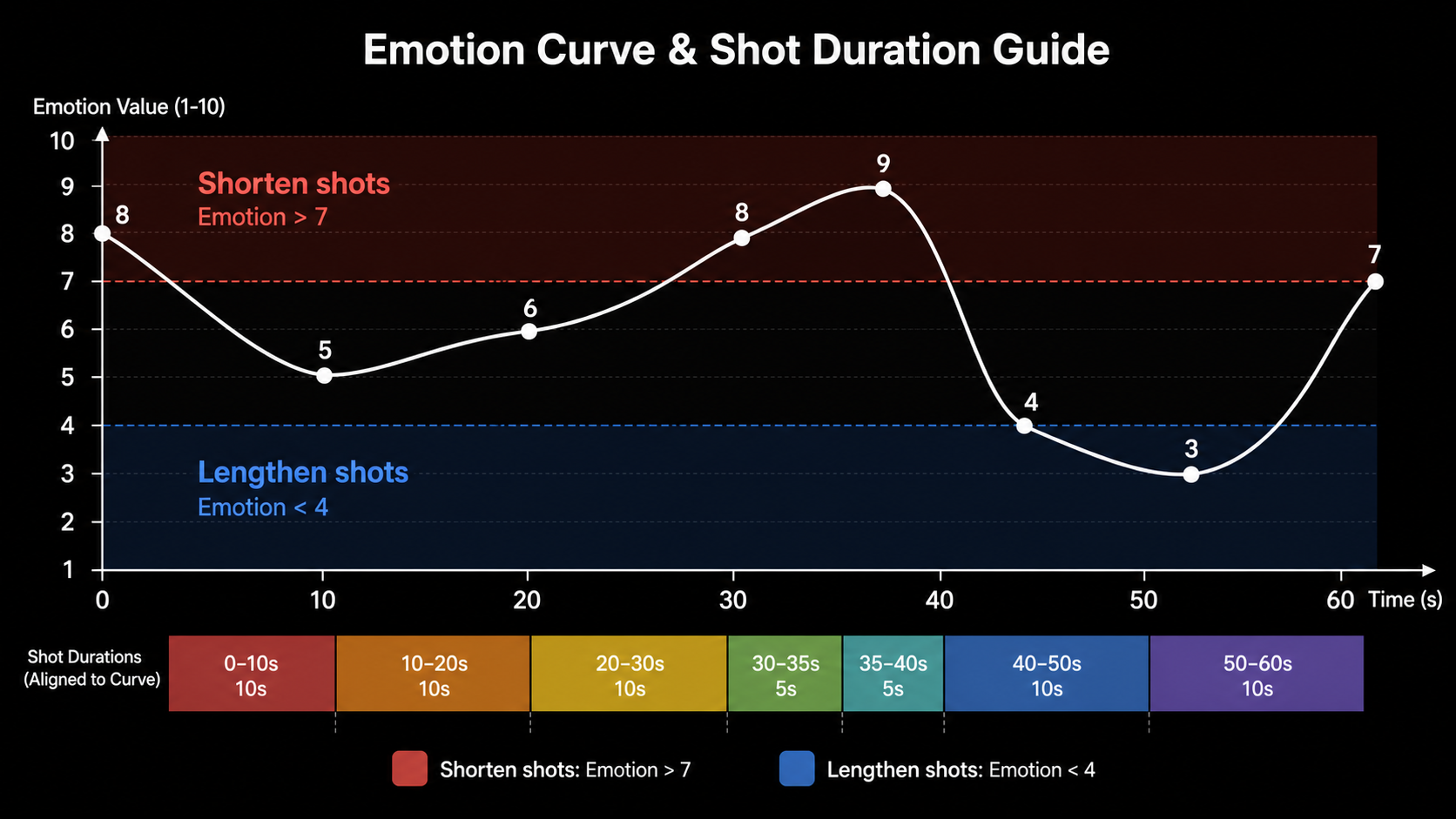
Once you've completed the initial duration allocation using the templates, use an "emotion curve" for final calibration. The principle is simple:
The more tense the emotion, the shorter the shot. The calmer the emotion, the longer the shot.
Next to your storyboard, assign each shot an emotion score (1–10):
• 1–3: Calm, relaxed, everyday
• 4–6: Curious, anticipatory, building
• 7–8: Tense, excited, conflicting
• 9–10: Explosive, awe-inspiring, peak
Then check: are high-emotion shots short enough? Are low-emotion shots long enough?
|
Emotion Score |
Emotional State |
Suggested Shot Duration |
Camera Language |
|
1–3 |
Calm / relaxed |
4–8 sec |
Locked-off / slow push / long take |
|
4–5 |
Curious / anticipatory |
3–5 sec |
Medium push / steady tracking |
|
6–7 |
Tense / conflicting |
2–3 sec |
Fast cuts / handheld follow |
|
8–9 |
Explosive / peak |
1–2 sec |
Ultra-fast cut / flash white / motion blur |
|
10 |
Extreme awe |
0.5–1 sec or 4–6 sec |
Ultra-fast (impact) or ultra-slow (immersion) |
|
�� A score of 10 has two opposite treatments: ultra-fast cuts (0.5–1 sec) for impact, or ultra-slow motion (4–6 sec) for immersion. Pick based on content — action explosions go fast, emotional breakthroughs go slow. |
|||
Using the AI short drama as an example, add an "Emotion" column to the right side of your storyboard:
|
Shot # |
Time |
Content Summary |
Duration |
Emotion |
Calibration |
|
1 |
0–1 sec |
Conflict shot |
1 sec |
8→ |
✓ Short enough |
|
2 |
1–3 sec |
Protagonist reacts |
2 sec |
7→ |
✓ Good |
|
3 |
3–8 sec |
Antagonist enters |
5 sec |
5→ |
✓ Good |
|
4 |
8–13 sec |
Dialogue clash |
5 sec |
6→ |
✓ Good |
|
5 |
13–18 sec |
Info revealed |
5 sec |
8→ |
⚠ Consider compressing to 3–4 sec |
|
6 |
18–25 sec |
Scene shift |
7 sec |
7→ |
⚠ Consider compressing to 5 sec |
|
7 |
25–33 sec |
Protagonist acts |
8 sec |
6→ |
✓ Good |
|
8 |
33–42 sec |
Climax eruption |
9 sec |
9→ |
⚠ Split into 2–3 fast cuts |
|
9 |
42–50 sec |
Result shown |
8 sec |
4→ |
✓ Good |
|
10 |
50–55 sec |
Protagonist expression |
5 sec |
3→ |
✓ Good |
|
11 |
55–60 sec |
Cliffhanger |
5 sec |
7→ |
✓ Good |
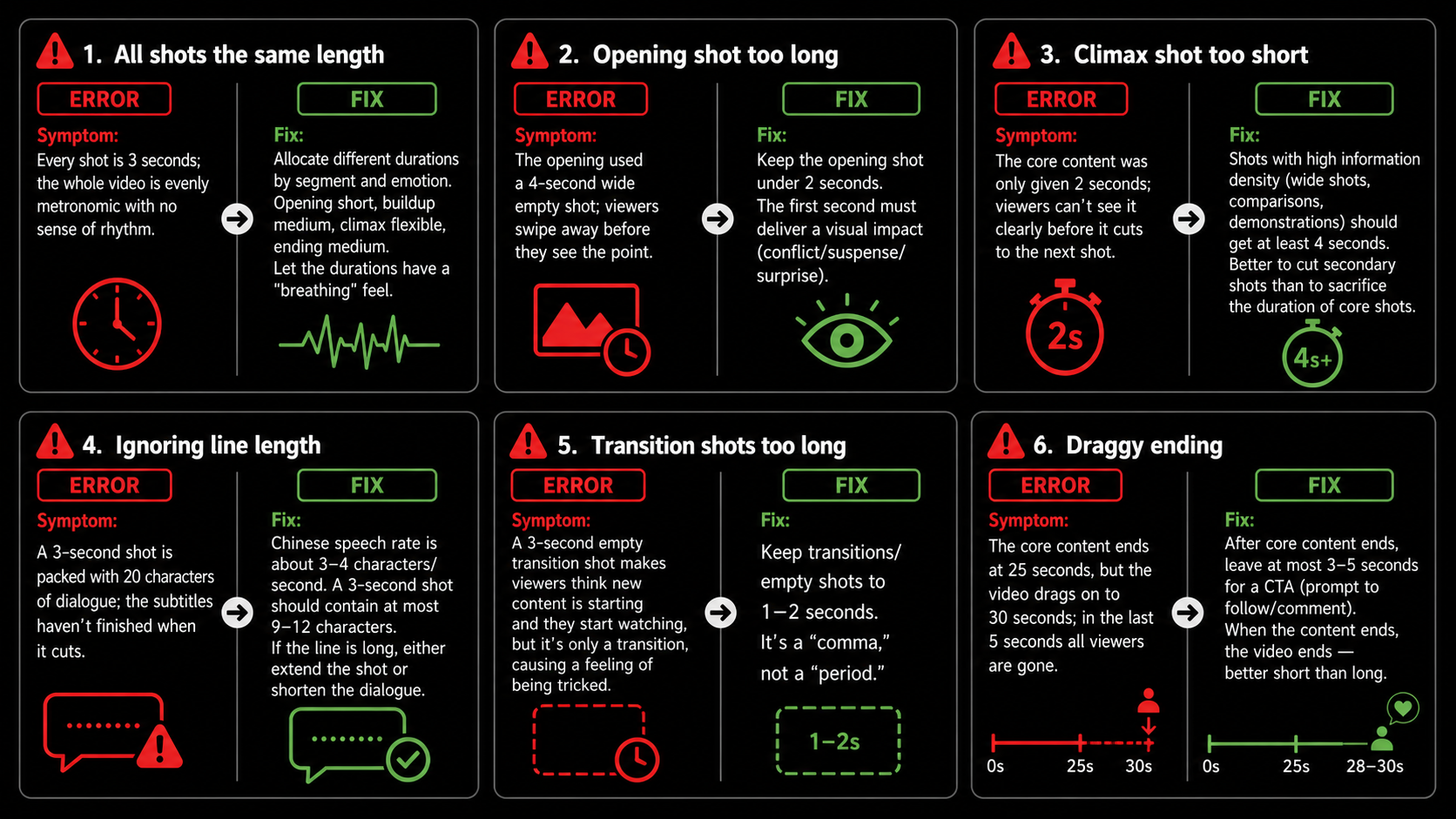
Symptom: Every shot is exactly 3 seconds. The video feels like a metronome — zero rhythm.
Fix: Allocate different durations by segment and emotion. Short opening, medium setup, flexible climax, medium ending. Give the pacing room to "breathe."
Symptom: A 4-second wide establishing shot. Viewers haven't seen the point yet, so they swipe.
Fix: Opening shots should be 2 seconds max. Second 1 must deliver a visual punch (conflict / suspense / surprise).
Symptom: The core content gets only 2 seconds. Viewers can't even process it before the next cut.
Fix: Information-heavy shots (wide shots, comparisons, demos) need at least 4 seconds. Cut secondary shots if you have to — protect the climax duration.
Symptom: A 3-second shot crammed with 15 words of dialogue. The subtitle hasn't finished before the cut.
Fix: Natural English speech runs about 2.5–3 words/second. A 3-second shot fits roughly 8–10 words max. If the line is longer, extend the shot or trim the script.
Symptom: A 3-second cutaway shot. Viewers think new content is starting, then realize it's just a transition — feels like a bait-and-switch.
Fix: Transitions and cutaways should be 1–2 seconds. They're commas, not periods.
Symptom: The core content ends at 25 seconds, but the video drags to 30. Viewers bail in those last 5 seconds.
Fix: After the core content, leave 3–5 seconds max for a CTA (follow / comment). When the content ends, the video ends. Shorter is always better.
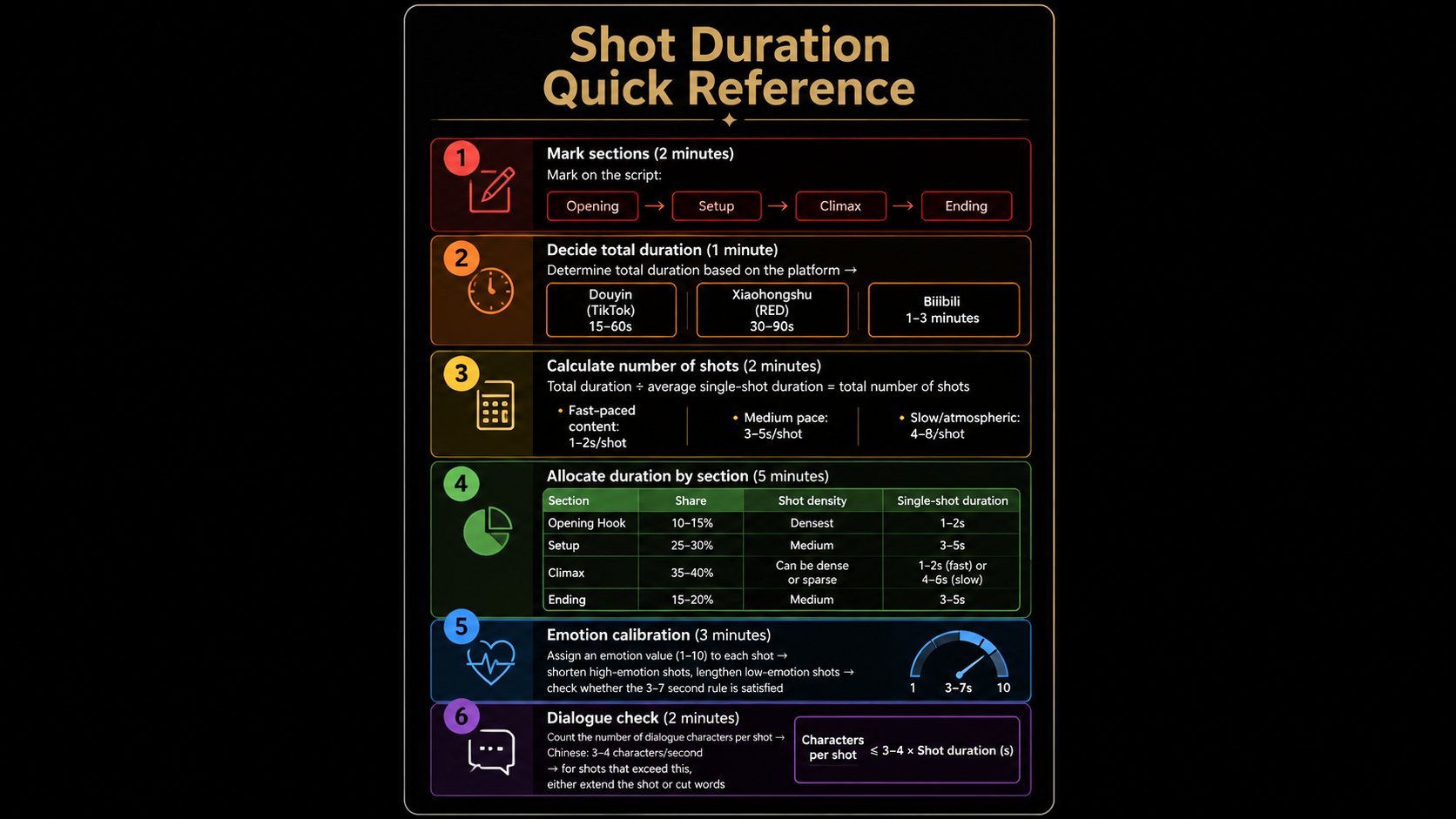
Print this out. Pin it next to your monitor. Every time you get a script, walk through this workflow:
On the script, label: Opening / Setup / Climax / Ending
Pick the platform's sweet spot → TikTok 15–60 sec / YouTube Shorts 30–60 sec / Instagram Reels 15–90 sec
Total duration ÷ average shot duration = total shots
• Fast-paced content: 1–2 sec/shot
• Medium pace: 3–5 sec/shot
• Slow / ambient: 4–8 sec/shot
Use the 4-part ratio: Hook 10–15% → Setup 25–30% → Climax 35–40% → Ending 15–20%
Assign each shot an emotion score (1–10) → shorten high-emotion shots, lengthen low-emotion shots → verify the 3–7 second rule
Convert each shot description into a Viddo AI prompt:
1. Open viddo.ai/text-to-video
2. Choose an AI model (recommended: Seedance 2.0 or Veo 3.1)
3. Set the aspect ratio (9:16 for TikTok / 16:9 for YouTube)
4. Enter each shot prompt one by one, generating 5–15 sec clips
5. Download and stitch in your editor according to the storyboard
Count the words in each shot's dialogue → English ~2.5–3 words/sec → if it exceeds, extend the shot or cut words
Total time: ~15 minutes for a complete shot duration plan.
Splitting shot duration from a script is fundamentally answering one question:
For every second of viewer attention, what shot will I use to "catch" it?
There's no single correct answer, but there is a clear methodology:
• Start with segments to set the framework
• Then use shot types to define the range
• Then apply the 3–7 second rule to verify density
• Finally, use the emotion curve to fine-tune
Remember one core principle:
Information-dense shots should be shorter (1–2 sec). Emotionally immersive shots should be longer (4–6 sec). Never let a viewer sit on the same frame for more than 7 seconds without any change.
You now have the complete framework for splitting shot duration. Next step: open Viddo AI and turn your storyboard into a real video.
Try Viddo AI for free — create your first video now
Viddo AI supports top-tier models including Seedance 2.0, Veo 3.1, and Kling. Text-to-Video, Image-to-Video — one click to generate. Turn your storyboard into a finished video.