

Jean Phil AI Video: How to Animate Images with AI
October 11, 2026 | Leo
Jean Phil AI Video: How to Animate Images with AI
Jean Phil AI videos are a creative way to turn a recognizable character image into entertaining animated content. From funny boxing moves to awkward dancing and unexpected everyday situations, AI video generation lets creators explore new ways to bring static images to life.
With Viddo AI's Image to Video feature, you can upload a Jean Phil image, describe the movements you want, and generate a video based on your creative idea. You don't need to film the scene yourself or manually animate every movement.
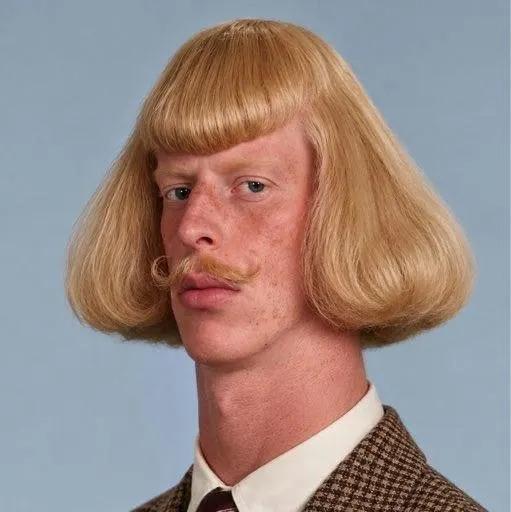
In this guide, you'll learn what Jean Phil AI videos are, how to make your own animated clips, and how to write effective prompts for better results.
Ready to animate your image? Try Viddo AI Image to Video and start creating your own AI videos.
What Is Jean Phil AI?
Jean Phil, often associated with the character name Jean Philanthrope, is a distinctive internet character featured in humorous and surreal video content. His recognizable appearance and exaggerated movements make the character suitable for creative edits, memes, and AI-generated animations.
The appeal of this type of content comes from the contrast between a distinctive character and unexpected actions. For example, a character who looks serious while performing exaggerated boxing moves or dancing in an ordinary setting can create an amusing visual effect.
AI video generation offers another way to experiment with this format. Instead of using only existing clips, creators can start with a still image and generate new movements, scenes, and visual variations.
How to Make a Jean Phil AI Video with Viddo AI
You can create a Jean Phil-inspired animation with an image-to-video workflow. The process is straightforward: prepare an image, describe the desired action, and generate the video.
Step 1: Choose a Jean Phil Image
Start with a clear image that shows the character's recognizable features, such as the hairstyle, curled mustache, and outfit.
For better results, choose an image with a clearly visible face and body. A suitable starting image can help the AI preserve the character's appearance throughout the generated clip.
Make sure you have the right to use the image, especially if you intend to publish or commercially distribute the resulting video.
Step 2: Open Viddo AI Image to Video
Visit Viddo AI and open the Image to Video feature.
Upload your chosen Jean Phil image as the starting frame. The image provides the visual reference for the generated video, while your prompt describes the action and scene you want to create.
Step 3: Write a Creative AI Video Prompt
Describe what you want the character to do. Start with one clear action rather than combining too many unrelated movements.
For example, you could ask the character to perform exaggerated shadowboxing in a Parisian café, dance awkwardly in a supermarket, or walk confidently through a city street.
A focused prompt can help guide the video's movement, environment, and visual style.
Step 4: Generate Your Video
Review your image and prompt, select the available generation settings, and click Generate.
Once the video is ready, preview the result. If the movements look unnatural or the character's appearance changes too much, try a clearer image or simplify the prompt.
You can experiment with different actions and environments to create several versions of the same character.
Step 5: Save and Share Your Creation
When you're satisfied with the result, save your video and prepare it for your preferred social media platform.
Short, visually distinctive clips can be suitable for TikTok, Instagram Reels, YouTube Shorts, and other platforms that support short-form video content.
5 Jean Phil AI Video Prompts to Try
The following prompts are starting points for creating humorous character animations. Upload your chosen image first, then adapt the prompts to suit your preferred style.
1. Jean Phil Shadowboxing in a Parisian Café
Prompt:
"Animate the character performing exaggerated shadowboxing movements inside a traditional Parisian café. Keep a serious facial expression while the movements remain playful and slightly absurd. Add subtle camera movement and natural background activity. Preserve the character's distinctive hairstyle, curled mustache, and outfit."
2. Jean Phil Doing an Awkward Dance
Prompt:
"Make the character perform an awkward, funny dance in a supermarket aisle. Use exaggerated arm movements, small steps, and a completely serious expression. Keep the environment realistic and maintain the character's recognizable facial features and clothing."
3. Jean Phil Walking Like a Movie Star
Prompt:
"Animate the character confidently walking along a Parisian street as if arriving at a movie premiere. Add a cinematic camera movement, natural body motion, and subtle reactions from pedestrians. Preserve the original character design and clothing."
4. Jean Phil Performing Martial Arts
Prompt:
"Show the character performing a short sequence of exaggerated martial arts poses in a city park. Use controlled movements, a dramatic but humorous atmosphere, and smooth transitions between poses. Keep the character's hairstyle, mustache, and outfit consistent."
5. Jean Phil in an Unexpected Situation
Prompt:
"Animate the character standing in a quiet office before suddenly performing a series of exaggerated dance moves. Keep the character completely serious while the surrounding situation feels unexpected and funny. Use natural movement and preserve the original appearance."
AI-generated results may vary depending on the source image, model, and generation settings. You may need to adjust a prompt or try different inputs to achieve your preferred result.
Tips for Better Jean Phil AI Videos
Use a Clear Source Image
A sharp image with visible facial features and a well-defined outfit can give the model a stronger visual reference.
Focus on One Main Action
Prompts that describe one primary action are often easier to interpret than long descriptions containing many unrelated movements. Start with a simple movement and add complexity after reviewing the first result.
Describe the Character's Appearance
If the hairstyle, mustache, and clothing are important to the concept, explicitly mention them in the prompt. This can help communicate which features should remain consistent, although perfect consistency is not guaranteed.
Experiment with Different Scenarios
Try placing the same character in contrasting environments, such as a café, supermarket, office, or city street. Unexpected settings can make otherwise ordinary movements more entertaining.
Choose the Right AI Video Workflow
Image to Video is useful when you want to animate a still image with newly generated movements.
If you want the character to follow the movements of a specific existing video, consider using Viddo AI Motion Control. Upload a suitable reference video and a character image to explore motion transfer.
Frequently Asked Questions
Can I make a Jean Phil AI video from a single image?
Yes. Image-to-video tools can generate a video from a still image and a text prompt. You can describe actions such as dancing, walking, or shadowboxing without recording the movements yourself.
How do I make a funny Jean Phil AI video?
Start with a clear character image and a simple, humorous action. For example, you could describe a serious-looking character performing exaggerated dance moves in an ordinary setting.
Can I use Viddo AI to animate other characters?
Yes. The same image-to-video workflow can be used to experiment with other characters, portraits, illustrations, and suitable images, subject to the platform's content rules.
Can I use a reference video instead of describing the movements?
If you want to follow a specific performance, Viddo AI Motion Control provides a reference-video workflow. It is a useful alternative when you want to guide the generated character's movements with existing footage.
Will the generated character look exactly like the original image?
Not always. AI video generation can introduce changes to facial features, clothing, or body proportions during movement. Clear source images and focused prompts may help, but results can vary.
Create Your Own Jean Phil AI Video with Viddo AI
AI video generation makes it easier to explore humorous character animations without traditional filming or manual animation. With a suitable image and a creative prompt, you can experiment with dancing, shadowboxing, cinematic movements, and unexpected everyday scenarios.
Whether you're exploring the Jean Phil trend or developing your own character-based content, Viddo AI provides a starting point for turning static images into dynamic videos.
Ready to bring your character to life?
Visit Viddo AI and try Image to Video to create your own AI-generated video.