
Seedance 2.0: As low as $0.345 per video
Veo3.1 Lite: As low as $0.0575 per video

Viddo AI is an advanced all-in-one AI video and image generation platform that lets you quickly and easily create stunning videos and images from various inputs. These AI Model powered by Google, OpenAI, Grok AI, ByteDance, Alibaba, Kling, Runway, Vidu, Minimax, Elevenlabs, Midjourney,and so on.
MiniMax H3 (also known as Hailuo 3.0) is an open-weight multimodal video generation model released by MiniMax in July 2026. It is one of the most advanced models in the AI video generation field, with the following core capabilities:
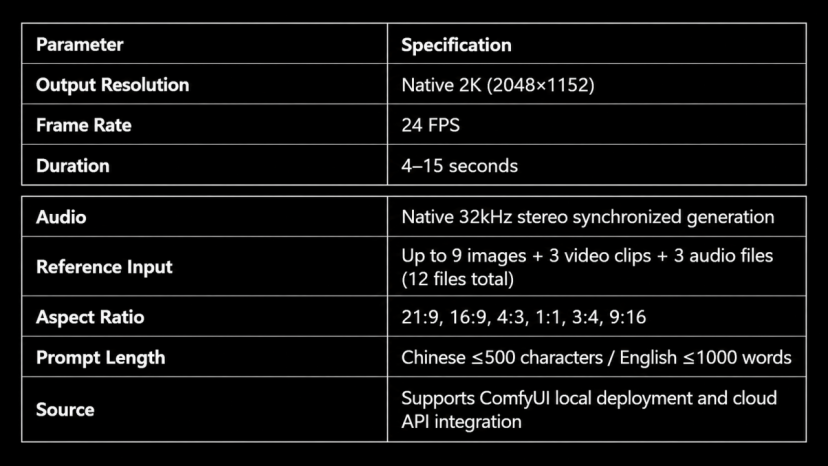
For AI short-video creators, MiniMax H3 offers three key differentiators:
· Omni-Reference Multimodal Reference System: Simultaneously input reference materials in three modalities—images, video, and audio—to achieve character consistency, motion control, and voice anchoring. This is something competitors (such as Kling and Seedance) cannot match.
· Native Audio-Video Synchronization: The model automatically generates matching stereo sound effects while producing the video, eliminating the need for separate post-production dubbing.
· Instruction-Based Editing: Make localized modifications to already-generated videos without regenerating from scratch, dramatically improving iteration efficiency.
Viddo.ai is a cutting-edge AI video generation platform that supports MiniMax H3 and other leading models. Visit https://viddo.ai/minimax-h-3 to start using it directly—no local deployment required. The platform offers three generation modes: Text to Video, Image to Video, and Reference, along with Video Transition functionality.
The workflow for using MiniMax H3 on Viddo.ai: Upload assets or enter a prompt → Select video ratio (16:9 / 9:16 / 4:3 / 3:4 / 1:1 / 21:9) → Select resolution (768P / 2K) → Select duration (15 seconds / 4 seconds, etc.) → Click Generate → Wait for generation → Download MP4.
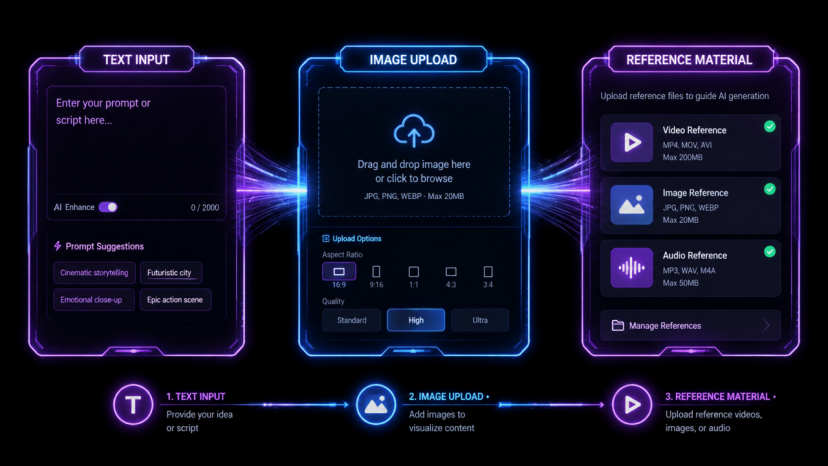
This is the simplest way to get started. Just describe the desired scene in Viddo.ai's prompt input box, and the model will generate a complete video clip based on your text description.
· Use Cases:
· Rapid concept validation: Test whether an idea is feasible
· Purely imaginative content: Fantasy scenes with no reference images available
· Style exploration: Try different visual styles and cinematographic language
· Steps:
2. Enter your description in the Prompt input box (supports both Chinese and English)
3. Select Video Ratio (9:16 recommended for vertical short videos, 16:9 for horizontal content)
4. Select Resolution (768P for quick testing, 2K for final publication)
5. Select Video Length (start with 15 seconds for testing, then adjust as needed)
6. Click Generate and wait for completion
When you have a product photo, character design, or scene image that you want to bring to life, use Image to Video mode. Viddo.ai supports drag-and-drop or click-to-upload (JPG, PNG, WEBP formats supported).
· Key Tips:
· Don't repeat what's already visible in the image in your prompt—focus on what should move and what should stay still.
· The quality of your uploaded image directly determines output quality: evenly lit, sharp subjects with clean backgrounds produce the best results.
· In your prompt, clearly specify which elements should remain consistent (e.g., character appearance, product branding).
This is MiniMax H3's flagship feature. In Viddo.ai's Reference panel, you can simultaneously upload:
|
Material Type |
Max Quantity |
Duration Limit |
Size Limit |
|
Images |
Up to 9 |
— |
30 MB each |
|
Video |
Up to 3 clips |
2–15 sec each, 15 sec total |
50 MB each |
|
Audio |
Up to 3 clips |
2–15 sec each, 15 sec total |
15 MB each |
|
Total files |
12 files |
— |
64 MB request body limit |
· Key Rules:
· Audio cannot be submitted alone—it must be paired with at least one image or video clip.
· Reference video duration counts toward billing time; reference images and audio are not billed separately.
· In your prompt, clearly label the purpose of each asset, e.g.: Image 1 controls character appearance, Video 1 controls motion rhythm, Audio 1 controls voice.
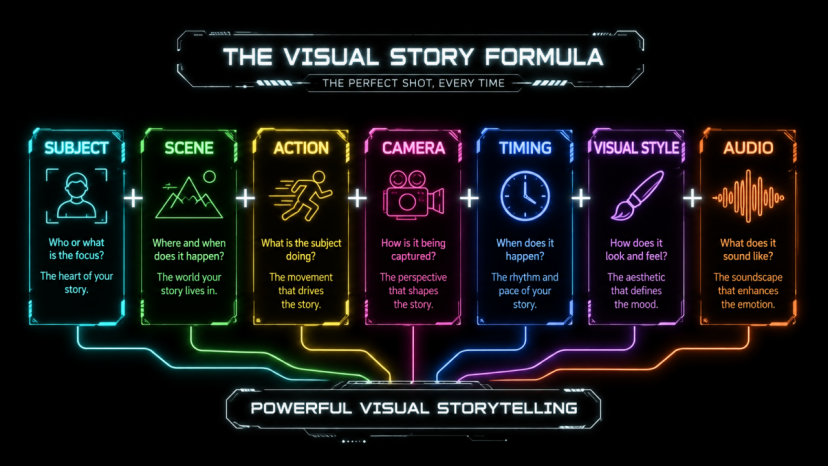
Based on analysis of dozens of successful cases, the most effective MiniMax H3 prompts follow this structure:
|
Element |
Description |
Example |
|
Subject |
Clearly specify the core person, product, or object in the frame |
A young woman in a white dress |
|
Scene |
Physical environment, weather, props, background motion |
Tokyo streets after rain, neon lights reflected on wet pavement |
|
Action |
Describe visible changes in chronological order |
She closes her umbrella, looks up at the sky, and breaks into a smile |
|
Camera |
Use professional cinematic terminology to describe camera movement |
Slow push-in from medium shot to facial close-up |
|
Timing |
Speed of action, pauses, and turning points |
Slow for the first 3 seconds, sudden acceleration at the 4th second |
|
Visual Style |
Image texture, color palette, lighting, genre reference |
Cyberpunk style, cool tones, high contrast, neon lighting |
|
Audio |
Ambient sound, dialogue, music, sound effects |
Rain sounds, distant electronic music, soft footsteps |
1. Use Professional Cinematographic Language
"Slow orbit to the right" produces far better results than "camera moves around." MiniMax H3 understands cinematic terminology—use terms like dolly, tracking, crane, handheld, and orbit.
2. Describe Events in Chronological Order
The model interprets your prompt as a timeline. If you describe the ending before the beginning, the model may rearrange the shot sequence.
3. Limit the Number of Key Actions
A 15-second clip supports at most 2–3 distinct actions or narrative beats. Trying to cram six events into 15 seconds will only produce chaotic output.
4. Separate Visual and Audio Instructions
Write visual descriptions first, then add audio cues at the end. This helps the model distinguish which instructions correspond to which output channel.
5. Explicitly Mark What Should Stay Consistent
If character appearance, product branding, or background elements need to remain stable across shots, state this explicitly in your prompt.
6. Leave Room for Stillness
H3 handles pacing and pauses well. Don't fill every second with new events—give the scene room to breathe naturally.
A luxury silver watch rests on a dark stone pedestal inside a modern gallery. The camera slowly pushes forward as a beam of light moves across the metal surface. Fine dust floats in the air. Premium cinematic aesthetic with dramatic directional lighting. Soft ambient hum and delicate mechanical ticking.
Analysis: Covers all seven elements—subject (watch), scene (modern gallery), action (light beam sweep), camera (slow push-in), visual style (premium cinematic), audio (mechanical ticking + ambient sound).
Quick hand swipe reveals a pair of glowing neon sneakers floating in a dark warehouse. Camera dollies forward rapidly. The sneakers drop and land on a reflective wet floor, sending sparks outward. Urban streetwear aesthetic, high contrast neon lighting. Bass beat drop on impact with echoing reverb.
Analysis: Designed for TikTok/Reels—opens with a bang (hand swipe reveal), fast rhythm, strong sound effects, high visual impact.
A middle-aged man in a worn leather jacket sits alone at a rain-streaked window in a dimly lit diner. He stares at an old photograph, then slowly folds it and puts it in his pocket. Begin with a wide shot of the diner exterior in the rain, transition to a medium shot of the man at the window, and end with a close-up of the photograph being folded. Natural rain ambience, distant diner chatter, soft melancholic piano.
Analysis: Multi-shot narrative—wide → medium → close-up, three distinct shot transitions, rich ambient sound layers.
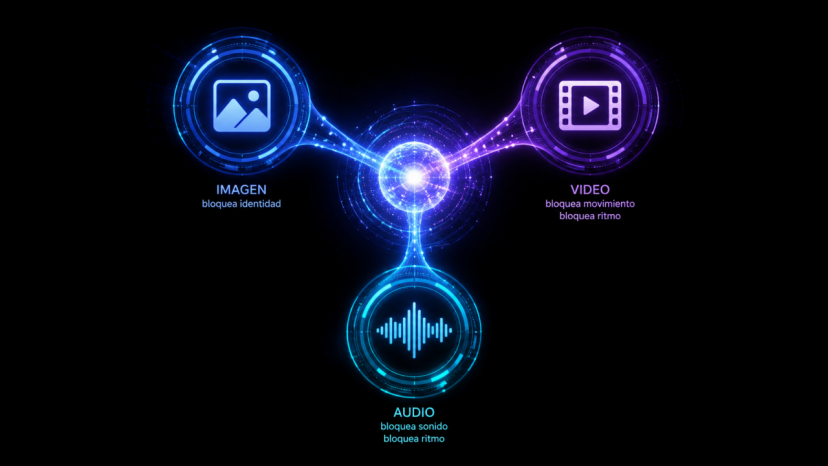
· Character consistency: Ensure the same character maintains identical appearance across multiple videos.
· Product form: Lock in the product's shape, material, color, and branding.
· Scene style: Define the overall visual style and color palette of the frame.
· Best practices for preparing reference images:
· Even lighting: Avoid harsh shadows, backlighting, or mixed color temperatures.
· Front-facing angle: Front or near-front photographs produce the best results.
· No occlusions: Hats, sunglasses, and hair covering the face all reduce reference effectiveness.
· Clean background: A simple background helps the model isolate the subject.
· Multiple angles: If you have extra slots, provide front + side + full-body shots.
· Motion transfer: Apply body movements from the reference video to a new character.
· Camera control: Reference the camera movement path of the source video.
· Effects control: Rhythm and direction of particles, lighting effects, and energy trails.
· Voice anchoring: Ensure a character maintains the same voice across different videos.
· Rhythm control: Use music beats to control the pacing of scene transitions.
· Mood definition: Use ambient sound to define the emotional tone of the scene.
· Note: Audio cannot be used alone—it must be paired with at least one image or video clip.
|
Use Case |
Recommended Mode |
Reason |
|
Quick concept testing, no specific character |
Text to Video |
No assets needed, minimal setup |
|
Product photo animation |
Image to Video (first frame) |
Starting image locks product appearance |
|
Cross-shot character consistency |
Reference (Image + Audio) |
Image locks identity + Video locks motion + Audio locks voice |
|
Brand mascot advertisement |
Reference (Image + Audio) |
Mascot image + Brand voice |
|
Music video |
Reference (Image + Video + Audio) |
Performer appearance + Dance moves + Music rhythm |
|
Style transfer |
Reference (video clip) |
Preserve original video's motion and camera language |
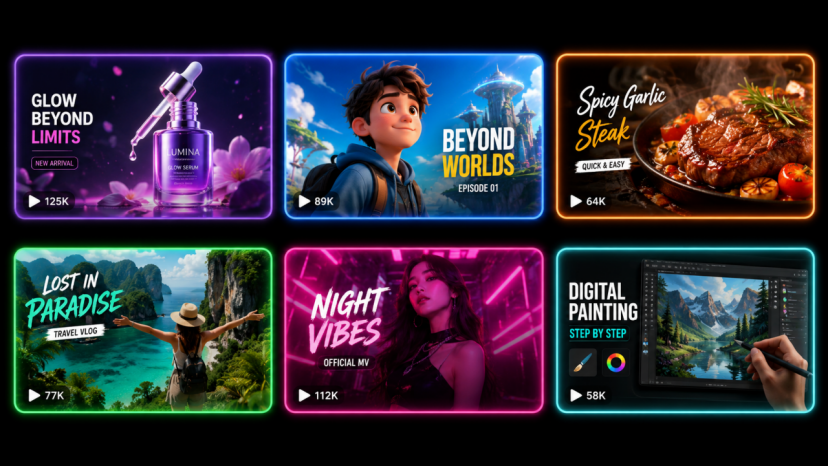
· Template Formula:
[Product] placed on [surface] in [environment]. Camera [movement description], while [lighting effect]. [Atmosphere details]. [Visual style] aesthetic. [Audio: ambient sound + subtle sound effects].
· Practical Example (Viddo.ai Text to Video):
A matte black perfume bottle sits on a white marble countertop in a softly lit studio. The camera slowly orbits to the right as a beam of blue light sweeps across the glass surface. Fine mist particles float in the air. Minimalist luxury commercial aesthetic with dramatic directional lighting. Soft ambient hum and gentle glass resonance.
· Template Formula:
[Character description] [chronological action sequence]. Begin with [opening shot], [transition shot], then end with [closing shot]. [Dialogue or voice qualities]. [Ambient sound] + [Background music].
· Practical Example (Viddo.ai Reference Mode):
Use Image 1 to control the character's face, hairstyle, and outfit. Use Video 1 to control only body movement and camera rhythm. Place the character in a modern train station, ending as she turns to face the camera. Natural conversational ambience, distant train announcements, soft piano music.
MiniMax H3's native audio generation capability is particularly well-suited for food and ASMR short videos. The key is to describe sound details: the crisp chop of vegetables, the sizzle of oil in a pan, the pouring sound of a drink being served.
· Practical Example (Viddo.ai Image to Video):
Upload a beautifully photographed ramen image as the first frame. Prompt: Chopsticks lift noodles, steam rises billowing, broth drips back into the bowl. Camera slowly pushes in from a top-down angle to 45 degrees. Warm lighting, shallow depth of field. Crisp chopstick sounds, bubbling broth, distant restaurant ambience.
The core of e-commerce short videos is capturing attention within 3 seconds. Leveraging MiniMax H3's rapid generation capability, you can batch-test different opening hooks on Viddo.ai.
· Efficient Workflow:
1. Prepare 3–5 product images (different angles, different scenes)
2. On Viddo.ai, use Image to Video mode with different motion prompts for each image
3. Select 9:16 vertical ratio, 15-second duration
4. Batch-generate 5–10 versions
5. Select the best 2–3 versions for instruction-based editing refinements
6. After export, add subtitles and CTA in your editing software

On short-video platforms, users typically decide whether to keep watching within 1 second. MiniMax H3 prompts should place the most eye-catching visual element right at the beginning.
· Comparison Example:
· ❌ Bland opening: A person walks down the street, and then something happens...
· ✅ Attention-grabbing opening: Quick hand swipe reveals a pair of glowing neon sneakers floating in a dark warehouse.
MiniMax H3 is one of the few models that can simultaneously generate video and synchronized audio. Leveraging this capability can significantly reduce post-production time.
· At the end of your prompt, separately describe audio layers: ambient sound + sound effects + music.
· Use time-anchored descriptions like "Bass beat drop on impact."
· For ASMR content, describe every sound detail in full (crackling, sizzling, pouring).
· After generating on Viddo.ai, remember to enable audio preview to check synchronization.
· synchronization.
If you want to build a serialized short-video IP, character consistency is critical. Using MiniMax H3's Omni-Reference feature, you can achieve cross-video character uniformity.
· Workflow:
1. Create a character reference pack: 3–5 character images (front, side, full-body, different expressions)
2. Create a voice reference pack: 2–3 clean voice recordings of the character (10–15 seconds each)
3. Each time you generate a new video on Viddo.ai, upload the same reference pack
4. In your prompt, explicitly state: Use Images 1–3 as character identity reference; maintain consistent facial features, hairstyle, and outfit.
|
Platform |
Recommended Ratio |
Duration |
Style Notes |
|
TikTok |
9:16 Vertical |
15 sec |
Fast-paced, strong visual impact, core visual within 3 seconds |
|
Instagram Reels |
9:16 Vertical |
15 sec |
Strong aesthetic sense, unified color palette, suits fashion/lifestyle |
|
YouTube Shorts |
9:16 Vertical |
15 sec |
High information density, educational or entertainment value |
|
Bilibili |
16:9 Horizontal |
15 sec |
Content depth, creative narrative, anime or tech style |
|
YouTube Long-form |
16:9 Horizontal |
Multiple 15-sec clips |
Cinematic feel, coherent narrative, high-quality visuals |
|
Xiaohongshu (RED) |
3:4 or 1:1 |
15 sec |
Refined, lifestyle feel, product-focused |
|
Issue |
Common Cause |
Solution |
|
Frame barely moves |
Prompt only describes appearance without describing change |
Add clear action descriptions and camera movement instructions |
|
Character looks different in every shot |
No reference image used or low-quality image |
Upload high-res, evenly lit, front-facing reference images |
|
Audio doesn't match visuals |
Visual and audio instructions mixed together |
Write visual and audio descriptions separately; place audio at the end |
|
Camera movement feels random |
Camera not described with professional terms |
Use cinematic terms: dolly, orbit, tracking, etc. |
|
Too many events crammed into 15 seconds |
Too many actions in the prompt |
Limit to 2–3 main actions; leave breathing room |
|
Edit instructions don't change accurately |
Instructions too vague or too broad |
Specify exactly what to change and what to keep; one modification at a time |
|
Video link expires before download |
Forgot the 24-hour expiration limit |
Download immediately after generation; store promptly in automated workflows |
|
Reference asset role confusion |
Didn't explain each asset's purpose |
In the prompt, explicitly label each asset's specific role |
When the generated result reaches 85%–90% satisfaction but still has minor issues, don't regenerate from scratch. Use Instruction-Based Editing for fine-tuning:
· Change the jacket color to navy blue.
· Replace the background with a sunset beach.
· Make the camera movement slower in the first half.
· Change the character's expression to more surprised.
Pro tip: If the first edit instruction doesn't achieve the desired result, rephrase with more specific wording. "Change the background" is too vague; "Replace the background with a white studio wall with soft directional lighting from the upper left" is specific enough for the model to execute.
· Fundamental errors: Wrong subject entirely, completely incorrect scene, incoherent motion—regenerate with a revised prompt.
· Multiple interconnected issues: Fixing one requires cascading changes—regenerating is cleaner than stacking multiple edits.
· Want a completely new creative direction: Use an entirely different prompt rather than forcing edits in the wrong direction.
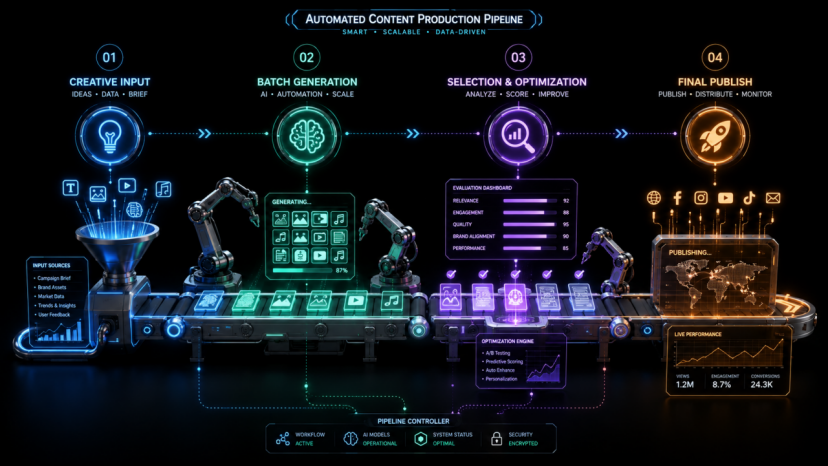
For the same product or topic, prepare 5–10 different opening hook prompts, batch-generate them on Viddo.ai, then select the best-performing versions. This is the most efficient way to improve short-video completion rates.
· Build your own prompt template library, organized by scenario:
· Product showcase template: Product + orbital camera + lighting changes + brand sound effects
· Character narrative template: Character + multi-shot narrative + ambient sound + background music
· Attention-grabbing hook template: Quick reveal + dynamic camera + strong sound effects
· ASMR template: Close-up shots + slow motion + delicate sounds
· Tutorial template: Step-by-step demonstration + subtitles + voiceover
· Brand elements: Add logo, watermark, and branded text overlays in your editing software.
· Color grading: Apply unified color correction according to your brand color system.
· Audio mixing: Adjust volume, add background music, or replace voiceover.
· Subtitle addition: Add appropriately formatted subtitles for each target platform.
· Format export: Export with the codec and bitrate required by the target platform (most social platforms use H.264 MP4).